
Cloud Intelligence™
Google BigQuery Data Modeller
This page is also available in Deutsch, Español, Français, Italiano, 日本語, and Português.

About Eben Du Toit
Senior Software Engineering Manager
I lead engineering teams in the Partner Channel space, building the tooling that helps customers make sense of their revenue — turning complex partner and billing data into something they can actually see, trust, and act on. The work sits at the intersection of cloud cost management, FinOps, and billing integrations, with data flowing across GCP, BigQuery, MongoDB Atlas, Snowflake, and the wider cloud ecosystem. It's technically meaty, and I love that about it.
My days are split between people and systems — growing and aligning multiple teams, helping the team navigate the environment, hiring, and partnering with stakeholders across the org. I shift between maker mode and manager mode depending on what's needed: sometimes I'm deep in the code building features, sometimes I'm in the room helping my teams move forward. I care a lot about building teams where good engineers can do their best work.
What I work on
Partner Channel engineering and revenue management tooling · Cloud cost management and FinOps · Billing data pipelines and integrations · Engineering leadership, hiring, and team process
Good topics to find me for
Anything Partner Channel, revenue, FinOps, or billing-related · Data engineering and pipeline architecture · Engineering management, hiring, or team culture
Outside work
When I'm not in a terminal, I'm usually behind a camera — shooting on a Nikon Z or whatever vintage film body I'm currently infatuated with. I follow mountain biking and trail running closely, have strong opinions about mechanical keyboards and good stationery, and watch more anime than I probably admit. I also play Rocket League with more optimism than results.
Cape Town · SAST (UTC+2)
My personal page
Wondering where to start when modeling your data in Google BigQuery? This post has you covered with a simple repo and example.
Photo by Steady Hand Co. on Unsplash. Make your way through the rough data on a clear path.
Today, a lot of ugly data glides across the ether. Usually, some very frustrated people wonder where to start making sense of this and, more importantly, how to structure it to be useful for their company.
Here I propose the usage of a simple script and repo that allows you to push your cleaned data as Views to Google BigQuery. In addition, you can use Jinja templating to make your life easier and even pre-define some variables if you like.
How does it work?
In a file called select_101.sql.j2 you can have this query:
SELECT {{aNumber}} as numThe template reference aNumber is taken from a pre-defined set of variables in a configuration file configuration.json :
{ "aNumber": 101}You also have a schema file called select_101.json :
{ "metric": "First example", "metric_description": "Select only a constant number as output", "purpose" : "", "usage_example" : "", "usage_description" : "", "fields": [\```\\```\ {\```\\```\ "field": "num",\```\\```\ "description": "A small number",\```\\```\ "type": "INTEGER",\```\\```\ "typical_values": [ 4 ]\```\\```\ }\```\\```\ ]````}
Now you are ready to deploy this to Google BigQuery:
`-m` allows you to provide a metric to deploy
`-v` indicates you want to deploy a view
`-d` takes your dataset as input
`-p` takes your projectId as input
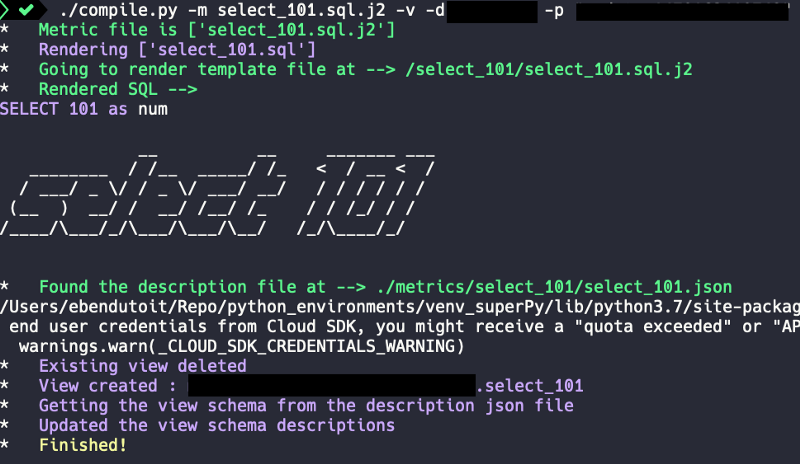
./compile.py -m select_101.sql.j2 -v -d -p
And you get this output:
## Including templates into templates…
You can also include templates in another.
In a file called `select_101_include.sql.j2` you can have this query:SELECT *
FROM (
{% include 'select_101/select_101.sql.j2' %}
)
The query will render and deploy as:SELECT * FROM ( SELECT 101 as num )
Happy modeling!

Want more stories? Check our [blog](https://doit.com/blog/), or [follow Eben on Twitter](https://twitter.com/eebsidian).


<!--DRAFT_BLOG_SEGMENT_2-->
## Resources

[https://github.com/ebendutoit/google-bigquery-data-modeller](https://github.com/ebendutoit/google-bigquery-data-modeller)
Cloud bill shouldn't be a mystery
One platform for AI and Cloud optimization.


