
Cloud Intelligence™
Google BigQuery Data Modeller
Questa pagina è disponibile anche in English, Deutsch, Español, Français, 日本語 e Português.

About Eben Du Toit
Senior Software Engineering Manager
I lead engineering teams in the Partner Channel space, building the tooling that helps customers make sense of their revenue — turning complex partner and billing data into something they can actually see, trust, and act on. The work sits at the intersection of cloud cost management, FinOps, and billing integrations, with data flowing across GCP, BigQuery, MongoDB Atlas, Snowflake, and the wider cloud ecosystem. It's technically meaty, and I love that about it.
My days are split between people and systems — growing and aligning multiple teams, helping the team navigate the environment, hiring, and partnering with stakeholders across the org. I shift between maker mode and manager mode depending on what's needed: sometimes I'm deep in the code building features, sometimes I'm in the room helping my teams move forward. I care a lot about building teams where good engineers can do their best work.
What I work on
Partner Channel engineering and revenue management tooling · Cloud cost management and FinOps · Billing data pipelines and integrations · Engineering leadership, hiring, and team process
Good topics to find me for
Anything Partner Channel, revenue, FinOps, or billing-related · Data engineering and pipeline architecture · Engineering management, hiring, or team culture
Outside work
When I'm not in a terminal, I'm usually behind a camera — shooting on a Nikon Z or whatever vintage film body I'm currently infatuated with. I follow mountain biking and trail running closely, have strong opinions about mechanical keyboards and good stationery, and watch more anime than I probably admit. I also play Rocket League with more optimism than results.
Cape Town · SAST (UTC+2)
My personal page
Non sa da dove partire per modellare i dati in Google BigQuery? In questo articolo trova una repo semplice e un esempio pratico.
Foto di Steady Hand Co. su Unsplash. Trovi la sua strada tra i dati grezzi seguendo un percorso chiaro.
Oggi nell'etere circolano enormi quantità di dati poco curati. Spesso, chi ci si trova davanti fatica a capire da dove cominciare per dargli un senso e, soprattutto, come strutturarli per renderli davvero utili all'azienda.
Qui propongo l'utilizzo di un semplice script e di una repo che consentono di pubblicare i dati ripuliti come View su Google BigQuery. In più, è possibile sfruttare il templating Jinja per semplificarsi il lavoro e, volendo, predefinire alcune variabili.
Come funziona?
In un file chiamato select_101.sql.j2 si può inserire questa query:
SELECT {{aNumber}} as numIl riferimento al template aNumber viene letto da un set predefinito di variabili nel file di configurazione configuration.json:
{ "aNumber": 101}È previsto anche un file di schema chiamato select_101.json:
{ "metric": "First example", "metric_description": "Select only a constant number as output", "purpose" : "", "usage_example" : "", "usage_description" : "", "fields": [\```\\```\ {\```\\```\ "field": "num",\```\\```\ "description": "A small number",\```\\```\ "type": "INTEGER",\```\\```\ "typical_values": [ 4 ]\```\\```\ }\```\\```\ ]````}
A questo punto è tutto pronto per il deploy su Google BigQuery:
`-m` consente di specificare la metrica da deployare
`-v` indica che si vuole deployare una view
`-d` riceve in input il dataset
`-p` riceve in input il projectId
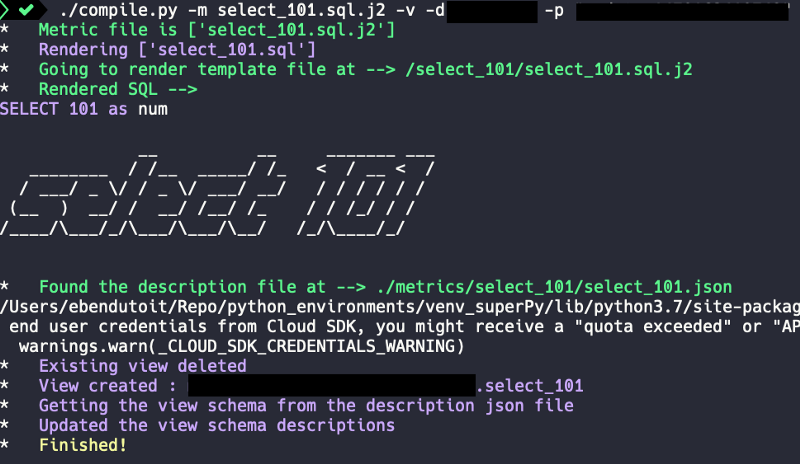
./compile.py -m select_101.sql.j2 -v -d -p
Il risultato è il seguente:
## Includere template dentro altri template…
Si possono anche includere template all'interno di altri.
In un file chiamato `select_101_include.sql.j2` si può scrivere questa query:SELECT *
FROM (
{% include 'select_101/select_101.sql.j2' %}
)
La query verrà renderizzata e deployata così:SELECT * FROM ( SELECT 101 as num )
Buon modeling!

Vuole approfondire? Visiti il nostro [blog](https://doit.com/blog/) oppure [segua Eben su Twitter](https://twitter.com/eebsidian).


<!--DRAFT_BLOG_SEGMENT_2-->
## Risorse

[https://github.com/ebendutoit/google-bigquery-data-modeller](https://github.com/ebendutoit/google-bigquery-data-modeller)
Cloud bill shouldn't be a mystery
One platform for AI and Cloud optimization.


