
Cloud Intelligence™
Google BigQuery Data Modeller
Esta página também está disponível em English, Deutsch, Español, Français, Italiano e 日本語.

About Eben Du Toit
Senior Software Engineering Manager
I lead engineering teams in the Partner Channel space, building the tooling that helps customers make sense of their revenue — turning complex partner and billing data into something they can actually see, trust, and act on. The work sits at the intersection of cloud cost management, FinOps, and billing integrations, with data flowing across GCP, BigQuery, MongoDB Atlas, Snowflake, and the wider cloud ecosystem. It's technically meaty, and I love that about it.
My days are split between people and systems — growing and aligning multiple teams, helping the team navigate the environment, hiring, and partnering with stakeholders across the org. I shift between maker mode and manager mode depending on what's needed: sometimes I'm deep in the code building features, sometimes I'm in the room helping my teams move forward. I care a lot about building teams where good engineers can do their best work.
What I work on
Partner Channel engineering and revenue management tooling · Cloud cost management and FinOps · Billing data pipelines and integrations · Engineering leadership, hiring, and team process
Good topics to find me for
Anything Partner Channel, revenue, FinOps, or billing-related · Data engineering and pipeline architecture · Engineering management, hiring, or team culture
Outside work
When I'm not in a terminal, I'm usually behind a camera — shooting on a Nikon Z or whatever vintage film body I'm currently infatuated with. I follow mountain biking and trail running closely, have strong opinions about mechanical keyboards and good stationery, and watch more anime than I probably admit. I also play Rocket League with more optimism than results.
Cape Town · SAST (UTC+2)
My personal page
Não sabe por onde começar a modelar seus dados no Google BigQuery? Este post te ajuda com um repositório simples e um exemplo prático.
Foto de Steady Hand Co. no Unsplash. Abra um caminho claro em meio aos dados brutos.
Hoje, muito dado bagunçado circula por aí. E, normalmente, tem gente bem frustrada se perguntando por onde começar a fazer sentido disso tudo e, mais importante, como estruturar essas informações para que sejam úteis para a empresa.
Aqui eu proponho usar um script e um repositório simples que permitem subir seus dados já tratados como Views para o Google BigQuery. Além disso, dá para usar templates do Jinja para facilitar a vida e até pré-definir algumas variáveis, se quiser.
Como funciona?
Em um arquivo chamado select_101.sql.j2, você pode ter esta query:
SELECT {{aNumber}} as numA referência aNumber do template vem de um conjunto pré-definido de variáveis no arquivo de configuração configuration.json:
{ "aNumber": 101}Você também tem um arquivo de schema chamado select_101.json:
{ "metric": "First example", "metric_description": "Select only a constant number as output", "purpose" : "", "usage_example" : "", "usage_description" : "", "fields": [\```\\```\ {\```\\```\ "field": "num",\```\\```\ "description": "A small number",\```\\```\ "type": "INTEGER",\```\\```\ "typical_values": [ 4 ]\```\\```\ }\```\\```\ ]````}
Agora é só fazer o deploy disso no Google BigQuery:
`-m` permite informar a métrica que vai entrar em deploy
`-v` indica que você quer fazer o deploy de uma view
`-d` recebe seu dataset como entrada
`-p` recebe seu projectId como entrada
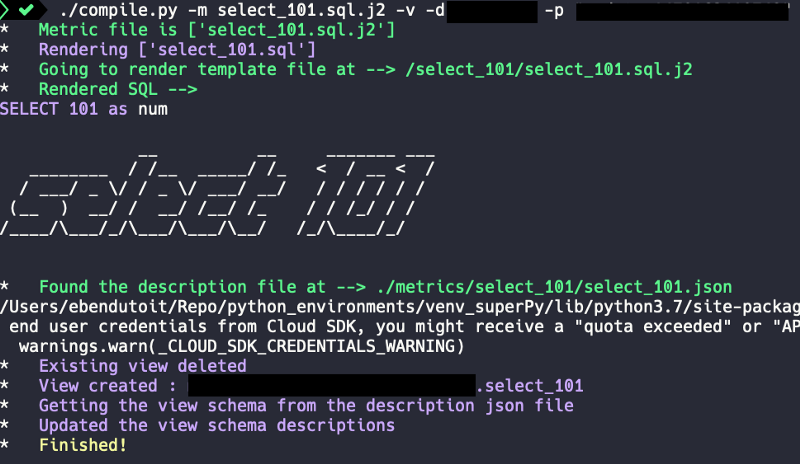
./compile.py -m select_101.sql.j2 -v -d -p
E você obtém esta saída:
## Incluindo templates dentro de templates…
Você também pode incluir um template dentro de outro.
Em um arquivo chamado `select_101_include.sql.j2`, você pode ter esta query:SELECT *
FROM (
{% include 'select_101/select_101.sql.j2' %}
)
A query será renderizada e implantada assim:SELECT * FROM ( SELECT 101 as num )
Boa modelagem!

Quer mais conteúdos como este? Confira nosso [blog](https://doit.com/blog/) ou [siga o Eben no Twitter](https://twitter.com/eebsidian).


<!--DRAFT_BLOG_SEGMENT_2-->
## Recursos

[https://github.com/ebendutoit/google-bigquery-data-modeller](https://github.com/ebendutoit/google-bigquery-data-modeller)
Cloud bill shouldn't be a mystery
One platform for AI and Cloud optimization.


