
Cloud Intelligence™
Google BigQuery Data Modeller
Diese Seite ist auch in English, Español, Français, Italiano, 日本語 und Português verfügbar.

About Eben Du Toit
Senior Software Engineering Manager
I lead engineering teams in the Partner Channel space, building the tooling that helps customers make sense of their revenue — turning complex partner and billing data into something they can actually see, trust, and act on. The work sits at the intersection of cloud cost management, FinOps, and billing integrations, with data flowing across GCP, BigQuery, MongoDB Atlas, Snowflake, and the wider cloud ecosystem. It's technically meaty, and I love that about it.
My days are split between people and systems — growing and aligning multiple teams, helping the team navigate the environment, hiring, and partnering with stakeholders across the org. I shift between maker mode and manager mode depending on what's needed: sometimes I'm deep in the code building features, sometimes I'm in the room helping my teams move forward. I care a lot about building teams where good engineers can do their best work.
What I work on
Partner Channel engineering and revenue management tooling · Cloud cost management and FinOps · Billing data pipelines and integrations · Engineering leadership, hiring, and team process
Good topics to find me for
Anything Partner Channel, revenue, FinOps, or billing-related · Data engineering and pipeline architecture · Engineering management, hiring, or team culture
Outside work
When I'm not in a terminal, I'm usually behind a camera — shooting on a Nikon Z or whatever vintage film body I'm currently infatuated with. I follow mountain biking and trail running closely, have strong opinions about mechanical keyboards and good stationery, and watch more anime than I probably admit. I also play Rocket League with more optimism than results.
Cape Town · SAST (UTC+2)
My personal page
Sie wissen nicht, wo Sie bei der Datenmodellierung in Google BigQuery anfangen sollen? Dieser Beitrag zeigt es Ihnen – mit Repo und Beispiel.
Foto von Steady Hand Co. auf Unsplash. Mit klarem Kurs durchs Datendickicht.
Heute schwirren Unmengen unsauberer Daten durchs Netz. Und davor sitzen oft ziemlich frustrierte Leute, die sich fragen, wo sie überhaupt anfangen sollen, um daraus etwas Sinnvolles zu machen – und vor allem, wie sich diese Daten so strukturieren lassen, dass sie für das eigene Unternehmen wirklich nutzbar werden.
Ich schlage hier ein schlankes Skript samt Repo vor, mit dem Sie Ihre bereinigten Daten als Views nach Google BigQuery bringen. Zusätzlich können Sie Jinja-Templating einsetzen, um sich die Arbeit zu erleichtern, und bei Bedarf sogar Variablen vordefinieren.
Wie funktioniert das?
In einer Datei namens select_101.sql.j2 können Sie folgende Query hinterlegen:
SELECT {{aNumber}} as numDie Template-Referenz aNumber stammt aus einem vordefinierten Variablensatz in der Konfigurationsdatei configuration.json:
{ "aNumber": 101}Außerdem gibt es eine Schemadatei namens select_101.json:
{ "metric": "First example", "metric_description": "Select only a constant number as output", "purpose" : "", "usage_example" : "", "usage_description" : "", "fields": [\```\\```\ {\```\\```\ "field": "num",\```\\```\ "description": "A small number",\```\\```\ "type": "INTEGER",\```\\```\ "typical_values": [ 4 ]\```\\```\ }\```\\```\ ]````}
Jetzt können Sie das Ganze nach Google BigQuery deployen:
`-m` gibt die zu deployende Metrik an
`-v` signalisiert, dass Sie eine View deployen möchten
`-d` übernimmt Ihr Dataset
`-p` übernimmt Ihre projectId
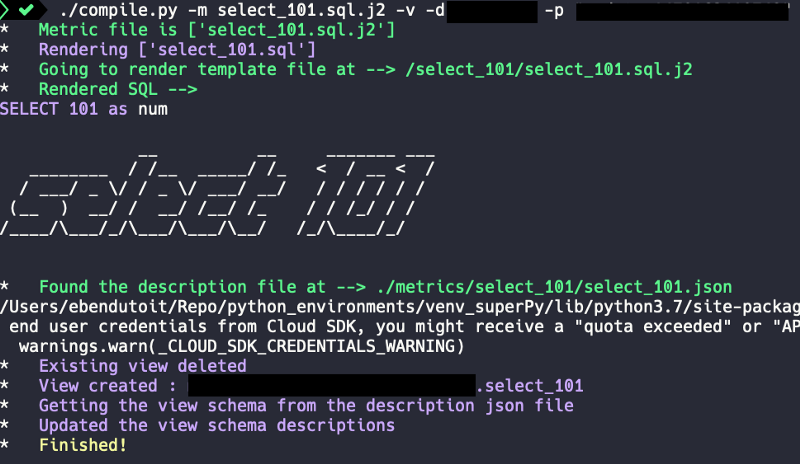
./compile.py -m select_101.sql.j2 -v -d -p
Und Sie erhalten folgende Ausgabe:
## Templates in Templates einbinden …
Sie können Templates auch ineinander verschachteln.
In einer Datei namens `select_101_include.sql.j2` können Sie folgende Query hinterlegen:SELECT *
FROM (
{% include 'select_101/select_101.sql.j2' %}
)
Die Query wird gerendert und deployt als:SELECT * FROM ( SELECT 101 as num )
Viel Erfolg beim Modellieren!

Lust auf mehr? Schauen Sie in unserem [Blog](https://doit.com/blog/) vorbei oder [folgen Sie Eben auf Twitter](https://twitter.com/eebsidian).


<!--DRAFT_BLOG_SEGMENT_2-->
## Ressourcen

[https://github.com/ebendutoit/google-bigquery-data-modeller](https://github.com/ebendutoit/google-bigquery-data-modeller)
Cloud bill shouldn't be a mystery
One platform for AI and Cloud optimization.


