
Cloud Intelligence™
Snitching on expensive Google BigQuery queries
This page is also available in Deutsch, Español, Français, Italiano, 日本語, and Português.

About Vadim Solovey
CEO
Founded DoiT in 2011 and have been here ever since — in every flavor of CTO, co-CEO, and now CEO. I started my career in 1999 building data centers before anyone called it "the cloud," and I've spent the two decades since trying to deliver on what the cloud was actually supposed to be. I still write code most weeks.
My personal page
Get visibility into queries that might require some (cost) optimization and user training on how (not) to run queries on Google BigQuery.
BigQuery snitch in action to identify expensive queries
From time to time, we all make mistakes and run unoptimized Google BigQuery queries. What matters the most is how quickly we can identify these queries, learn from our mistakes, apply the lessons learned, and move on.
At DoiT International, in our capacity of Google Managed Service Provider, we are always being asked by our customers about how teams can surface these queries as soon as they run. One of my colleagues, Moshe Ohayon has found an elegant way to solve this problem and has open-sourced a solution that now everyone can use (and improve!).
By following the README, you can deploy a single Google Cloud Function watching over all of your Google BigQuery queries and posting on Slack queries exceeding `ALERT_THRESHOLD`.
The following `config.json` will produce alerts on all queries exceeding $10 and will post a message to Slack and email.
{ "ALERT_THRESHOLD": 10
, "TB_COST": 5, "SLACK_ALERT": true, "SLACK_WEBHOOK_URL": "https://hooks.slack.com/services/.
..", "SLACK_WEB_API_TOKEN": "", "SLACK_WEB_API_DESTINATION_CHANNEL": "", "EMAIL_ALERT": true, "SENDGRID_API_KEY": "SG...", "EMAIL_SENDER": "Cloud bill shouldn't be a mystery
One platform for AI and Cloud optimization.
",
  "EMAIL_CC": [\
    "\
```\
\
[[email protected]](mailto:[email protected])\
\
```\
"\
  ],
  "FIELDS_TO_RETRIEVE": [\
    "job_id",\
    "user_email",\
    "total_bytes_billed",\
    "total_bytes_processed"\
  ]
}
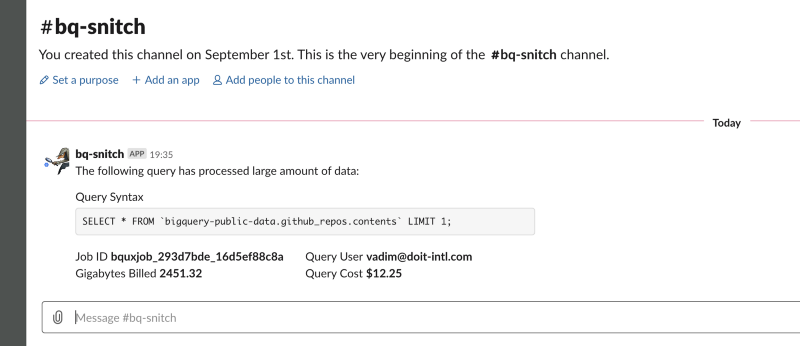 Example of how bq-snitch notifications are posted on Slack. I admit I wasn’t very creative with my sample query ;-)
The bq-snitch can also send the notifications on email. Make sure to enable Sendgrid on your Google Cloud Platform project and put your Sendgrid API key to the config.json.
Taboola.com is one of the early beta testers of bq-snitch.
“The visibility gains from using this tool are palpable. The fact that the feedback is fast and to the point helps us improve our overall cloud cost management”.
If you’re using Google BigQuery (and Slack/email), give bq-snitch a try. If you can think about how we/you can improve it, we’d love to get issues/pull-requests on GitHub.
If none of these work for you, the least you can do is to give us a star 😇
Want more stories? Check our blog, or follow Vadim on Twitter.


