
Announcement
This page is also available in Deutsch, Español, Français, Italiano, 日本語, and Português.
See the spend that never had a billing API
Upload a vendor's PDF invoice, or just forward the email it arrived in, and its cost shows up in your reports, budgets and allocations a minute later.
Every finance team has a folder of invoices that never reach Cloud Intelligence™: the niche SaaS tool, the agency retainer, the data provider, the on-prem license. The vendor has no billing API, so the spend lives in a PDF and in someone's memory or spreadsheet. Until now the only way to get it into DataHub was a CSV with exactly the right column headers, which is a fair thing to ask of an engineer and an unfair thing to ask of accounts payable.
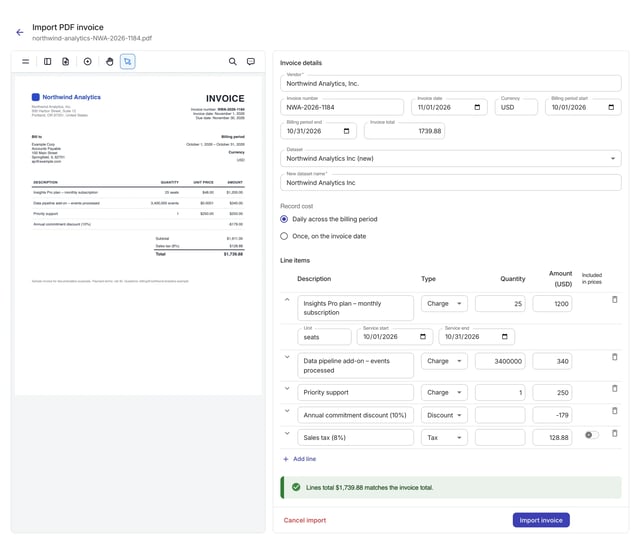
You can now drop that PDF into Cloud Intelligence™ instead. It would intellegently parse the invoice, the UI shows what it found next to the original document, and one click imports it. Or skip the upload: your account has its own invoice email address, and forwarding the vendor's email to it does the same job.
What you get
No CSV, no template. Upload the PDF the vendor sent you. Scanned invoices work too.
Forward it instead. Invoices arrive by email, so that is where the import can start. Forward the message with the PDF attached to your account's invoice address, or give the address to the vendor.
Every line, typed. Charges, discounts, credits and tax come in as separate lines, so a report can include or exclude tax with a filter.
The right dataset, suggested. If you imported from this vendor before, the same dataset is preselected. If not, a new one is named after the vendor. You can always pick another.
Amortization. Spread each line across its billing period, or record it once on the invoice date.
Any currency. Amounts are converted to USD at the invoice date's rate, and the rate is shown before you import.
A nudge toward the better path, if available. If the invoice comes from a vendor Cloud Intelligence™ already integrates with, the review screen says so. An integration brings in the same costs every day with more detail than an invoice has, and if it is already connected you get a warning before you count the spend twice.
Get started
- Open DataHub in the Cloud Intelligence™ UI and select Upload invoice.
- Drop in the PDF and wait a few seconds while it is being processed.
- Check the details and line items against the PDF, choose the dataset, and select Import invoice.
- Open the dataset in a report to see the cost next to your cloud spend.
Would rather not open the UI for every invoice? Copy your invoice address from General settings and forward invoices to it.
Prefer automation? The same import is one call in the DataHub API, or the Cloud Intelligence™ MCP server.