
Announcement
This page is also available in Deutsch, Español, Français, Italiano, 日本語, and Português.
Push cost anomaly alerts and outages straight into Claude Code using channels.
Claude Code now tells you about new cost anomalies and cloud incidents from Cloud Intelligence™ in the session you are working in, and traces them to a cause on request
A cost anomaly is cheapest to fix in the first hour, and that is rarely when anyone sees it. The alert lands in a Slack channel or an inbox. The engineer who shipped the change is deep in a terminal. By the time someone looks into the anomaly works out which deploy it lines up with, the spend has run for a day. Cloud provider incidents cost you the same way: forty minutes debugging a timeout before finding out the region was degraded all along.
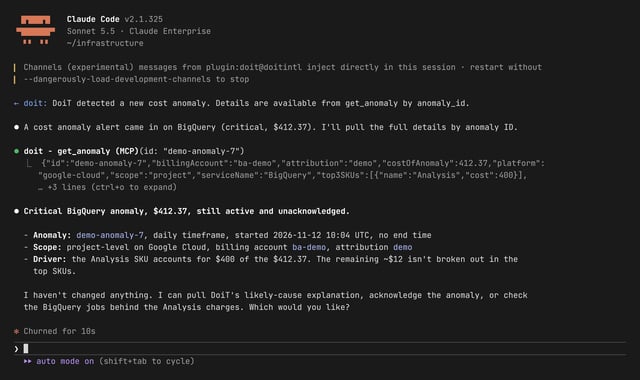
If you work in Claude Code, Cloud Intelligence™ now tells Claude about a new cost anomaly or an active cloud incident as it shows up, in the session you already have open. You ask what drove it, and Claude answers with your own cost data, next to the code and infrastructure you are working on.
This is built on Claude Code channels (research preview). Normally Claude only responds when you type something. A channel lets an outside system put a message into a session that is already running, so Claude can react to something that happened while you were busy with other work.
How you would use it
You ship a change, and the bill moves. You are in Claude Code in your infrastructure repo, an hour after merging a change to a data pipeline. A line appears in the session: Cloud Intelligence™ detected a new cost anomaly, critical, on let's say BigQuery or EKS. You type "what drove this?" Claude pulls the anomaly, breaks the cost down by SKU and project, and reports that on-demand analysis in one project is running at several times its usual daily rate, starting this morning. The same session has your repo open, so the next question is the useful one: "does anything we merged today touch that project?" You are looking at the diff a few minutes after the spike started, not at a report the next day.
You are debugging something that is not your fault. Requests to a managed database start timing out and you begin reading your own logs. A cloud incident event arrives: an active incident on that provider and product. You ask Claude whether it covers the region and service you run, get the incident details, and stop digging through a healthy deployment.
You keep watch for the team. A FinOps or platform engineer leaves a Claude Code session running in a persistent terminal during the working day. When something new appears, they ask Claude to size it, compare it with last week, and say which team owns the project, then acknowledge the anomaly or open a support ticket from the same conversation.
What you get
Anomalies and incidents arrive where you work. A new cost anomaly or cloud provider incident shows up in your open Claude Code session as a short event. No dashboard to keep open, no ID to copy between tools.
From alert to cause in one place. Which service, which project, which SKU, and how it compares with last week are follow-up questions, answered from your cost and usage reporting.
Your pick of events and pace. Choose anomalies, incidents, or both, and how often to check. The default is every five minutes.
Only identifiers travel in the event. It carries a fixed sentence plus the anomaly or incident ID, severity, platform, and service. Titles, descriptions, and cost detail stay in Cloud Intelligence™ until Claude fetches them with your permissions.
Get started
- Create a personal API token in the Cloud Intelligence™
- Give Claude Code the Cloud Intelligence™ tools, if it does not have them yet: connect Claude to the MCP server.
- Install the channel plugin, enter the token, and start Claude Code with the channel: Claude Code plugin and channel.
Events reach you while a Claude Code session is open, which is the point: this is for the hours you are working, and your anomaly notifications by email and Slack still cover the rest.
Channels are a research preview in Claude Code, so on Team and Enterprise plans an organization owner allows the channel first; the guide has the exact setting.