
Learn how DoiT helps allocate costs and break down your cloud bill in the context of your business.
How to understand your cloud bill in the context of your business.
As your cloud spend grows and becomes more complex, breaking down your bill by service and/or project/account won’t cut it if you want to truly understand how costs are split among your organization.
You’ll want to organize costs in a way that matches your org structure. For instance, you might have multiple teams, environments, or other categories you’d like to divide your cloud bill among. But these categories may have complex definitions. For example, your company’s definition of “Staging Environment” costs might be an aggregation of all projects/accounts that begin with the word “staging”.
Using Attributions in Cloud Intelligence™, you can map cloud costs to custom categories by grouping any combination of cloud resources — Tags/Labels, projects/accounts, service metadata, and more.
Let’s explore what Attributions are and how they work. Jump down to the interactive tour to experience Attributions yourself.
What are Attributions?
An “Attribution” is a logical grouping of cloud resources that defines a cost category unique to your company.
Companies use Attributions in Cloud Intelligence™ to understand cloud consumption in the context of their business.
They’re also used as an early step towards driving cost ownership among stakeholders.
Let’s explore some examples of Attributions and how you can use them:
Using Attributions to define engineering team costs
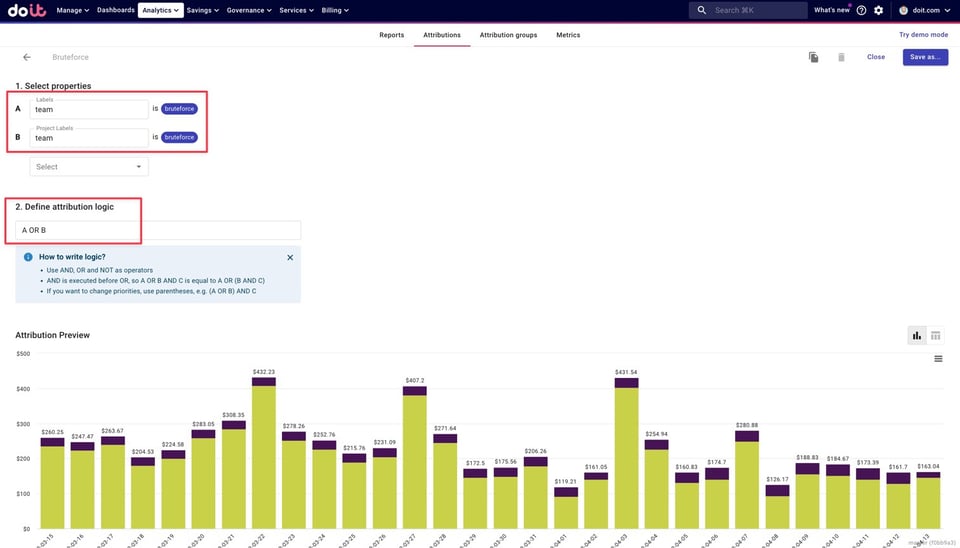
We use Attributions internally to define each engineering team’s costs. In this example, we’ve defined team “Bruteforce” as any resource tagged with a “team” label or project label value corresponding to “bruteforce”
Then, we use the logic “A OR B” to ensure that we aggregate the costs of resources:
- Tagged with only the label “team”
- Tagged with only the project label “team”
- Tagged with the project label and label “team”
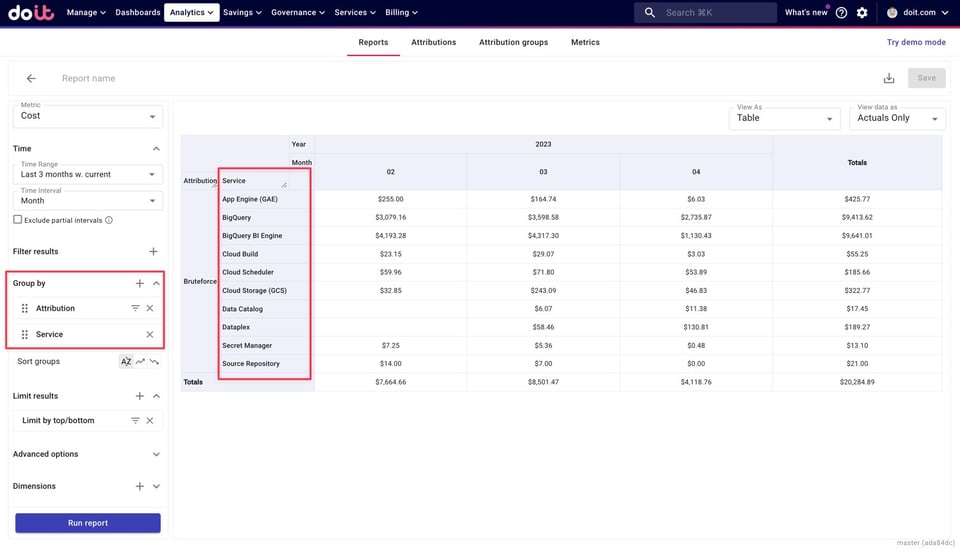
Many use Attributions to build cost reports that help them understand costs in the context of their business.
In the example below, we can break down “Team Bruteforce” costs by service to understand the main cost drivers for this engineering team.
Using Attributions to define environment costs
Here we define our staging environment costs using regex by grouping together all Google Cloud projects that contain the word “staging”.
This is a great example of how you can define cost categories without the use of Tags or Labels.
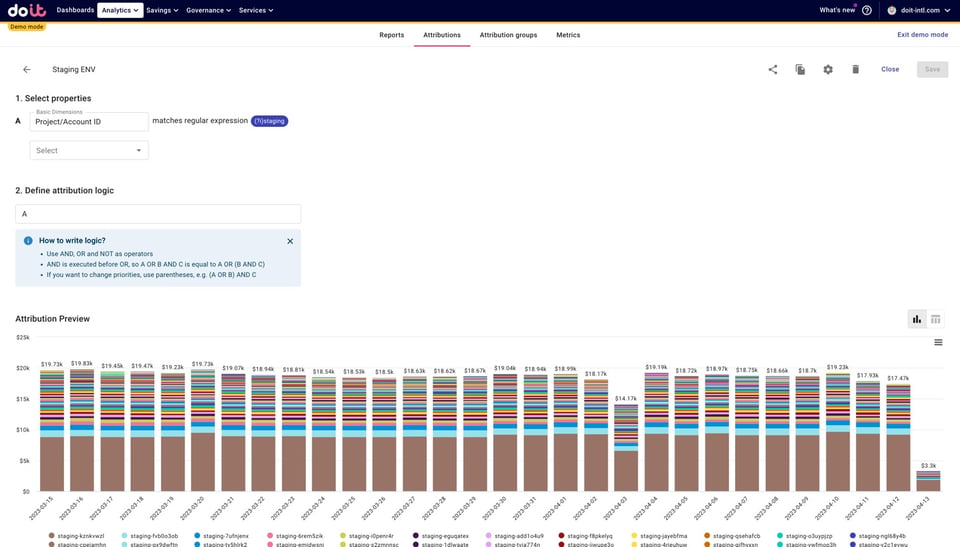
Note that in defining our “Staging Environment” Attribution, we used regex to capture all projects with the word “staging”. You might be adding or removing “staging” projects/accounts often. By using regex, you avoid having to repeatedly go back to change your reports (or Attributions) every time a “staging” project is added or removed.
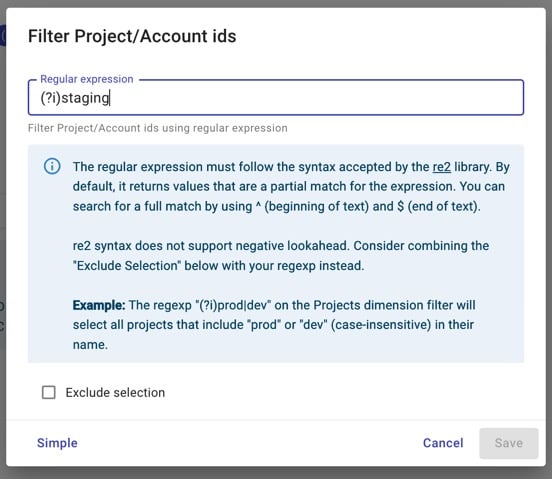
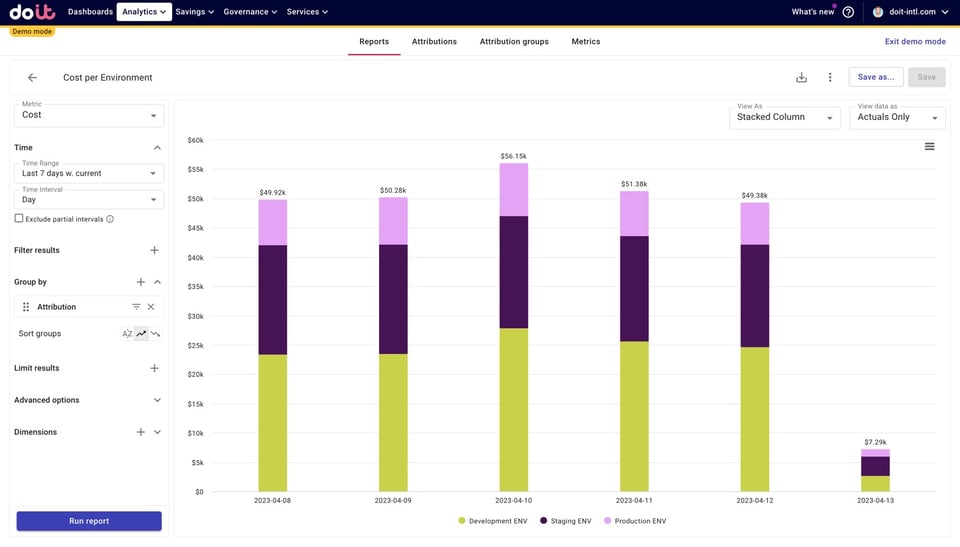
Below, we’ve created a “Cost per Environment” report using three Attributions that each define a different type of environment, allowing us to clearly see Development, Staging, and Production environment costs.
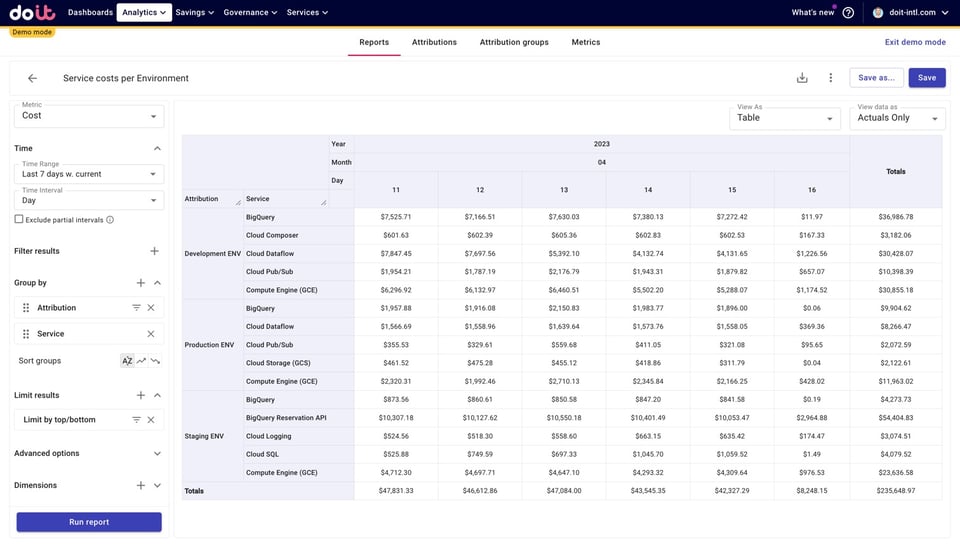
We can once again break down each environment’s costs by other variables, like “Service” to understand their main cost drivers.
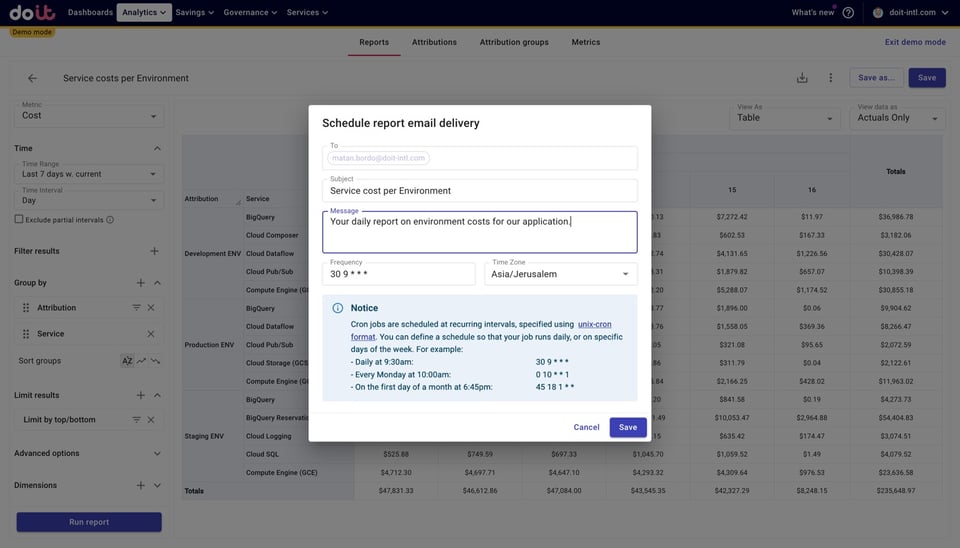
 Finally, if you’d like to make your team or other stakeholders aware of these reports, you can schedule them to be refreshed and delivered to their inboxes at a custom interval.
Using Attributions to estimate EBS storage savings
You can also use Attributions to define other types of groupings not related to categories you’d like to define your cloud bill by.
For example, let’s say you were using GP2 volumes for AWS EBS, and wanted to figure out how much you could save by migrating those volumes to GP3.
First, we’ll create an attribution that captures all EBS costs related to GP2 volumes:
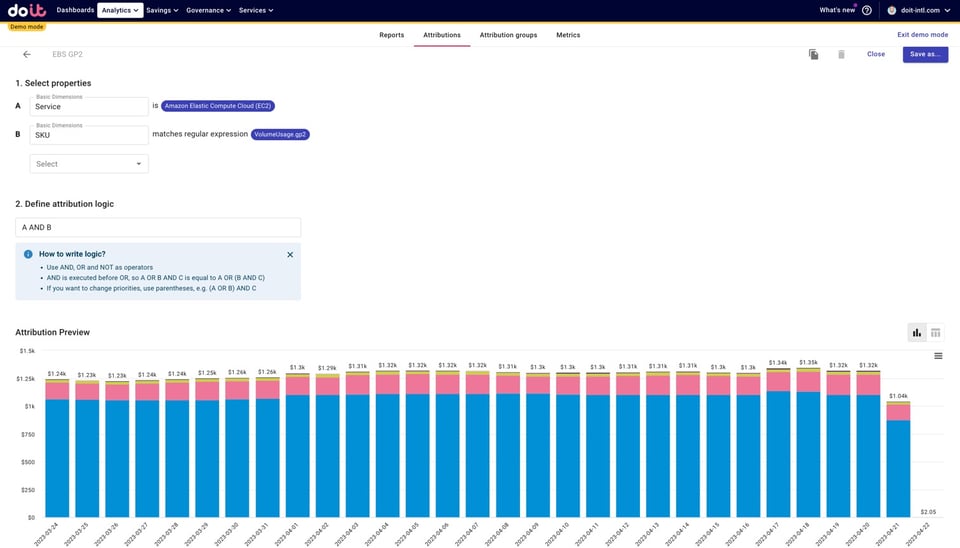
Since, according to AWS, GP3 provides up to a 20% lower price-point per GB vs. existing GP2 volumes, the savings calculation is fairly straightforward.
We can use another Cloud Intelligence™ feature, Metrics, to identify our daily potential savings using the Attribution we just created. To do so, we’ll just multiply our GP2 Attribution by .2, as shown below.
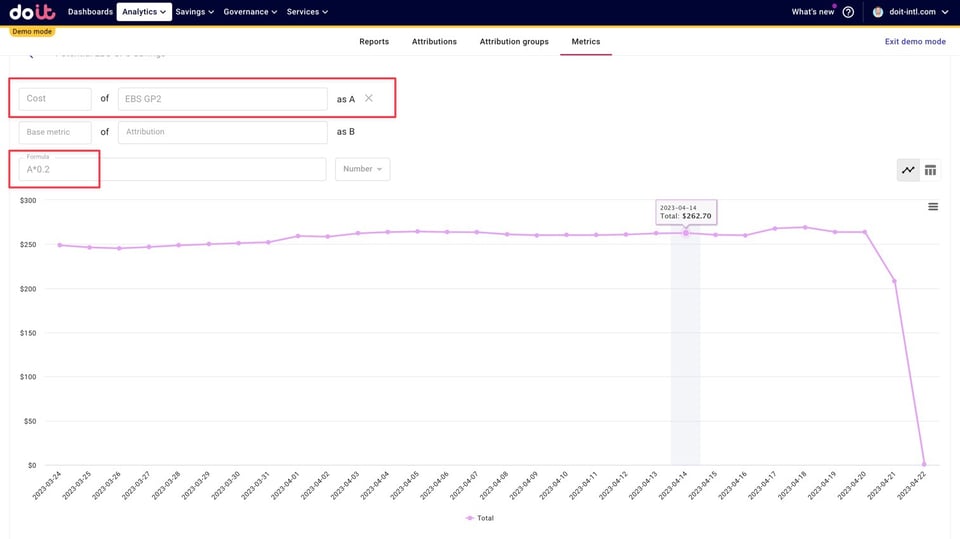
Conversely, you could also multiply this Attribution by .8 to get potential costs with GP3 volumes, after savings are taken into account.
Additional ways to use Attributions
Once you create Attributions, you can use them in various ways across Cloud Intelligence™ to make sense of your cloud spend, catch unintended activity, and drive cost awareness across your company.
We already went over how to use Attributions to build custom cost reports, but DoiT customers also use them to
- Allocate cloud costs
- Improve spend predictability with budgets
- Set up granular cloud cost alerts
- Autonomously monitor teams, environments, and more for anomalies
- And much more!
You can explore the rest of them in this post.
Cloud bill shouldn't be a mystery
One platform for AI and Cloud optimization.
What about Tags and Labels?
You might be reading this thinking, “But can’t I accomplish this with tags and labels?”. Are Attributions a replacement for tags and labels?
They are two separate things, but with some overlap. Attributions simply help you organize your spend without requiring you to have perfect tagging. You can use Tags/Labels to build your Attributions.
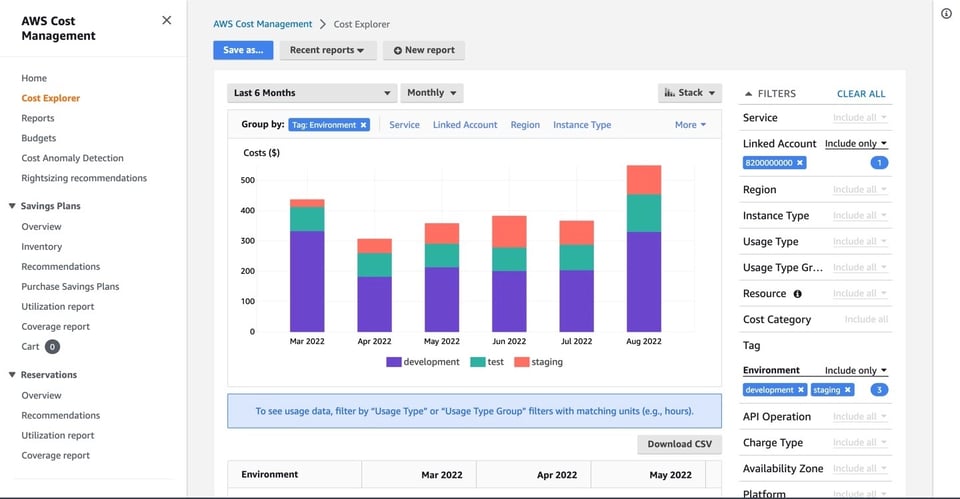
Yes, you can accomplish something similar to Attributions with Tags/Labels if your organization has good tagging hygiene. Meaning, you have one tag key for each category you’d like to define (ex. environment, product, team) — as well as one value for each item within the tag key — and you are consistent about tagging your resources.
Here’s how a report in AWS Cost Explorer might look with correctly (and consistently) applied AWS Tags:
Duplicate Tag keys and/or values
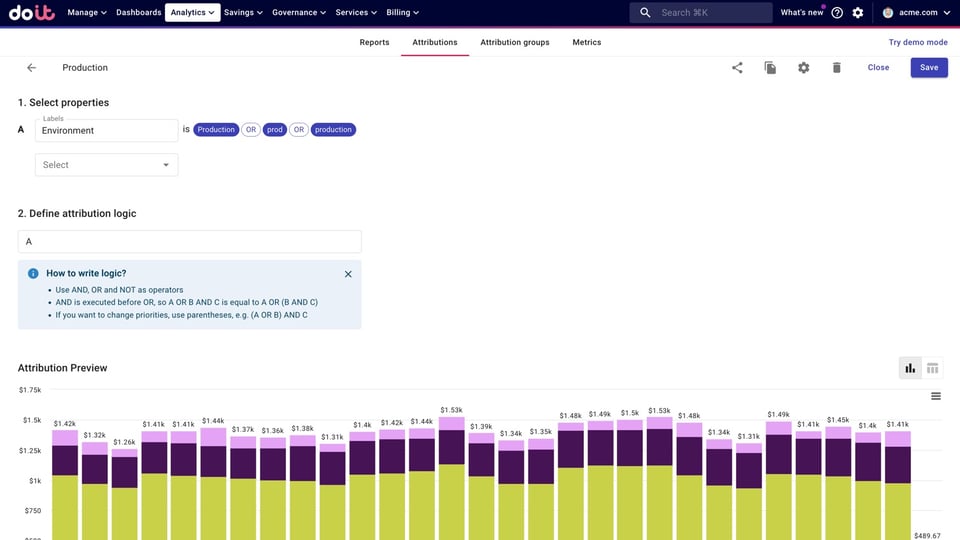
However, you might find yourself in a situation where you have multiple tag keys or values for the same category. For example, some resources will be tagged with an “Environment” tag and others with “Env” or “environment”. Or all resources are tagged with an “Environment” tag, but some have values of “prod”, “production”, or “Production”.
This makes cost reporting trickier because you can’t consolidate all duplicate keys/values into a single grouping. However, with Attributions you can.
Below we’ve grouped together all resources tagged with an “Environment” tag with values of “prod”, “Production”, and “production” to define what Production Environment costs are.
Multi-cloud
What if, for example, your app(s) were running on both AWS and Google Cloud? How would you measure the total cost of running it? You wouldn’t be able to do it natively on the cloud platforms, since you’d only have one half of the data. You’d have to analyze your labeled and tagged resources separately.
With Attributions you can combine costs from both clouds — labeled/tagged resources, accounts/projects, etc. — to create a consolidated definition of your multi-cloud app.
Tags not appropriate for the cost grouping you’re defining
In other situations, your definition of a cost category may not require the use of Tags. For instance, you might want to define “Staging Environment” costs by aggregating the costs of multiple AWS accounts or GCP projects used for staging.
Legacy systems not working with Tags
Finally, we’ve also seen customers with legacy systems that couldn’t implement Tags.
Currently there are no workarounds for these situations in the AWS or Google Cloud consoles. But using Attributions, you won’t be dependent on Tags when connecting cloud costs to the unique taxonomy of your business.
Take an interactive tour of Attributions
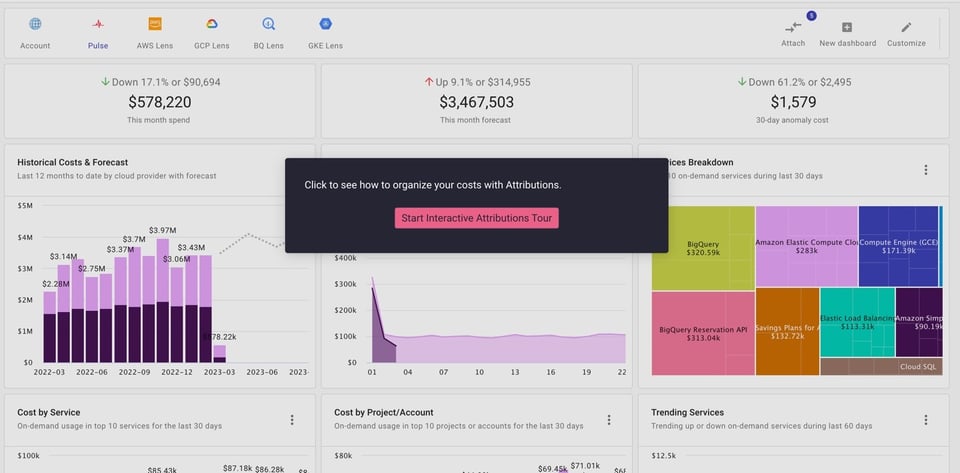
Whether you’re simply looking to better understand costs in the context of your business, or trying to drive a culture of cost ownership among stakeholders, it all starts with Attributions.
Interested in using Attributions to get a clear picture of your cloud costs? Take the interactive tour below, or get in touch with DoiT about unlocking Attributions and the rest of DoiT’s products for your team.


