
Cloud Intelligence™
Know Before You Provision: GCP Spot VM Availability Signals
This page is also available in Deutsch, Español, Français, Italiano, 日本語, and Português.


About Chimbu Chinnadurai
Senior Cloud Architect II
I've probably debugged a Kubernetes issue in more time zones than I care to count. Based in London, I help engineering teams across EMEA get their clusters to behave — and actually understand why they misbehaved in the first place.
I write, speak, and guest on podcasts about all things cloud-native. Away from the terminal: I enjoy cooking almost as much as simplifying overly complex systems.
My personal pageGCP Spot VMs are one of the most effective cost levers in cloud infrastructure — offering up to 91% off standard on-demand pricing by using excess Compute Engine capacity that would otherwise go unused.
The trade-off is well understood: Compute Engine can reclaim Spot VMs at any time. When preemption occurs, GCP sends a termination signal and begins a best-effort 30-second shutdown period for your VM to stop gracefully before it is terminated. A 120-second preemption notice duration is also available in Preview for workloads that need more time to drain.
What has been less clear — until recently — is whether a specific machine type in a particular zone will actually be available when you need it.
The Problem: Provisioning Blind
Managing Spot VMs at scale was frustrating because there was no reliable way to check zone capacity beforehand. You would start your Managed Instance Group, request creation or scaling, and only find out whether the zone had sufficient resources after the fact. Any availability issue surfaced as a provisioning failure, leaving teams to decide whether to wait, retry, or explore alternatives.
Zone selection had the same problem. Availability depends not only on the region but on individual zones within that region. Without data, teams defaulted to familiar zones rather than those with the most available capacity.
The result was a reactive feedback cycle:
- Failed provisioning requests exposed availability issues only after they occurred.
- Zone selection was guesswork rather than informed decision-making.
- Preemption frequency was opaque, with no signal on how stable a machine type was in a given location.
- Cost planning was difficult without visibility into price trends alongside preemption risk.
What Changed: Real-Time Availability Signals
GCP has introduced real-time availability signals for Spot VMs via the advice.capacity API, now in Public Preview. Before committing to provisioning, you can query two key metrics for a specific machine type and zone.
1. Obtainability Score
A numeric value indicating the probability that your Spot VM creation request will succeed, based on current resource availability and recent creation success rates.
| Score | Signal |
|---|---|
0.7 – 1.0 |
High — highly likely to succeed |
0.4 – 0.6 |
Medium — moderately likely; bulk creation may be partially fulfilled |
0.0 – 0.3 |
Low — unlikely to succeed; consider a different zone, region, or machine type |
Obtainability scores are not guarantees. Capacity can change between query time and provisioning time.
2. Estimated Uptime
The minimum expected duration that most of your Spot VMs are likely to run before preemption, calculated from historical and current usage patterns.
| Estimated Uptime | What It Means |
|---|---|
| 60 minutes (3,600s) | Suitable for longer-running batch workloads that tolerate occasional interruption |
| 10 minutes (600s) | Use only for short tasks or workloads that checkpoint frequently |
| 1 minute (60s) | Testing or non-critical work only; consider a different zone or machine type |
Estimated uptime is not a guarantee. VMs may run longer or shorter than estimated.
Using the Feature
The Console's Capacity Advisor for Spot is the quickest way to get a combined view — real-time obtainability and historical preemption rate side by side in a single interface. The gcloud surface splits these into distinct commands for scripting or automation.
Via the Console (Capacity Advisor for Spot)
Navigate to Compute Engine → Capacity Advisor in the GCP Console. Select your region, machine family, series, and machine type, then click Search.
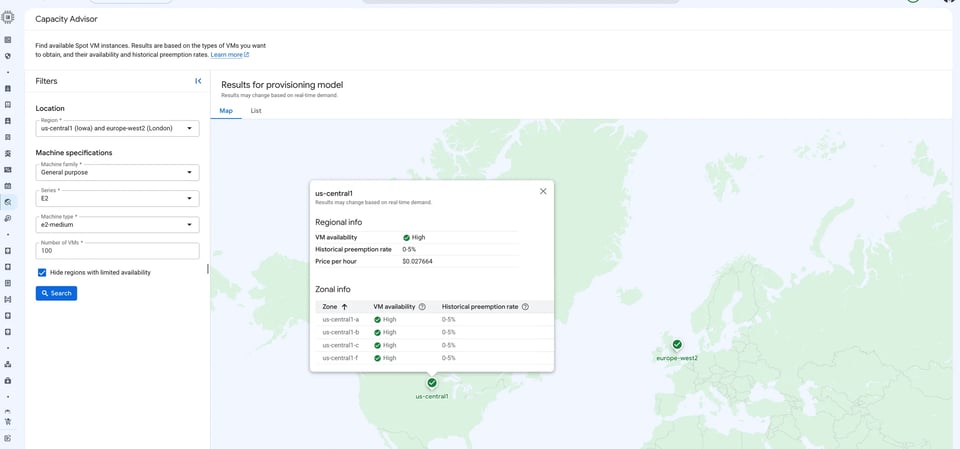
The Map and List views display per-region and per-zone availability signals alongside historical preemption rates and current Spot pricing. To compare availability across multiple machine series, types, and regions simultaneously, use this console view rather than the CLI.
The screenshot below shows us-central1 queried for an e2-medium Spot VM — High availability and a 0–5% historical preemption rate across all four zones (us-central1-a, -b, -c, -f), at a current Spot price of $0.027664/hr.
Via gcloud
Real-time availability and estimated uptime:
gcloud beta compute advice capacity \ --provisioning-model=SPOT \ --instance-selection-machine-types=MACHINE_TYPES \ --target-distribution-shape=TARGET_DISTRIBUTION_SHAPE \ --size=SIZE \ --region=REGIONThe response includes the obtainability score and estimatedUptime for the requested configuration.
Sample output:
recommendations:- scores: estimatedUptime: 3600s obtainability: 0.9 shards: - instanceCount: 10 machineType: e2-medium provisioningModel: SPOT zone: https://www.googleapis.com/compute/beta/projects/chimbuc-playground/zones/us-central1-fHistorical preemption rate and pricing:
The capacity-history command returns daily preemption rates and price history for a specified machine type and zone:
gcloud beta compute advice capacity-history \ --provisioning-model=SPOT \ --machine-type=e2-medium \ --types=PREEMPTION,PRICE \ --region=us-central1Sample output:
location: https://www.googleapis.com/compute/beta/projects/chimbuc-playground/regions/us-central1machineType: e2-mediumpreemptionHistory:- interval: endTime: '2026-06-23T07:00:00Z' startTime: '2026-03-25T07:00:00Z' preemptionRate: 0.0priceHistory:- interval: endTime: '2026-04-12T07:00:00Z' startTime: '2026-04-08T07:00:00Z' listPrice: currencyCode: USD nanos: 26752000- interval: endTime: '2026-06-16T07:00:00Z' startTime: '2026-04-12T07:00:00Z' listPrice: currencyCode: USD nanos: 27664000Use capacity to inform zone and machine type selection before provisioning; use capacity-history to understand longer-term stability and price volatility when planning workload architecture or FinOps budgeting.
Limitations
- TPU availability cannot be queried through the
advice.capacityAPI. - AI zones are included in recommendations by default — verify that AI zones are enabled for your project before acting on those recommendations.
- To query availability for N1 GPU VMs or Local SSD disks that are not attached to a machine type by default, use the REST API directly.
- Scores and uptime estimates are not guarantees; capacity can shift between query time and creation time.
Cloud bill shouldn't be a mystery
One platform for AI and Cloud optimization.
Best Practices
Compare across machine types. If your workload is flexible, compare outputs across configurations — for example,
100 × n1-standard-2vs50 × n1-standard-4. Choose the configuration that balances obtainability and estimated uptime for your needs.Compare across locations. If your workload can run in multiple regions or zones, check availability in each. Where two regions offer similar estimated uptime, prefer the one with the higher obtainability score.
Distribute across zones. With an
ANYorBALANCEDdistribution shape in a regional MIG, the API may recommend splitting VMs across zones to maximise creation success — for example, 90 VMs in one zone and 10 in another rather than all 100 in a single zone.Revisit periodically. Spot availability shifts with GCP-wide demand. Build a periodic availability check into your MIG management or GKE node pool review cycle.
Summary
Provisioning Spot VMs without checking availability first is the equivalent of driving without a map. The advice.capacity API puts the map in your hands. There is no good reason to skip the query.
Before you write an instance template, before you run terraform apply, before you scale a MIG — run the check. It tells you whether the zone will give you VMs at all, and how long they're likely to stay up. That signal should drive your zone selection, your machine type choice, and your checkpoint interval.
Spot VMs remain one of the best cost levers in GCP. The 91% discount is real. The preemption risk is real too — but it's now a known, queryable risk rather than a blind one.
Query first. Choose on signal. Design to the uptime. Revisit as demand shifts.


