
Announcement
This page is also available in Deutsch, Español, Français, Italiano, 日本語, and Português.
See your Tencent Cloud spend, including AI models, next to every other cloud you pay for
Bring Tencent Cloud costs into Cloud Intelligence™ and see which models your TokenHub spend goes to, by input and output tokens
Tencent Cloud offering compute, storage, databases, and AI services globally, and ranking among the largest cloud providers in China and Asia. Tencent Cloud bills arrive in their own console, in their own time zone, with components called "CPU SA5" and "Hy3 Input" that mean nothing to the rest of your reporting. If your teams run workloads in Hong Kong or Singapore, or call models through TokenHub, that spend usually sits outside the reports where you track everything else.
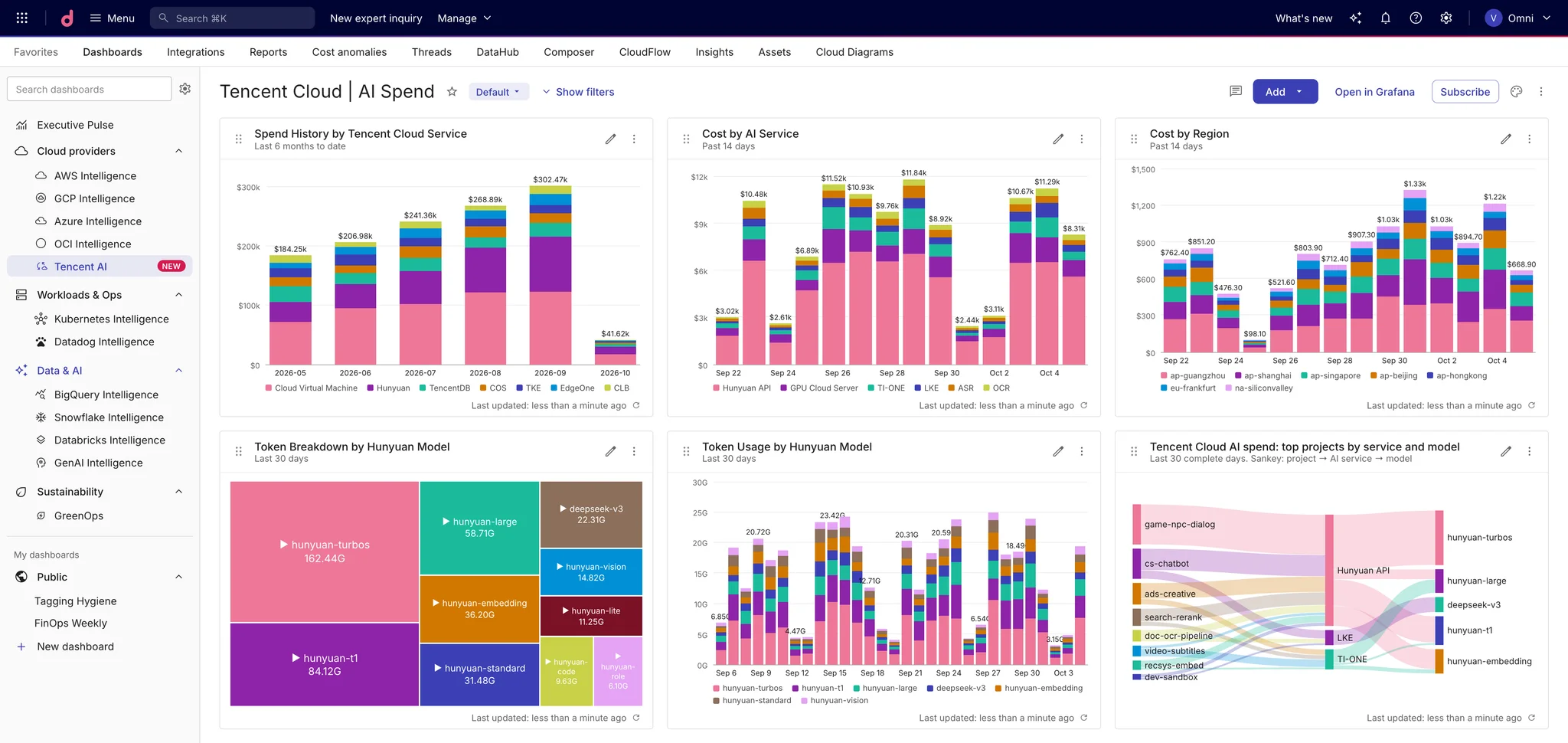
Cloud Intelligence™ now reads Tencent Cloud's own FOCUS bills, so those costs show up in Cloud Analytics by account, service, region and hour, and TokenHub model spend shows up in GenAI Intelligence next to your other AI providers.
What you get
Tencent Cloud in Cloud Intelligence™. Cost and usage reporting for every Tencent Cloud service you use: CVM, block storage, object storage and the rest. Break it down by account, service, product, billable component, region and zone. Your Tencent Cloud project and resource tags come through as labels, so existing allocation rules have something to match on.
Billed amounts you can reconcile. Costs are what Tencent Cloud actually charged, after your discount, and the list price stays available as list cost. We reconciled our own test account against Tencent's billing API to the cent before turning the connector on.
AI spend broken down by model. TokenHub charges, for Hunyuan Hy3, DeepSeek and the other models it hosts, are counted as GenAI spend. Each charge carries the model, the model provider and whether it paid for input or output tokens, so you can see which model and which direction drives the bill. Token Plan subscriptions are counted as AI cost too, once, without double counting the tokens they include.
One view of AI across providers. Tencent's AI spend lands in the same GenAI Intelligence dashboards as your other model providers, while CVM, storage and networking stay in your infrastructure numbers.
Get started
Tencent Cloud writes the bills to a bucket you own, and Cloud Intelligence™ reads them with a user that can only list and read that bucket.
- In Tencent Cloud, create a private COS bucket and turn on bill storage for Standard bill (FOCUS) - daily details. The Tencent Cloud connection guide walks through the console steps.
- Create a read-only CAM user for that bucket, as described in Create a read-only user.
- In Cloud Intelligence™, open Data ingestion and integrations > Integrations, find Tencent Cloud, and connect your account.
- Once the first bill lands, analyze it in Cloud Analytics and check your model spend in GenAI Intelligence.
Related documentation
- help.doit.com/docs/connect-third-party/connect-tencentcloud#bill-storage
- help.doit.com/docs/connect-third-party/connect-tencentcloud#create-user
- help.doit.com/docs/connect-third-party/connect-tencentcloud#connect-your-account
- help.doit.com/docs/cloud-analytics/reports
- help.doit.com/docs/dashboards/genai/genai-intelligence
