
Imagen generada por IA que representa el almacenamiento en la nube
Comparación entre volúmenes gp3 y gp2
En diciembre de 2020, AWS lanzó una nueva generación de volúmenes EBS de propósito general basados en SSD, llamados gp3. A diferencia de su predecesor, su rendimiento base no depende del tamaño del volumen: los gp3 ofrecen un mínimo de 3000 IOPS de base, sin importar el tamaño, frente a la tasa variable de 3 IOPS/GiB de gp2, que sí estaba directamente atada al tamaño del volumen. Además, los gp3 son más económicos: cuestan $0.08/GiB-mes, frente a los $0.10/GiB-mes de los antiguos gp2.
Con los volúmenes EBS gp2, el throughput y los IOPS de base están directamente atados al tamaño del volumen, a una tasa de 3 IOPS/GiB y entre 128 MiB/s y 250 MiB/s de throughput, según el tamaño. En gp2 no hay forma de subir los IOPS o el throughput sin aumentar el tamaño del volumen. Estos volúmenes también cuentan con un sistema de créditos de burst, que les permite alcanzar picos de rendimiento durante períodos cortos.
Con los nuevos gp3 puedes aprovisionar hasta 16,000 IOPS y 1,000 MiB/s de throughput, sin importar el tamaño del volumen, con un costo adicional de $0.005 por IOPS-mes aprovisionado por encima de los 3000 IOPS de base, y $0.04 por MiB/s-mes aprovisionado por encima de los 125 MiB/s de base.
AWS publicó una tabla comparativa concisa que resume las diferencias entre los tipos de volumen gp2 y gp3:
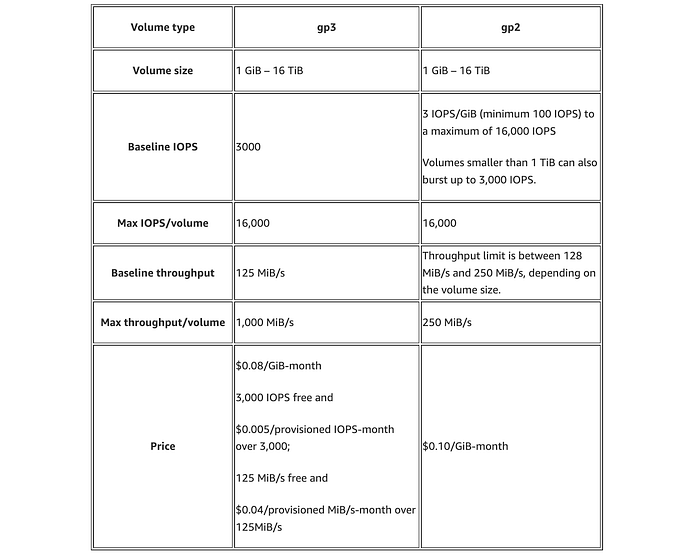
Tabla comparativa entre los tipos de volumen EBS gp3 y gp2
Con esta nueva generación de volúmenes EBS de propósito general basados en SSD, ya no resulta económico ni ventajoso a nivel de rendimiento seguir con gp2: son más caros y, normalmente, ofrecen menos IOPS de base que un gp3 del mismo tamaño.
Si bien los gp2 empiezan a ofrecer más IOPS que los IOPS de base de gp3 cuando superan 1 TiB, sigue siendo más rentable pagar el costo extra para igualar los IOPS y el throughput con gp3 que quedarse en gp2 para conseguir esos extras. En estos casos, eso sí, el ahorro empieza a bajar desde la base del 20%, aunque sigue siendo conveniente.
Si tu volumen EBS es menor a 334 GiB, migrar de gp2 a gp3 te permitirá ahorrar 20% y conseguir enormes mejoras de rendimiento.
En volúmenes mayores a 334 GiB pero menores a 1 TiB, migrar a gp3 y pagar el throughput adicional para igualar los 250 MiB/s de gp2 también te ahorra dinero, además de darte mejor rendimiento gracias a esos IOPS de base adicionales. Aquí, el ahorro va del 15% al 5%, según el tamaño del volumen.
En volúmenes mayores a 1 TiB, migrar a gp3 y pagar el throughput y los IOPS adicionales para igualar los 250 MiB/s y los 3 IOPS por GiB de gp2 también genera ahorros, que van del 15% al 7%.
En ningún caso usar gp2 resulta mejor o más barato que usar gp3. Dicho esto, cambiar a gp3 es la decisión obvia por su relación costo-beneficio y su rendimiento superior.
Como bonus, el proceso de migración no tiene contras: se completa sin downtime y no afecta el rendimiento de forma negativa. Esto es así porque, durante la modificación, se garantiza que el rendimiento del volumen EBS sea al menos igual al del volumen original.
Cloud bill shouldn't be a mystery
One platform for AI and Cloud optimization.
¿Cómo migrar todos los volúmenes gp2 a gp3?
La migración se hace de forma sencilla y sin contratiempos ejecutando el script de Python que aparece a continuación. Convierte automáticamente todos tus volúmenes gp2 a gp3, en todas las regiones, e iguala sus IOPS y throughput en los volúmenes mayores a 334 GiB.
Al ejecutarlo, ahorrarás costos en cada volumen migrado (hasta un 20%), mejorarás drásticamente el rendimiento en los volúmenes pequeños y, como mínimo, igualarás los niveles de rendimiento en los más grandes.
El script también calcula cuánto ahorraste al migrar tus volúmenes gp2 a gp3 y muestra el monto efectivo de ahorro.
import boto3
from botocore.exceptions import ClientError

def calculate_gp3_cost(size_gib, iops, throughput):
    # gp3 pricing
    storage_cost_per_gib = 0.08  # $0.08/GB-month
    iops_cost = 0.005  # $0.005 per IOPS over 3000 IOPS
    throughput_cost = 0.04  # $0.04 per MB/s of throughput above 125 MB/s

    storage_cost = size_gib * storage_cost_per_gib
    extra_iops_cost = (iops - 3000) * iops_cost if iops > 3000 else 0
    extra_throughput_cost = (throughput - 125) * throughput_cost if throughput > 125 else 0

    return storage_cost + extra_iops_cost + extra_throughput_cost

def calculate_gp2_cost(size_gib):
    # gp2 pricing
    storage_cost_per_gib = 0.10  # $0.10/GB-month
    return size_gib * storage_cost_per_gib

def migrate_volume(ec2_client, volume_id, size_gib, region_name):
    savings = 0
    try:
        if size_gib < 334:
            iops = 3000
            throughput = 125
        elif size_gib < 1024:
            iops = 3000
            throughput = 250
        else:
            iops = size_gib * 3
            throughput = 250

        gp2_cost = calculate_gp2_cost(size_gib)
        gp3_cost = calculate_gp3_cost(size_gib, iops, throughput)
        savings = gp2_cost - gp3_cost

        response = ec2_client.modify_volume(
            VolumeId=volume_id,
            VolumeType='gp3',
            Iops=iops,
            Throughput=throughput
        )
        print(f"Migrated volume {volume_id} of size {size_gib} GiB to gp3 in {region_name}. Savings: ${savings:.2f} per month.")
    except ClientError as e:
        print(f"An error occurred: {e}")
    return savings

def list_and_migrate_volumes_in_region(region_name):
    ec2_client = boto3.client('ec2', region_name=region_name)
    total_savings = 0
    try:
        volumes = ec2_client.describe_volumes(
            Filters=[\
                {'Name': 'volume-type', 'Values': ['gp2']}\
            ]
        )
        if not volumes['Volumes']:
            return total_savings  # Return early if no volumes to migrate

        for volume in volumes['Volumes']:
            volume_id = volume['VolumeId']
            size_gib = volume['Size']
            savings = migrate_volume(ec2_client, volume_id, size_gib, region_name)
            total_savings += savings
    except ClientError as e:
        print(f"An error occurred in {region_name}: {e}")
    return total_savings

def list_regions_and_migrate_volumes():
    ec2 = boto3.client('ec2')
    regions = [region['RegionName'] for region in ec2.describe_regions()['Regions']]
    grand_total_savings = 0
    volumes_found = False

    for region in regions:
        total_savings = list_and_migrate_volumes_in_region(region)
        grand_total_savings += total_savings
        if total_savings > 0:
            volumes_found = True
            print(f"Total savings in {region}: ${total_savings:.2f} per month.")

    if not volumes_found:
        print("No gp2 volumes to migrate.")
    else:
        print(f"Grand total savings from migrating all gp2 volumes to gp3: ${grand_total_savings:.2f} per month.")

if __name__ == "__main__":
    list_regions_and_migrate_volumes()
Requisitos previos:
- Asegúrate de tener Python3 instalado, junto con la extensión boto3;
- Asegúrate de contar con credenciales de AWS con los permisos necesarios para modificar volúmenes EBS en todas las regiones, en la ruta ~/.aws/credentials; O BIEN
- Como alternativa, puedes exportar las credenciales de AWS como variables de entorno para una ejecución única con los siguientes comandos:
export AWS_ACCESS_KEY_ID="your_access_key_id_here"
export AWS_SECRET_ACCESS_KEY="your_secret_access_key_here"
export AWS_DEFAULT_REGION="us-east-1"
Una vez que confirmes que cumples con todos los requisitos previos listados arriba, basta con guardar el script como un archivo (por ejemplo, gp2togp3.py) y ejecutar el siguiente comando:
python3 gp2togp3.py
Ejemplo de salida tras la ejecución:
❯ python3 gp2togp3.py
Migrated volume vol-0f554746c24525f01 of size 520 GiB to gp3 in eu-west-1. Savings: $5.40 per month.
Migrated volume vol-03123800cba75b18f of size 20 GiB to gp3 in eu-west-1. Savings: $0.40 per month.
Migrated volume vol-087a04f1d3d88bf07 of size 2520 GiB to gp3 in eu-west-1. Savings: $22.60 per month.
Migrated volume vol-06b09798a7b6f21d3 of size 4020 GiB to gp3 in eu-west-1. Savings: $30.10 per month.
Migrated volume vol-0b55386bde1279329 of size 4520 GiB to gp3 in eu-west-1. Savings: $32.60 per month.
Migrated volume vol-0f2935d2360fdd2ed of size 2020 GiB to gp3 in eu-west-1. Savings: $20.10 per month.
Migrated volume vol-0a686b3a9aebbbf8f of size 3020 GiB to gp3 in eu-west-1. Savings: $25.10 per month.
Migrated volume vol-0d2d709a825421233 of size 1020 GiB to gp3 in eu-west-1. Savings: $15.40 per month.
Migrated volume vol-00766065b8e2ccc14 of size 1520 GiB to gp3 in eu-west-1. Savings: $17.60 per month.
Migrated volume vol-07ff6098fc4a188f6 of size 3520 GiB to gp3 in eu-west-1. Savings: $27.60 per month.
Total savings in eu-west-1: $196.90 per month.
Migrated volume vol-0de6269b523834350 of size 1520 GiB to gp3 in us-east-1. Savings: $17.60 per month.
Migrated volume vol-05c8fffff1e48fdcb of size 3020 GiB to gp3 in us-east-1. Savings: $25.10 per month.
Migrated volume vol-0f5bd9886a18cfb22 of size 2020 GiB to gp3 in us-east-1. Savings: $20.10 per month.
Migrated volume vol-05981da5774928178 of size 4020 GiB to gp3 in us-east-1. Savings: $30.10 per month.
Migrated volume vol-0d788bce161c9978a of size 2520 GiB to gp3 in us-east-1. Savings: $22.60 per month.
Migrated volume vol-0a45ded9ba633b92a of size 520 GiB to gp3 in us-east-1. Savings: $5.40 per month.
Migrated volume vol-06d300164bf986c32 of size 20 GiB to gp3 in us-east-1. Savings: $0.40 per month.
Migrated volume vol-04a27bbad19828bbf of size 4520 GiB to gp3 in us-east-1. Savings: $32.60 per month.
Migrated volume vol-0e85c18b59e418b8c of size 1020 GiB to gp3 in us-east-1. Savings: $15.40 per month.
Migrated volume vol-0b0cafa0f49767f28 of size 3520 GiB to gp3 in us-east-1. Savings: $27.60 per month.
Total savings in us-east-1: $196.90 per month.
Grand total savings from migrating all gp2 volumes to gp3: $393.80 per month.
Cómo ahorrar todavía más al migrar a gp3
Si bien este artículo se centra en una solución universal, podrías ahorrar aún más al migrar a gp3 si no necesitas esos IOPS y throughput adicionales en volúmenes mayores a 1 TiB.
En esos casos, eso sí, tendrías que analizar con cuidado el uso de tu aplicación para entender cuántos IOPS y cuánto throughput necesita, y ajustar los volúmenes gp3 en consecuencia.
Cuando los volúmenes más grandes no requieren tantos IOPS como 3 IOPS por GiB, podrías ahorrar más con solo no subir los IOPS de base; lo mismo aplica para el throughput.


