
In the fast-moving landscape of 2026, the question of whether to use Amazon SageMaker or AWS Bedrock is no longer a simple choice. With the launch of SageMaker Unified Studio and the expansion of Bedrock’s Agentic AI, the two services have become the foundation of a modern AI strategy.
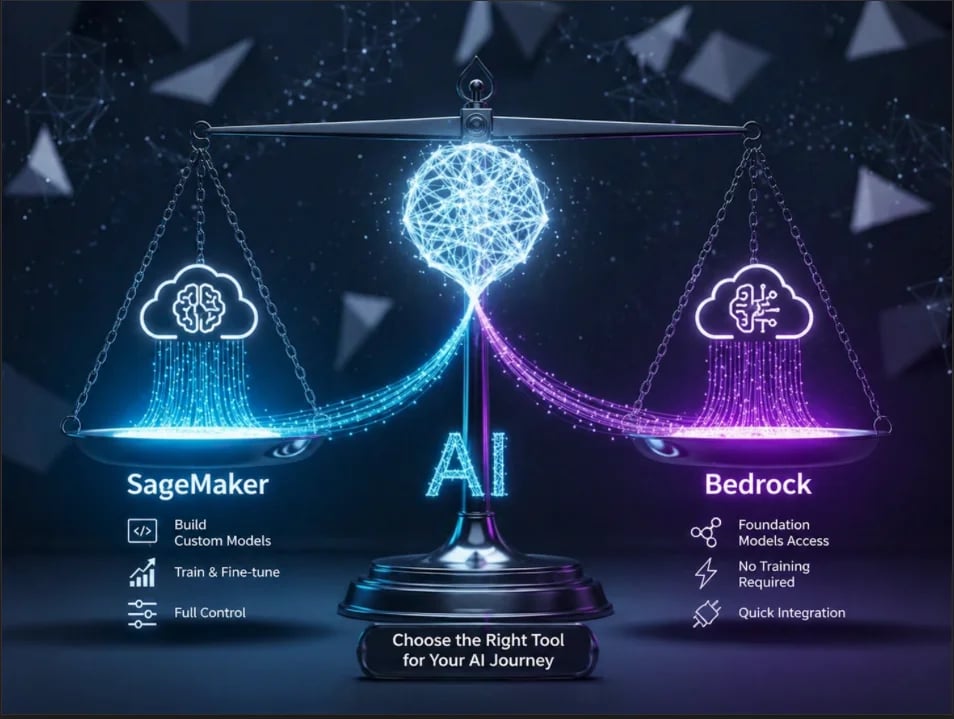
The Best of Both Worlds
In the early 2020s, AWS AI services were clearly separated. SageMaker was the “Lab” for data scientists to build from scratch, while Bedrock was the “Plug-and-Play studio” for developers to use fully managed AI platforms.
By 2026, these lines have blurred. SageMaker now offers serverless, agent-guided workflows that rival Bedrock’s simplicity, while Bedrock has introduced specialized Reinforcement Fine-Tuning (RFT) and Provisioned Throughput that offer levels of control once reserved for SageMaker.
The decision today is less about coding skills and more about product lifecycle, return on investment (ROI), and data sovereignty.
1: Design Logic
To choose the right tool, you must first understand the “shared responsibility model” of each service.
AWS Bedrock: Intelligence as a Utility (MaaS)
Bedrock is built on the philosophy of Model-as-a-Service (MaaS). It is a ready-to-use model. It handles the heavy lifting like managing servers and specialized hardware drivers. You just manage your code.
- The Consumption Model: You interact with models via a standardized API. Whether you are calling Anthropic’s Claude 4, Meta’s Llama 3.5, or Amazon’s Nova 2, the plumbing remains identical.
- Serverless Scaling: Bedrock handles the cold start problem. You don’t manage instance scaling; AWS ensures that the compute power is ready to handle your request, whether you send one or one million.
Amazon SageMaker: The Workbench (IaaS/PaaS)
SageMaker provides a managed infrastructure environment. While it offers high-level abstractions, it ultimately gives you access to the machine learning lifecycle.
- The Infrastructure Model: You select specific EC2 instances for training and inference. You control the type of instances to use and the runtime environment.
- Ownership of Weights: In SageMaker, when you fine-tune or train a model, you own the resulting model artifacts (the .tar.gz files in S3). You can move these to another service or even on-premises.
2: Deep Dive into AWS Bedrock (New Features)
As of 2026, Bedrock is no longer just a wrapper for LLMs. It has evolved into a complete orchestration layer for GenAI.
2.1 The Agentic Evolution: Bedrock AgentCore
The standout feature is Bedrock AgentCore. This allows developers to create autonomous agents that don’t just talk but act.
- Episodic Memory: Now agents remember past interactions across sessions without requiring the developer to manually manage a DynamoDB state.
- Bidirectional Streaming: Agents can now engage in natural voice conversations, allowing for human-like interruptions and real-time reasoning. For example: Imagine a customer calling an airline to rebook a flight. Instead of the AI finishing a long legal script, the customer can say, “Wait, that’s too expensive — what about the morning flight?” The AI stops mid-sentence, hears the concern, and immediately starts looking for cheaper options without missing a beat.
- Policy Controls: Using natural language (which Bedrock converts into a policy), you can set rigid boundaries. For example: “NEVER offer a discount higher than 15% without supervisor approval.”
2.2 Knowledge Bases & Native RAG
Bedrock has automated the Retrieval-Augmented Generation (RAG) pipeline.
- Automatic Chunking: It automatically splits documents into optimal semantic segments.
- Vector Managed Service: It handles the embedding generation using models like Titan Embeddings V2 and stores them in a serverless OpenSearch cluster, S3 Vector database, Aurora PostgreSQL Serverless, and Neptune Analytics (Graph RAG)
2.3 Reinforcement Fine-Tuning (RFT)
RFT allows users to improve models using feedback rather than massive labeled datasets. By pointing Bedrock to your application’s invocation logs, it learns which responses were helpful and self-optimizes over time.
3: Deep Dive into Amazon SageMaker (New Features)
SageMaker remains a powerful environment for custom ML, but it has become significantly more user-friendly.
3.1 SageMaker HyperPod: For Better Resilience
For organizations training trillion-parameter models, SageMaker HyperPod is a gold standard.
- Self-Healing Clusters: Training massive models often fails due to a single GPU hardware error. HyperPod automatically detects a failing node, replaces it, and resumes training from the last checkpoint within minutes, saving millions in wasted compute.
3.2 Serverless Model Customization
SageMaker has borrowed from Bedrock’s playbook. You can now perform Supervised Fine-Tuning (SFT) and Direct Preference Optimization (DPO) via an agent-guided natural language interface. It is a popular technique for aligning Large Language Models (LLMs) with human preferences on Amazon SageMaker.
3.3 The Inference Revolution: Inference Components
SageMaker solved the wasteful GPU problem. With Inference Components, you can host dozens of different models on a single large GPU instance. This allows for massive cost consolidation that Bedrock’s per-token model cannot match for high-volume users.
4: The Economics of Scale (The Math)
This is the most critical section for decision-makers. The cheapest service depends entirely on your Volume and Throughput.
4.1 Bedrock Pricing: The Variable Cost
Bedrock primarily uses token-based pricing.
Cost_{Bedrock} = (Tokens_{Input} \times Rate_{In}) + (Tokens_{Output} \times Rate_{Out})
Bedrock introduced Prompt Caching, which significantly changes the math for RAG systems. If you send the same 5,000-word “Company Handbook” with every query:
- Initial Read: Full Price.
- Cached Read: Up to 90% discount.
4.2 SageMaker Pricing: The Fixed Cost
SageMaker uses instance-based pricing.
Cost_{SageMaker} = Hours_{Instance} \times Rate_{Hourly}
4.3 The Break-Even Point
As a rule of thumb, the standard break-even point occurs around 220 million tokens per day.
- Below 220M tokens: Bedrock is almost always cheaper because you only pay for what you use. If your app is quiet at night, you pay $0.
- Above 220M tokens: SageMaker becomes more attractive. Once your volume is high enough (busy 80–90% of the time) to host a distilled, quantized model on SageMaker using AWS Inferentia3 chips. Then the flat rate of the server is cheaper than the aggregate per token cost on an API.
ROI Tip: If you have high, steady-state traffic, SageMaker’s Savings Plans (1-year or 3-year commitments) can drop your costs by up to 64%. Similarly, Amazon Bedrock’s Provisioned Throughput offers significant savings for consistent, high-volume generative AI workloads. You can reserve dedicated capacity instead of paying on-demand token prices. By committing to 1-month or 6-month terms, you can achieve cost reductions, typically ranging from 30% to 50% compared to on-demand pricing.
5: Security, Sovereignty, and Compliance
5.1 VPC Isolation
- Bedrock: Connects via VPC Endpoints (PrivateLink). Your data never traverses the public internet; the model weights reside in the AWS-managed service zone.
- SageMaker: Offers total VPC isolation. You can deploy models in a subnet with no internet access. This is the preferred choice for the highly regulated sector (defense, healthcare).
5.2 Ownership & Weight Sovereignty
If your business model depends on a particular model, Bedrock is a risk. If you use Bedrock, you are dependent on the model provider (e.g., Anthropic) keeping that model available. In SageMaker, you own the model snapshot. If a provider retires a version, your SageMaker endpoint keeps running. This is Model Sovereignty.
6: Industry Examples
Example 1: The Fintech “Smart Compliance” Agent (Use Bedrock)
The Problem: A bank needs a tool that audits every outbound email for regulatory compliance in real-time.
- Why Bedrock? The traffic is bursty (high at 9 AM, zero at 2 AM).
- The Architecture: Bedrock Guardrails automatically scan for PII and toxic language. Bedrock Knowledge Bases contain the latest banking regulations.
- AgentCore Edge: Using AgentCore, the agent can “learn” from the bank’s senior compliance officers through Reinforcement Fine-Tuning (RFT). Or with a well configured system prompt, an agent can perform the given task.
Example 2: The Radiology Vision Suite (Use SageMaker)
The Problem: A hospital group needs to process millions of MRI scans to flag potential anomalies using a custom neural network architecture.
- Why SageMaker? This is a non-generative, high-precision computer vision task.
- The Architecture: Use SageMaker Ground Truth for medical-grade data labeling. Train the model on SageMaker HyperPod to ensure zero downtime during the 3-week training cycle.
- Deploying on Inferentia3 chips ensures sub-100ms latency, critical for real-time surgical assistance.
Example 3: The Smart-Router for Support Center (The Cost Optimizer)
The Problem: A fintech startup handles 1 million customer inquiries a month. 20% are complex financial planning questions, but 80% are simple “Where is my refund?” or “Reset my password” requests.
The Hybrid Solution:
- Phase 1 (Bedrock): Use Amazon Nova 2 Lite as a router. It identifies the intent of every incoming message instantly and cheaply.
- Phase 2 (SageMaker): While your support agent is chatting with a customer, the customer asks, “Can I increase my credit limit right now?” To answer this, the system must analyze 5,000 data points in milliseconds: transaction history, late payment probabilities, and real-time market volatility.
- Model Incompatibility: Bedrock is for Generative AI (LLMs). It cannot host or run XGBoost, Random Forest, or LightGBM, the industry-standard models for tabular data and binary decisions (Yes/No).
- Latency: Sending thousands of rows of raw data into a prompt for an LLM to reason through is slow and expensive.
- Data Structure: LLMs are fuzzy thinkers. For a credit decision, you need the mathematical precision of a model trained specifically on your company’s proprietary data.
The SageMaker Solution:
You host a specialized Gradient Boosting Model on a SageMaker Inferentia3 endpoint.
- Bedrock handles the conversation (“I’d be happy to check that for you!”).
- SageMaker does the heavy math in the background, analyzing the tabular data in under 10ms.
- SageMaker passes the “Approved” result back to Bedrock to deliver the news.
Why? You avoid paying master-level prices (Bedrock) to answer grade-school questions. SageMaker’s dedicated hardware handles the high-volume grunt work for pennies, while Bedrock is reserved for the high-value logic and clear communication.
7: The Decision Framework: Here is an overview of a simple decision framework:
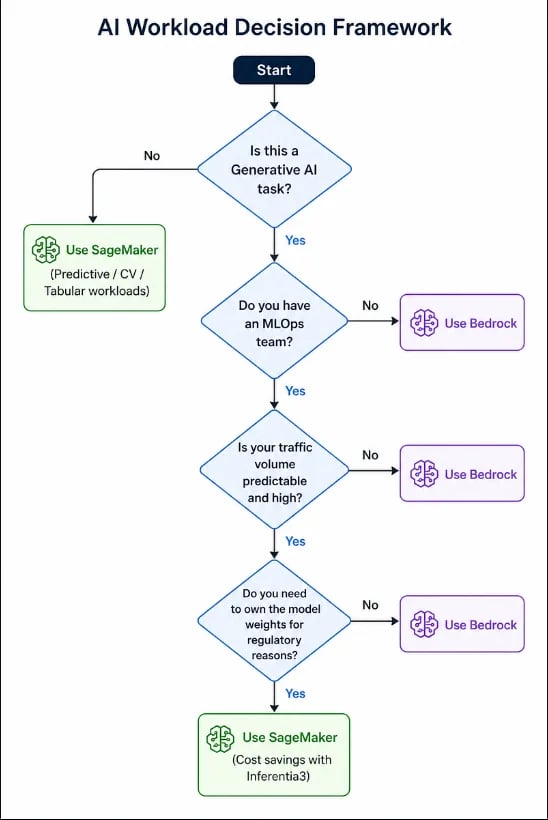
By 2026, the SageMaker vs. Bedrock debate has shifted toward SageMaker Unified Studio, where you can use both side-by-side in the same project.
With the launch of SageMaker Unified Studio (which began rolling out in late 2025), AWS effectively ended the “two-tab” era. You no longer have to jump between a SageMaker console and a Bedrock console; they are now integrated into a single development environment.
Why this is a “Game Changer”:
- The Shared Workspace: You can create a single project in Unified Studio that contains both your SageMaker training notebooks and your Bedrock Agent configurations.
- Data Liquidity: The Studio uses a unified data catalog. You can use AWS Glue to prep data, use it to fine-tune a model in SageMaker, and then immediately pull that model into a Bedrock Flow, all without moving your data between different services.
- One-Click Bedrock Access: Within the Unified Studio interface, there is a dedicated web interface for Bedrock tools (Agents, Guardrails, and Knowledge Bases) that lives right alongside your SageMaker experiments.
The winning strategy for the next decade is not picking one service but building a modular AI stack: use Bedrock for your application’s brain and SageMaker for its specialized skills and economic efficiency.
Cloud bill shouldn't be a mystery
One platform for AI and Cloud optimization.
Final Takeaway:
The $10k Rule:
Start with Bedrock for speed-to-market. Once your monthly inference spend hits $10,000, the “convenience tax” starts to outweigh the “engineering cost.” That’s your signal to move high-volume workloads to SageMaker to capture the massive savings of dedicated hardware.
Here is the breakdown of why this works and where the nuance lies:
- The cost of managing infrastructure: Bedrock charges a premium for convenience. Once your bill hits $10k, you are likely paying a significant amount for serverless scaling.
- The SageMaker Crossover: At $10k/month, there is enough budget to cover the cost of a dedicated SageMaker HyperPod or for Inferentia3 instances running 24/7. At this volume, the flat-rate cost of the server would be cheaper than the per-token cost of Bedrock.
- Team Justification: A $10k monthly spend is usually the point where a business can justify the salary of an MLOps engineer whose sole job is to optimize usage of SageMaker resources.
The Nuance (When it might not be true):
- Spiky Traffic: If your $10k spend comes from massive bursts followed by hours of silence, Bedrock might still be cheaper. SageMaker’s dedicated instances cost money even when they aren’t processing a single token.
- Need For Speed: If your team is small, the “heavy lifting” of moving to SageMaker might slow you down.


