

Amazon RDS instance types determine your database’s compute, memory, networking, and (indirectly) storage performance—making them one of the biggest levers for both reliability and cost. Choose well and you’ll get predictable performance at an efficient price. Choose poorly and you’ll pay for idle capacity (or suffer latency, timeouts, and noisy failovers).
Amazon RDS instance types: quick answer
Amazon RDS instance types are preconfigured compute profiles (vCPU, memory, network) used to run an RDS database. Pick db.m for balanced workloads, db.r for memory-heavy databases and high concurrency, and db.t for dev/test or bursty usage. Pair the instance with the right storage (often gp3 or io2) and review utilization quarterly to right-size over time.
What you’ll learn
- The main RDS instance classes and what they’re best for
- How to choose an instance type using 5 practical decision factors
- How storage choices (gp3, gp2, io1/io2) change real-world performance
- Common mistakes that inflate RDS costs (and how to avoid them)
- FAQ answers for AEO/featured snippets
Comprehensive Guide to Amazon RDS Instance Types
Managing cloud databases is a challenge every growing business faces. Whether you’re running a startup or a Fortune 500 company, one question always comes up: How do you get the performance you need without blowing your budget? The answer often comes down to making smart decisions about your database instances—choices that can seriously impact your bottom line.
Choosing the right database infrastructure can make or break your application’s performance and cost efficiency. Take the ecommerce company, for example, that once ran its product catalog database on an oversize RDS instance, spending more than $5,000 per month on resources it didn’t fully utilize. By switching to the right-size instance type, the company cut its costs by 60% without sacrificing performance.
This scenario highlights a common challenge: achieving the right balance between performance and cost. With the right approach, you can ensure your database infrastructure supports your needs effectively while avoiding unnecessary expenses.
Amazon Relational Database Service (RDS) offers a wide range of instance types, each optimized for different workloads and requirements. Think of instance types as different sizes and models of cars; while a compact car might be perfect for city commuting, you’d need a truck for heavy hauling. Similarly, while a burstable db.t3.medium might be ideal for a development environment, your production analytics database might need a memory-optimized db.r6g.2xlarge for heavy lifting.
The challenge many organizations face isn’t just choosing an instance type, but optimizing it over time as workloads evolve. That’s why it’s important to fully understand the different RDS instance types available. Choosing the right one can boost your app’s performance while keeping costs in check.
Introduction to Amazon RDS
Amazon RDS is a managed database service that handles routine database tasks while providing the flexibility to optimize for your specific workload.
Picking the right database instance type really comes down to your workload. Memory-optimized instances are great for transaction-heavy tasks or analytics, while general-purpose instances are a better fit for read-heavy apps or steady traffic. Burstable instances are perfect for development and testing with unpredictable workloads. The instance type you choose will directly affect your database performance and costs.
At its core, your database performance and costs are largely determined by the instance type you choose—the computational and memory resources your database uses. RDS automates many critical database management tasks, including:
- Automated backups with point-in-time recovery (up to 35 days retention)
- Operating system and database engine patching with customizable maintenance windows
- High availability through automated failover with Multi-AZ deployments (typically completing within 60 to 120 seconds, though actual failover time depends on factors like database size and workload)
- Database log rotation and retention management
- Automated snapshot management for longer-term retention
The real challenge for many organizations isn’t just picking the right instance type, it’s keeping it optimized as workloads change over time. Database instances often end up being either over- or underutilized, which means wasted money or performance headaches. This mismatch between resources and actual needs is especially common in growing companies, where database demands can change quickly as they scale. That’s why following FinOps best practices, like regular monitoring and optimization (which DoiT specializes in), is key to striking the right balance between performance and cost.
How to choose an RDS instance type (fast checklist)
- Measure: CPU, memory, read/write IOPS, storage latency, connections, and query time.
- Match class: db.m (balanced), db.r (memory/concurrency), db.t (bursty/dev-test).
- Validate storage: gp3 for most; io2 for sustained low-latency transactional needs.
- Plan availability: Multi-AZ if downtime is unacceptable; test failover behavior.
- Revisit quarterly: Right-size as traffic and query patterns change.
Understanding RDS instance classes
RDS DB instance classes are categorized by their compute and memory capabilities, with each class designed to meet specific performance characteristics. Each instance family is identified by a prefix that represents its category:
- db.m: Balanced, all-purpose instances that combine compute, memory, and networking resources. Great for transactional apps, blogs, or content management systems. Need a boost in read performance? Add read replicas to share the query load.
- db.r: Memory-optimized instances made for apps that need heavy in-memory processing. These are great for high-transaction workloads and lots of simultaneous connections, like ecommerce platforms, booking systems, or data-heavy apps.
- db.t: Burstable performance instances ideal for development, testing, or workloads with occasional traffic spikes. They’re a cost-effective option that can scale up compute power when you need it.
- db.x1/x2: High-memory instances built for specialized workloads requiring massive RAM.
Each instance class comes in multiple generations (indicated by a number, e.g., m5 versus m6) and various sizes (denoted by suffixes such as large, xlarge, 2xlarge). Choosing the right instance involves balancing compute power, memory, and network performance based on your workload.
Storage considerations for RDS
When choosing an instance type, don’t overlook storage performance—it’s just as important. RDS gives you several storage options to fit your workload needs:
- GP3 (General Purpose SSD v3): A cost-effective SSD option with customizable IOPS and throughput, offering better performance than GP2.
- GP2 (General Purpose SSD v2): An older, general-purpose SSD where performance improves as storage size increases.
- Provisioned IOPS (io1/io2): High-performance storage built for databases that need low latency and handle lots of transactions.
Picking the right mix of instance class and storage is key to keeping your database running efficiently, cost effectively, and at scale. Conducting a comparison of GP3, GP2, and Provisioned IOPS storage options can help you make an informed decision about the storage configuration you require.
Categories of RDS instance types
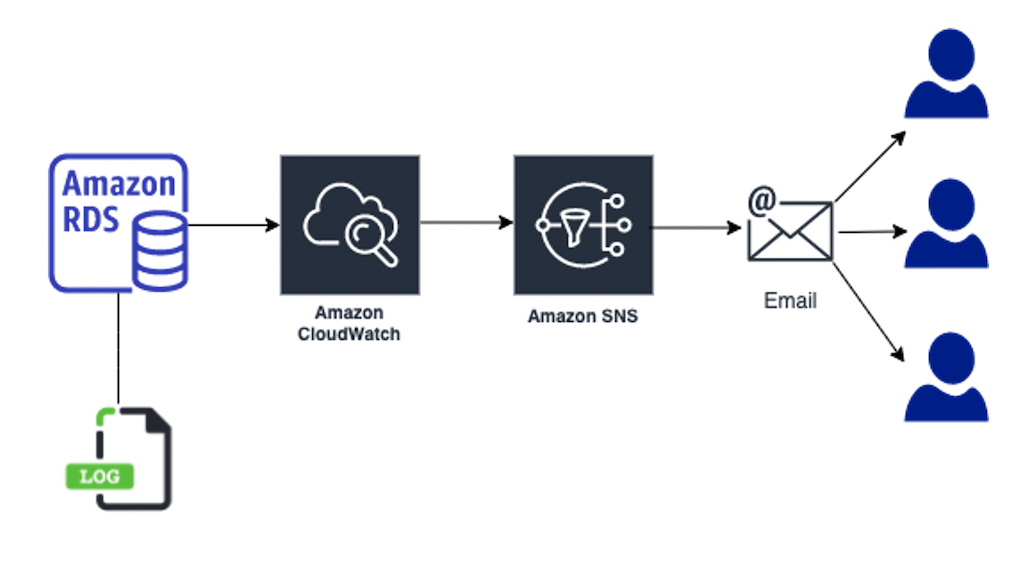
RDS instance types can be categorized into several groups based on their specific characteristics and recommended use cases:
General purpose instances
General purpose instances (db.m classes) are the workhorses of AWS RDS. Suitable for a wide range of applications, they offer balanced performance across compute, memory, and network resources. They are ideal for:
- Medium-size databases
- Development and testing environments
- Content management systems
- Ecommerce applications
Latest generations like db.m6g (powered by AWS Graviton2 processors) offer up to a 40% better price/performance ratio compared to db.m5.
Memory optimized instances
Memory optimized instances (db.r classes) are designed for memory-intensive database workloads that require high memory-to-vCPU ratios. These instances excel in:
- High-performance databases
- Real-time big data analytics
- Large in-memory caches
- Applications with complex queries
The latest db.r6g instances provide up to 512 GiB of memory, making them perfect for applications that process large datasets in memory.
Burstable performance instances
Burstable performance instances (db.t classes) are cost-effective options for applications with variable workloads. They provide:
- Baseline performance with ability to burst
- CPU credits that accumulate during quiet periods
- Support for development, staging, and small production databases
Detailed comparison of RDS instance types
Let’s examine the key differences between instance types to help inform your selection:
Amazon RDS instance type comparison
| Instance Class | Use Case | vCPU | Memory (GiB) | Network Performance |
| db.m6g | Standard web applications, CMS systems, ecommerce | 1–64 | 4–256 | Up to 25 Gbps |
| db.m5 | Small-to-medium business applications | 2–96 | 8–384 | Up to 25 Gbps |
| db.r6g | Business intelligence tools, in-memory analytics | 2–64 | 16–512 | Up to 25 Gbps |
| db.r5 | High-performance databases, enterprise data warehouses, real-time analytics platforms | 2–96 | 16–768 | Up to 25 Gbps |
| db.t4g | Development, testing environments, code repositories | 2–8 | 1–32 | Up to 5 Gbps |
| db.t3 | Low-traffic blogs, small WordPress sites | 2–8 | 1–32 | Up to 5 Gbps |
This comparison illustrates the range of options available, from small burstable instances suitable for development to large memory-optimized instances capable of handling enterprise workloads. Instance types continuously evolve, with new generations offering improved performance and efficiency, such as those powered by AWS Graviton processors.
5 key factors to consider when choosing an RDS instance type
Picking the right Amazon RDS instance type means taking a close look at your app’s specific needs. This allows you to get the best mix of performance, cost savings, and scalability. Here are some things to consider.
1. Workload requirements
Understanding your workload is the foundation of instance-type selection. A busy ecommerce platform handling thousands of transactions per minute has very different needs compared to an internal reporting database that processes batch jobs overnight. Consider these workload characteristics:
- Query complexity and frequency
- Peak versus average utilization patterns
- Number of concurrent user connections
- Read/write ratio of database operations
- Data processing requirements (OLTP versus OLAP)
2. Performance vs. cost
Every organization needs to balance performance requirements against budget constraints. The most powerful instance type isn’t always the best choice—it’s more about finding the sweet spot where performance meets efficiency. Key considerations include:
- CPU performance utilization patterns throughout the day
- Memory requirements for your specific database engine
- I/O requirements and storage throughput needs
- Budget constraints and optimization opportunities
For example, if your application primarily handles read operations with occasional writes, you might benefit more from a memory-optimized instance that can effectively cache your dataset rather than a compute-optimized one.
Note: If your workloads have consistent and predictable usage, Reserved Instances (RIs) can be a great way to save money. They offer discounts compared to On-Demand pricing, making them a strong cost-saving option for Amazon RDS. For workloads with unpredictable usage patterns, Amazon Aurora Serverless is a flexible option that scales based on demand.
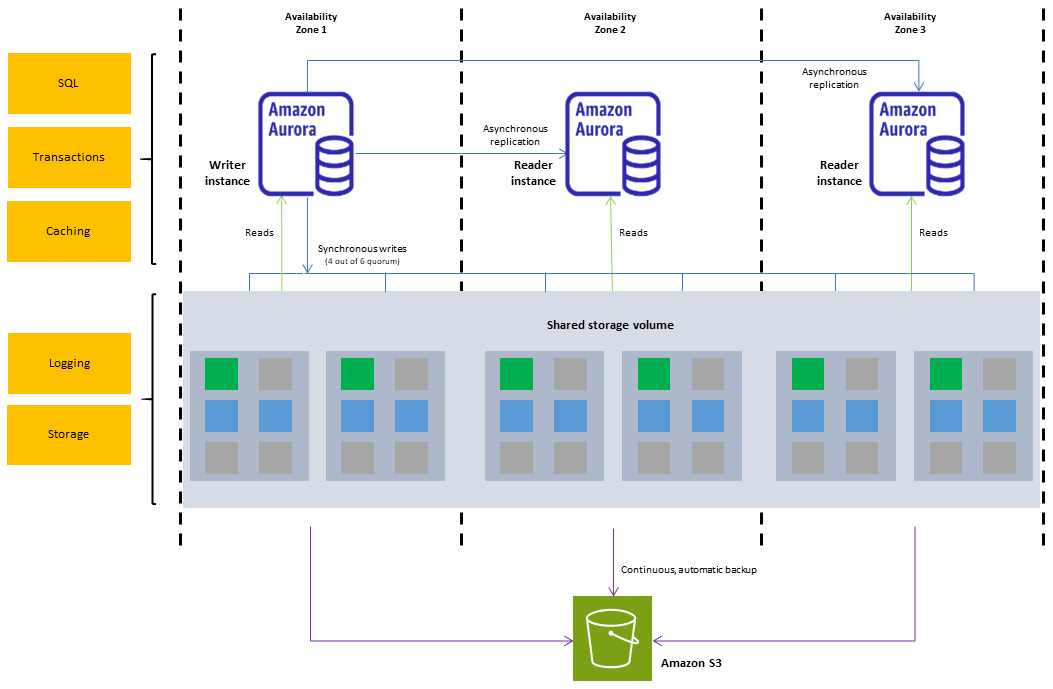
3. Scalability requirements
As your business grows, your database needs will grow too. Planning for scalability ensures your instance type can handle that growth without needing constant adjustments. Consider these scaling factors:
- Projected data growth rates
- Seasonal traffic variations
- Maintenance windows and backup requirements
- Multi-AZ deployment needs for high availability
The key is to choose an instance type that not only meets your current needs but provides room for growth without excessive overprovisioning.
4. Database engine compatibility
Different database engines like MySQL, PostgreSQL, Oracle, and SQL Server all use resources differently and have unique needs. The instance type that’s perfect for MySQL might not work as well for SQL Server. Important considerations include:
- Engine-specific memory requirements
- Version compatibility with instance types
- Feature support across different instance families
- Engine-specific optimization capabilities
For example, PostgreSQL often benefits from memory-optimized instances thanks to buffer management, while MySQL may perform well with general-purpose instances for similar workloads.
5. Compliance and security
Your compliance needs and security requirements can play a big role in choosing the right instance type—especially in regulated industries such as healthcare and finance. Key security and compliance factors include:
- Data protection requirements
- Performance monitoring and auditing needs
- Backup and recovery capabilities
- Geographic restrictions and data residency requirements
For example, if your compliance requirements mandate encryption at rest with high performance, you’ll need an instance type that can handle the additional computational overhead without impacting application performance. Ensuring a secure RDS setup, such as moving from public to isolated subnets, can also be a step in meeting compliance standards.
All these factors play a part in choosing the right instance type, and it’s important to look at them as a whole rather than individually. At DoiT, we work with customers to break these down using Cloud Analytics, helping them make smart, data-driven decisions about their RDS setup—often driving cost savings while keeping performance strong.
5 best practices for selecting RDS instances
Choosing the right RDS instance can feel overwhelming with all the factors and workloads to consider. To simplify this, we’ve outlined best practices to help you make the optimal choice for your needs:
1. Performance testing
Thorough performance testing is important before committing to an instance type in production. A comprehensive testing approach should include:
- Load testing with production-like workloads and data volumes
- Performance benchmarking across different instance types
- Testing during peak usage scenarios
- Validation of backup and maintenance operations
2. Monitoring and optimization
Effective monitoring goes beyond just watching CPU usage. Implement these monitoring practices:
- Track key performance metrics, including CPU utilization patterns:
- Memory usage and swap activity
- I/O operations and latency
- Connection counts and query performance
- Set up proactive alerts for performance thresholds
- Use DoiT Cloud Analytics for deep cost and usage insights
- Regularly review slow query logs and query patterns
3. Cost management
Cost optimization is an ongoing process that requires attention to both immediate and long-term expenses. A well-planned cost management strategy should include:
- Strategic use of AWS Reserved Instances for predictable workloads
- Implementation of automatic scaling policies for variable loads
- Regular right-sizing reviews based on utilization data
- Cost allocation tracking for different environments
DoiT Flexsave for AWS can help automate this process by intelligently managing instance commitments and identifying cost-saving opportunities without compromising performance.
4. Capacity planning
Effective capacity planning helps prevent overprovisioning and performance issues. A disciplined approach should include:
- Develop clear growth projections based on historical data patterns:
- Business expansion plans
- Seasonal variations
- Geographic expansion needs
- Plan for multi-region requirements if applicable
- Account for backup and maintenance overhead
- Build in buffer capacity for unexpected spikes
5. Regular review and optimization
Your database needs change as your business grows, so regular reviews and optimization are a must. Here’s how to stay on top of it:
- Schedule quarterly performance and cost reviews
- Analyze trends in resource utilization:
- Query patterns
- Cost per transaction
- Performance metrics
- Update instance types based on changing needs
- Document optimization decisions and their outcomes
For instance, a review using Python might reveal that your development environments are overpowered during non-business hours, leading to an opportunity for automated scaling or instance scheduling.
Remember that optimization is an iterative process. What works today might not be optimal six months from now as your workloads evolve. DoiT’s cloud experts can help establish and continuously refine an optimization strategy as you scale your cloud footprint.
Optimize your costs with DoiT
Selecting the right RDS instance type is just the beginning. To truly optimize your database costs while maintaining performance, you need ongoing monitoring and optimization. DoiT’s cloud management platform provides:
- Flexsave: Automatic RDS cost optimization through intelligent instance commitment management
- Cloud analytics: Deep insights into database usage and cost patterns
- Expert support: Access to database specialists who can help optimize your RDS deployment
- Automated monitoring: Proactive alerts and recommendations for optimization opportunities
Getting a handle on RDS instance types is key to building a database setup that’s both efficient and cost-effective. Whether you’re new to RDS or trying to fine-tune your current deployments, DoiT’s suite of cloud management tools can help you save money while keeping performance on point. Contact us today to reduce your cloud costs.
Frequently asked questions about Amazon RDS instance types
What are Amazon RDS instance types?
Amazon RDS instance types are predefined compute configurations (vCPU, memory, and network performance) that run your managed database. You choose an instance type based on workload requirements, then pair it with an appropriate storage option (gp3, gp2, io1/io2).
What’s the difference between db.m, db.r, and db.t?
db.m is balanced for general workloads, db.r is memory-optimized for high concurrency and in-memory processing, and db.t is burstable for dev/test or spiky, low baseline workloads.
Which RDS instance type is best for PostgreSQL?
For many PostgreSQL workloads, db.m is a strong default for balanced usage, while db.r often performs better for high-concurrency workloads or memory-heavy caching. The best choice depends on query patterns, connections, and cache behavior.
How do I know if my RDS instance is overprovisioned?
Common signs include sustained low CPU utilization, low memory pressure, consistently low IOPS, and stable connection counts—paired with high monthly cost. Validate with CloudWatch metrics, query performance, and storage latency before downsizing.
Is gp3 better than gp2 for RDS?
In many cases, yes. gp3 lets you provision IOPS and throughput independently from storage size, which often improves performance predictability and cost efficiency compared to gp2.
When should I use Provisioned IOPS (io1/io2)?
Use io1/io2 when you need sustained high IOPS and low latency for transactional workloads, or when storage performance is a known bottleneck. It’s most valuable when gp3 can’t meet latency or throughput requirements.
How often should I right-size RDS instances?
A good baseline is quarterly, plus after major product launches, traffic shifts, schema changes, or query pattern changes. Right-sizing should be continuous as workloads evolve.