
Organizations continue migrating to Amazon Web Services (AWS) for its flexibility, scalability, and access to emerging technologies. Cloud adoption enables faster responses to market changes, more efficient resource utilization, and reduced infrastructure overhead.
This migration introduces cost management complexities, though. Traditional infrastructure provided finance teams with predictable, fixed costs. However, AWS’s pay-as-you-go model can generate unexpected expenses when resource usage isn’t closely monitored and controlled.
TL;DR: FinOps in AWS is a cross-functional operating model that improves cost visibility, accountability, and optimization across services like EC2, S3, data transfer, and marketplace spend. Done well, it turns AWS costs into measurable unit economics and repeatable governance—without slowing engineering velocity.
Key takeaways
- FinOps isn’t just cost cutting—it’s value optimization across performance, resilience, and spend.
- Tagging + allocation are foundational; dashboards + alerts make costs actionable for engineers.
- Automate recurring savings (scheduling, rightsizing, cleanup, commitments) to scale FinOps maturity.
- Track unit economics (cost per customer/transaction/API call) to align spend with business outcomes.
What is FinOps in AWS?
Per the FinOps Foundation, FinOps is the practice of keeping cloud spending in check by bringing finance, tech, and business teams together. In AWS environments, this means establishing shared accountability for costs generated by EC2 instances, S3 storage, data transfer charges, and third-party marketplace services.
FinOps requires cross-team collaboration on specific AWS cost drivers. For instance, engineering teams must understand how architectural decisions—like choosing compute-optimized versus memory-optimized instances—directly impact monthly bills. Finance teams need visibility into technical dependencies that drive costs, such as peak traffic patterns affecting autoscaling groups.
AWS’s structure compounds these challenges through its linked account hierarchy, where costs flow up through organizational units, and its complex pricing models, including on-demand rates, Reserved Instance discounts, and Savings Plan commitments. The platform’s granular billing—tracking everything from API calls to data retrieval requests—creates thousands of line items that require systematic tagging and allocation across business units and projects. DoiT’s suite of FinOps tools can also help teams stay on top of their spending.
Setting the record straight: Is FinOps only about reducing costs?
A common misconception is that FinOps exists solely to cut cloud costs. While cost optimization is a significant component, FinOps is ultimately about maximizing business value from cloud investments.
FinOps operates through three interconnected phases:
- Inform establishes cost visibility through detailed reporting and allocation, enabling teams to understand spending patterns and identify anomalies.
- Optimize involves rightsizing resources, implementing automated scaling policies, and negotiating commitment discounts based on usage data.
- Operate embeds these practices into daily workflows, with regular cost reviews and performance tracking becoming standard operational procedures.
This framework ensures cost decisions consider their impact on performance, resilience, and innovation. In some cases, the optimal choice involves increased spending—such as upgrading to higher-performance instances to reduce application latency or investing in multi-region deployments for improved customer experience.
Benefits of FinOps for AWS environments
Organizations that adopt solid FinOps practices in their AWS environments see benefits across four key areas:
Financial control: FinOps eliminates unexpected AWS billing surprises through budget alerts, spend forecasting, and cost attribution. Finance teams gain predictable cloud spending patterns, while engineering teams understand how technical decisions directly impact monthly costs.
Resource optimization: Data-driven analysis identifies which AWS resources deliver business value versus those consuming budget without corresponding returns. Teams can redirect spending from underutilized EC2 instances toward high-impact services like managed databases or analytics platforms.
Unit economics: Organizations establish cost-per-business-metric tracking by combining AWS billing data with application metrics. This involves calculating ratios like cost per API call (using CloudWatch request counts), cost per customer (dividing allocated infrastructure costs by active users), or cost per transaction (tracking database and compute resources per business event). These metrics enable architectural decisions based on both performance and financial efficiency.
Governance and accountability: Clear resource tagging and cost allocation create ownership structures where teams manage cloud resources with the same financial discipline as traditional business expenses. Engineers understand cost consequences of architectural choices, while finance teams recognize technical constraints that drive spending patterns.
Essential steps to implement FinOps
Taking the first steps with automated cloud cost savings can dramatically reduce waste while freeing up engineering time for value-adding activities. Building a successful FinOps practice for your AWS environment means implementing a few important steps:
1. Establish clear tagging policies
Tags are the foundation of effective AWS cost management. Without proper tagging, attributing costs to specific business units, projects, or applications becomes nearly impossible.
Start by defining a consistent tagging structure that reflects your organizational priorities. At minimum, include tags for:
- Cost center / business unit
- Application / workload
- Environment (production, development, etc.)
- Owner
Then, enforce these tagging policies through AWS Organizations and service control policies (SCPs). Automated compliance checks can identify untagged or improperly tagged resources, while tag-based access controls ensure new resources follow established patterns.
As your AWS footprint grows, implementing best practices for cost-intensive services like Amazon EC2 becomes increasingly important. Tagging properly turns your AWS bill from a confusing list of services into a clear breakdown of where your money’s going and why—making it much easier to spot ways to save.
2. Empower teams with cost visibility
Cost visibility should extend beyond finance to the teams deploying AWS resources. When engineers understand how their technical decisions affect costs, they start making smarter, more budget-friendly choices.
Create dashboards tailored to different roles. Executive dashboards might focus on high-level trends and KPIs, while engineering dashboards should provide granular details about the services and resources they control.
Implement governance without friction by ensuring dashboards and alerts inform—but don’t block—engineering teams. The goal is awareness and guidance rather than bureaucracy that slows down development cycles.
Regular cost reviews should become standard practice, with teams analyzing spending patterns and identifying optimization opportunities. This cultural shift helps build shared ownership over cloud spending.
3. Automate optimization efforts
Managing costs manually in complex AWS environments can quickly become overwhelming. Automation helps you stay efficient as you scale.
Resource scheduling
Use AWS Lambda functions triggered by CloudWatch Events to stop development EC2 instances at 6 p.m. and restart them at 8 a.m. on weekdays. Tag resources with schedule requirements, then apply automated start/stop policies based on these tags. This approach typically reduces non-production compute costs by 60%–70%.
Intelligent autoscaling
Configure Application Load Balancer target tracking policies that scale EC2 instances based on actual CPU utilization (for example, a 70% target) rather than fixed capacity. Implement predictive scaling using historical traffic patterns to anticipate demand spikes—avoiding both overprovisioning and performance degradation.
Resource cleanup
Deploy automation that identifies EBS volumes that have been unattached for 30+ days, EC2 instances with consistently low CPU usage (e.g., below 10% for two weeks), and snapshots older than retention policies. Use AWS Config rules to flag these resources, then automate termination or route recommendations to resource owners.
Best tools and services for AWS FinOps
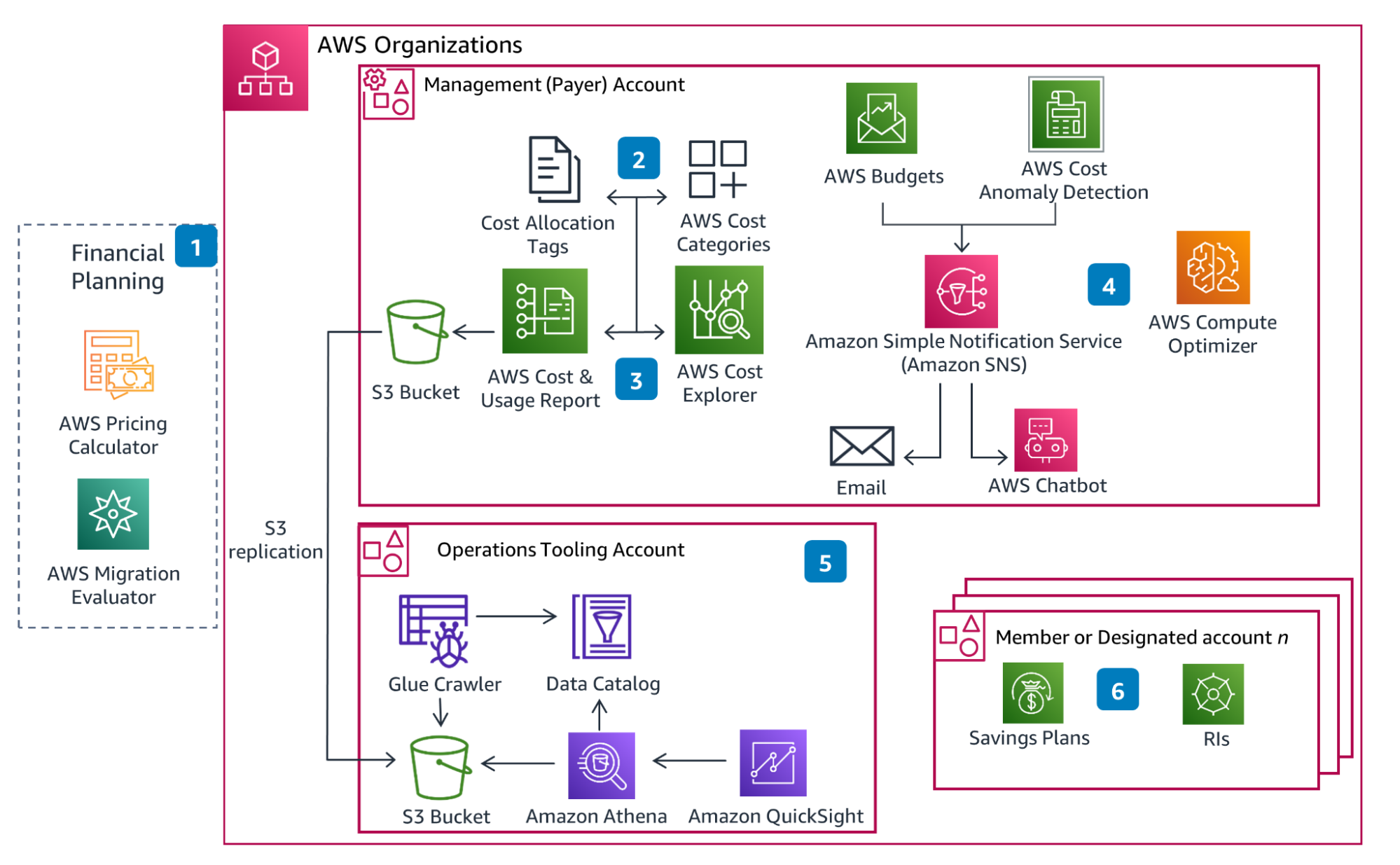
Implementing FinOps effectively requires the right tools, such as AWS Trusted Advisor, AWS Budgets, CloudWatch, and S3 Intelligent-Tiering.
Here’s a quick rundown of notable AWS native tools and DoiT (a third-party solution) that can help you manage costs better:
1. AWS Cost Explorer
AWS Cost Explorer provides visualization and analysis of your AWS costs and usage data over time. This service helps you explore cost trends, drill into spend, and spot anomalies.
Key features:
- Cost forecasting based on historical patterns
- Detailed insights with resource-level precision
- Customizable reports and dashboards
- Savings recommendations
Limitations:
- Limited data retention compared to many third-party tools
- Basic anomaly detection capabilities
- Requires manual analysis for more advanced optimization
AWS Cost Explorer is a strong starting point for teams beginning their FinOps journey, providing immediate visibility without additional investment.
2. AWS Compute Optimizer
Because compute resources often represent the largest portion of AWS bills, AWS Compute Optimizer focuses on analyzing EC2 instances, autoscaling groups, EBS volumes, and Lambda functions to identify rightsizing opportunities.
Key features:
- Machine learning (ML)–powered rightsizing recommendations
- Performance risk assessments for each recommendation
- Projected savings calculations
- EBS volume and Lambda optimization suggestions
Limitations:
- Limited to specific AWS services
- Recommendations based primarily on utilization metrics
- No built-in connection to business value metrics
Organizations with heavy compute workloads can see significant savings by operationalizing Compute Optimizer recommendations—especially when paired with broader FinOps processes and commitment strategies.
3. DoiT’s multicloud platform
Many organizations build FinOps with a mix of purpose-built FinOps tools rather than relying exclusively on AWS-native features.
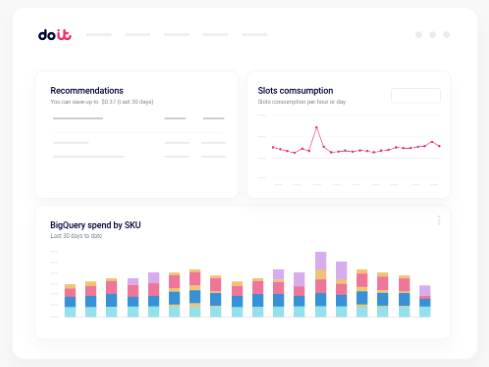
For more comprehensive cloud financial management, DoiT’s multicloud platform delivers advanced analytics, automation, and machine learning capabilities that extend beyond native AWS tools.
Key features:
- AI-driven anomaly detection to identify cost spikes early
- Automated recommendations with clear savings potential
- Custom dashboards for different organizational roles
- Workflow automation to implement optimization at scale
- Multicloud cost management and connectivity from a single platform
DoiT’s platform helps finance, engineering, and business teams work together more effectively on managing costs. For example, Pinecone uses a multicloud environment to save time and simplify visibility into cloud spend. By bringing cost data, recommendations, and workflows into one place, organizations can improve FinOps maturity and see value faster.
Common pitfalls in AWS FinOps adoption
Despite the clear benefits, organizations often stumble when implementing FinOps in AWS environments across three areas:
Process and governance failures: Organizations treat FinOps as quarterly cost-cutting rather than continuous optimization. The result is recurring waste in the same categories—overprovisioned databases, unused Elastic IPs, or forgotten dev environments that accumulate charges indefinitely.
Cultural and organizational resistance: Engineering teams resist financial accountability when cost controls reduce velocity or when they lack business context. Because provisioning is immediate but cost impact shows up later, FinOps can feel like “interference” unless it’s clearly connected to outcomes.
Measurement and incentive misalignment: Teams adopt misleading KPIs like “total AWS spend” (which penalizes growth) or “cost per EC2 instance” (which ignores serverless alternatives). Better options tie cost efficiency to business performance—like infrastructure cost as a percentage of gross margin, or cost per transaction/customer.
Pillars of FinOps that form the foundation of success
Successful AWS FinOps implementation rests on several core pillars:
Cross-functional collaboration: Engineering and finance run regular cost reviews that focus on specific AWS services and trade-offs. Shared dashboards connect technical metrics (utilization, latency) to financial metrics (cost per service, budget variance), and real-time alerts route to the people who can act.
Unit economics: Teams track business-relevant cost ratios by combining AWS billing data with application metrics—such as cost per customer or cost per transaction by allocating EC2/RDS/S3 spend across user segments or events.
Continuous optimization: Automation identifies anomalies and savings opportunities weekly (or daily), and teams implement improvements via Infrastructure as Code so cost efficiency becomes part of standard delivery workflows.
Clear ownership: Tagging and allocation enforce accountability across multi-account orgs, with automated checks that flag untagged resources quickly and budgets that notify owners when thresholds are crossed.
Transform your AWS cloud costs from expense to advantage
Implementing FinOps in AWS focuses on cost control—but it’s also a long-term strategy to get more value from cloud investments.
Finance leaders can turn AWS spend from an unpredictable cost into an intentional investment by establishing clear tagging policies, building shared cost visibility, and automating optimization.
Reaching FinOps maturity takes dedication, cultural alignment, and the right tooling—but for organizations that stick with it, the results compound over time.
Learn how you can uncover hidden saving opportunities and reduce your AWS cloud spend.
Frequently asked questions about FinOps in AWS
What is FinOps in AWS?
FinOps in AWS is a cross-functional practice that improves cloud cost visibility, allocation, and optimization across AWS services. It aligns finance, engineering, and business teams on shared accountability so cloud spending maps to measurable business value.
Is FinOps only about reducing AWS costs?
No. While savings matter, FinOps is primarily about maximizing value from cloud spend—balancing cost, performance, reliability, and speed. Sometimes the “best” decision increases spend if it improves customer experience or reduces operational risk.
What are the biggest AWS cost drivers FinOps teams manage?
Common cost drivers include EC2 compute, EBS storage, S3 storage and retrieval, data transfer/egress, managed databases (like RDS), Kubernetes and container workloads, and third-party marketplace tools.
What’s the first step to start FinOps on AWS?
Start with tagging and cost allocation. Without consistent tags (cost center, app/workload, environment, owner), you can’t assign ownership or measure efficiency. Then add dashboards and budget alerts so teams can act on costs in near real time.
Which AWS-native tools support FinOps?
Most teams start with AWS Cost Explorer, AWS Budgets, AWS Cost and Usage Reports (CUR), AWS Compute Optimizer, and AWS Trusted Advisor. These tools provide visibility, alerts, and rightsizing guidance, but often require additional process and operationalization.
How do Savings Plans and Reserved Instances fit into FinOps?
Savings Plans and Reserved Instances are commitment-based discounts. FinOps teams use usage data and forecasts to set appropriate commitment levels, track coverage, and continuously tune commitments to avoid underutilization or overcommitment.
How do you measure FinOps success in AWS?
Beyond “spend,” measure outcomes like budget variance, commitment coverage, waste reduction (idle resources), and unit economics (cost per transaction/customer/API call). The best metrics connect cloud efficiency to business performance and margin.
How often should FinOps reviews happen?
At minimum, run monthly reviews for executives and finance, and weekly reviews for engineering owners. High-velocity teams also use daily anomaly alerts and automated reports so issues are caught quickly and fixed before they snowball.