

Effortlessly monitor your cloud consumption, at any granularity
While setting cloud budgets is a great way to stay informed on your cost or usage, they aren’t great for all situations.
For example, what if you wanted to know when any of your Kubernetes clusters had a >10% week-over-week spend increase? Or if any EC2 machines had a day-over-day increase greater than 25%?
Normally, you’d have to set a budget for each cluster/machine. And then manually input the budget amount that represents a 10% and 25% increase from the previous week, respectively. Finally, you’d have to then constantly update that budget amount to reflect the previous week’s/day’s spend. You get the point.
That’s why we’re excited to launch Cloud Analytics Alerts, which helps you monitor your cloud costs and usage in a more granular, customizable way.
When to use cloud budgets vs. custom alerts
Budgets are great if your alert thresholds are based on absolute numbers and you’re evaluating a single item. For instance creating a budget for your overall Google Cloud spend, Kubernetes clusters, or the cost to run a specific product makes sense. But, as mentioned above, they’re less useful if you want to evaluate each instance of the same dimension separately (i.e. each of your K8s clusters), or base your alerts on % changes over a specific interval of time (ex. weekly).
When creating Alerts inside of the DoiT Console, you have more customizability around what you’re monitoring and what triggers you’re alerted on vs. regular budgets.
Let’s explore how to create an Alert in the DoiT Console!
How to create an alert for your cloud consumption
Part of what makes Alerts so flexible is that you use Attributions to define the Alert’s scope.
Attributions are custom groupings of resources that you create in the DoiT Console to understand your cloud consumption in the context of your business.
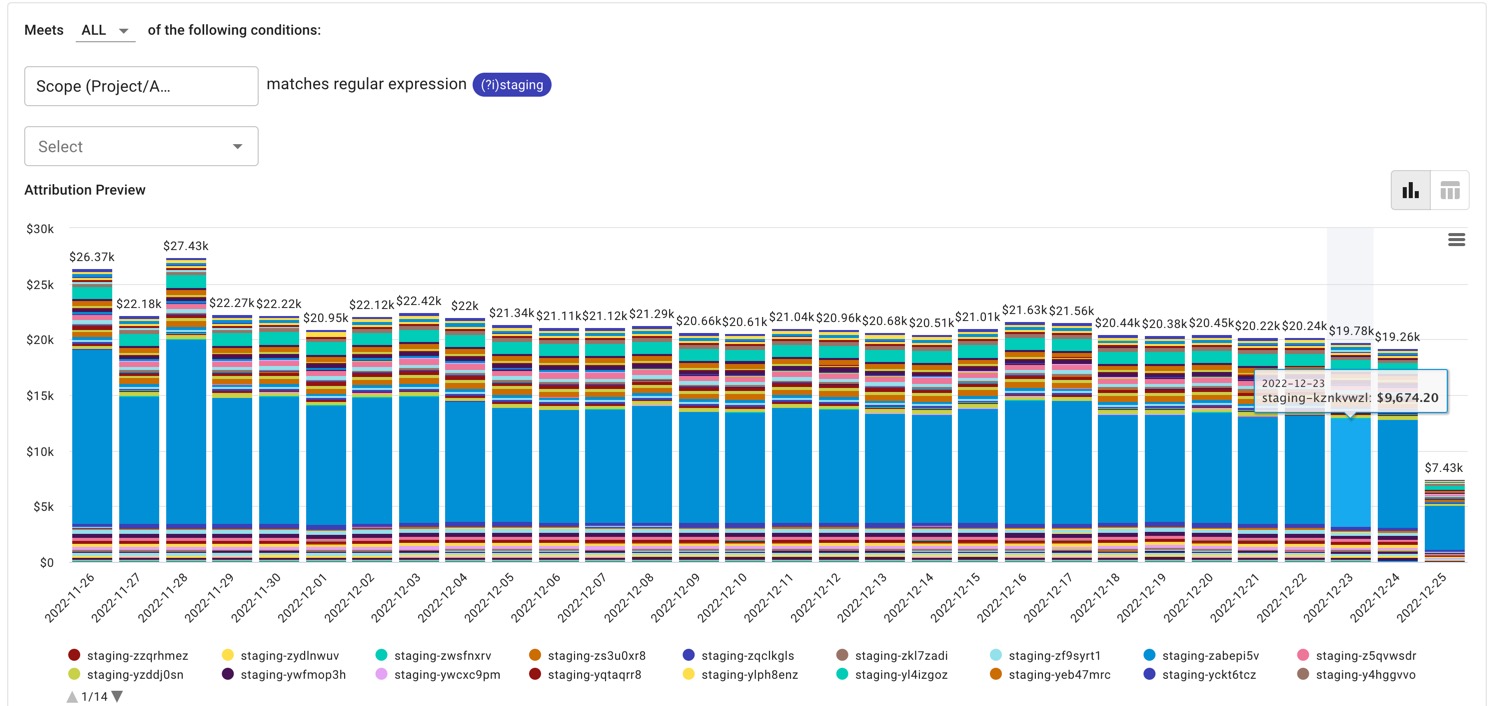
In the example below, I created an Attribution that represents my staging environment costs. I’m basically saying, “Group all Google Cloud projects containing the word ‘staging’ together — that’s how my company defines its staging environment costs’. However, you can use any combination of projects/accounts, services, labels/tags, and more to define your Attributions.
Your Alert scope defines the cost or usage data that the Alert reviews.
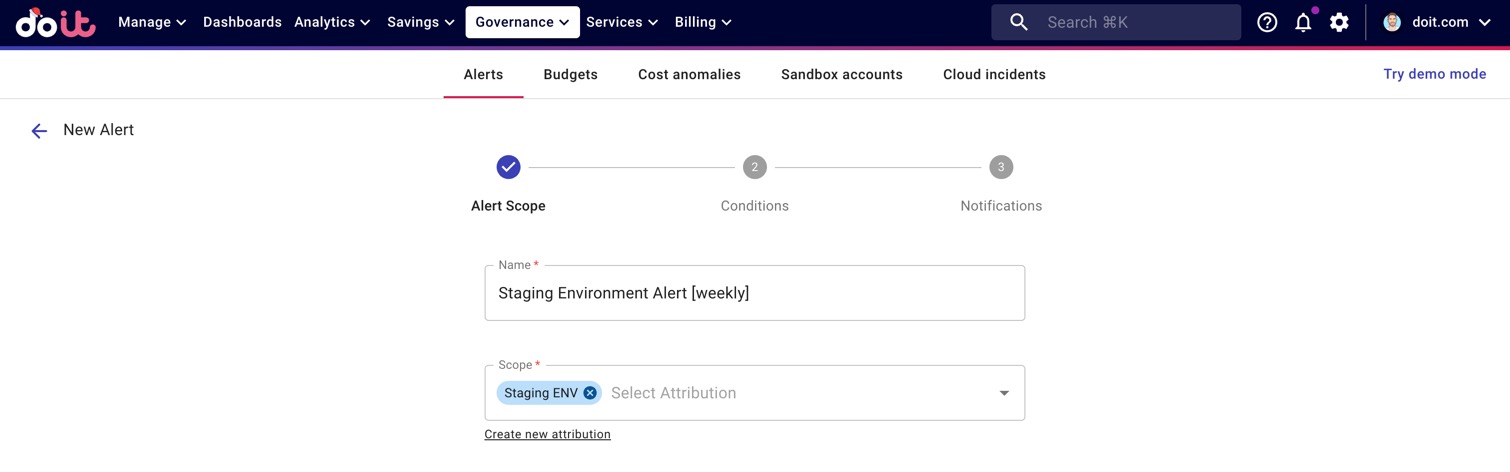
For instance, do you want to look at all of your Google Cloud or AWS costs? Or just the costs that are associated with a particular team or environment?
In our example below, we look only at costs associated with our Staging Environment.
Once you’ve defined your Alert’s scope, you need to set its conditions.
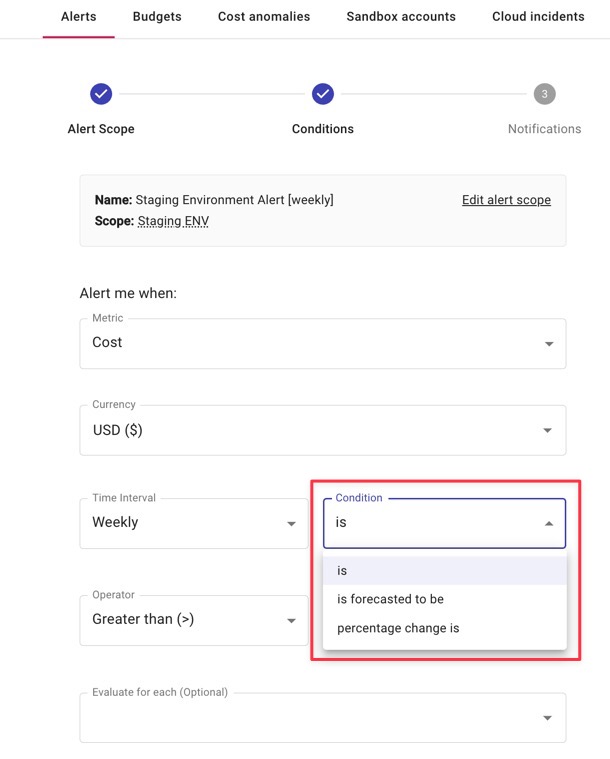
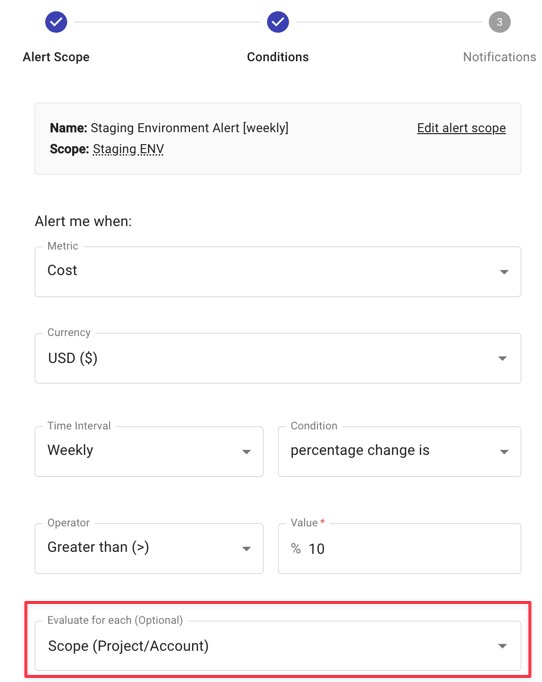
As highlighted below, after selecting the metric, currency, and time interval for your Alert you’ll need to decide whether your alert is triggered when you:
- Reach an absolute number threshold,
- Reach a specific % change in the cost or usage of whatever you’re tracking, or
- Are forecasted to reach a number threshold within the interval you selected
Lastly, you have an optional setting, “Evaluate for each”, which lets you apply your condition to each of a dimension you select. This can be each service, each cluster, each value within a given label/tag — anything.
For instance, below I selected “Scope (Project/Account)”. As a result, my Alert will trigger when any of the Google Cloud projects — or AWS accounts if there were any — associated with my Staging environment increase by more than 10% in any given week.
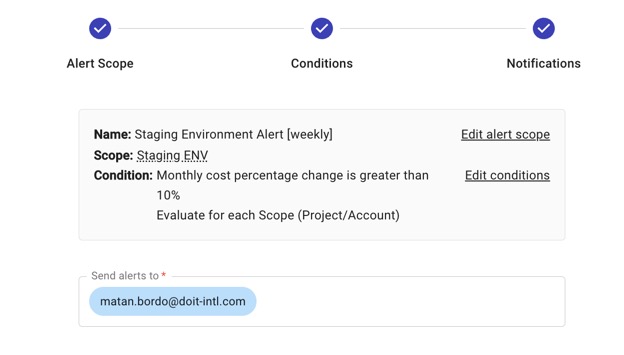
Finally, you just need to set who should receive the alerts when they’re triggered.
Creating Alerts helps increase cost/usage awareness and accountability of other stakeholders who don’t typically think about the cloud consumption of the “thing” they’re building in the cloud.
For example, you could create alerts for each of your products (if you have multiple) and subscribe the relevant Product Managers and/or Engineering Team Leads to the alerts. That way, they’ll always be aware of the costs of what they’re building without having to build their own reports.
Next, let’s explore some real life examples of how DoiT uses Alerts internally!
Alerts use case #1: Engineering team service costs
In the below example, each of our Product Engineering Team Leads created an Alert that monitors the service costs for any resources their respective teams use.
Alerts use case #2: Evaluating cost increases per machine
We use both AWS EC2 and Google Cloud Compute Engine at DoiT. But rather than monitor each service cost as a whole, I’d like to be notified if any SKU (i.e. machine) substantially increases in cost week over week. This Alert accomplishes that for us in just a few clicks.
Alerts use case #3: Cost of operating your product
At DoiT, we build technology that helps you better understand, optimize, and control your cloud costs. Operating our technology portfolio comes at a cost, which we monitor to make sure nothing gets out of control.
Using an Attribution that groups together all Google Cloud projects related to operating our technology, we’ll receive an alert whenever our product costs increase >5% week over week.
Preventing cloud cost overspend with multiple “safety nets”
All this is not to say that cloud budgets or anomaly detection functionality don’t have their purpose. Anomaly detection is great for monitoring for cost or usage spikes you’re not anticipating. Budgets are helpful for staying informed on costs of singular entities (teams, product lines, environments). Think of Alerts as an additional safety net for combatting cloud overspend.
The good news? If you’re a DoiT customer, you get access to all three along with the rest of DoiT’s technology portfolio at zero cost.
To create your first alert in the DoiT Console, click here (note, you must have the requisite user permission).
And if you’re not yet a customer? All you have to do is pay your AWS or Google Cloud bill through DoiT, that’s it. And for problems technology can’t solve – that require a more nuanced understanding of your business and goals – you’ll also have on-demand access to over 150 Senior Cloud Architects around the world (yes, at zero cost as well).
Click here to learn more about working with DoiT.