
Announcement
This page is also available in Deutsch, Español, Français, Italiano, 日本語, and Português.
Audit logs in Cloud Intelligence™
When a budget alert changes, an allocation rule disappears, or a report gets edited, audit logs answer the obvious question: who made the change, and what did it look like before? This is the foundation for troubleshooting config drift, supporting your SOC2 and ISO review workflows, and tracing actions back to a named user.
Before and after, side by side
Every change to a configurable object captures the full state before and after. Open any event to see exactly which field moved, what the old value was, and what replaced it. No more guessing why a budget started firing or where a tag mapping went.
What gets logged
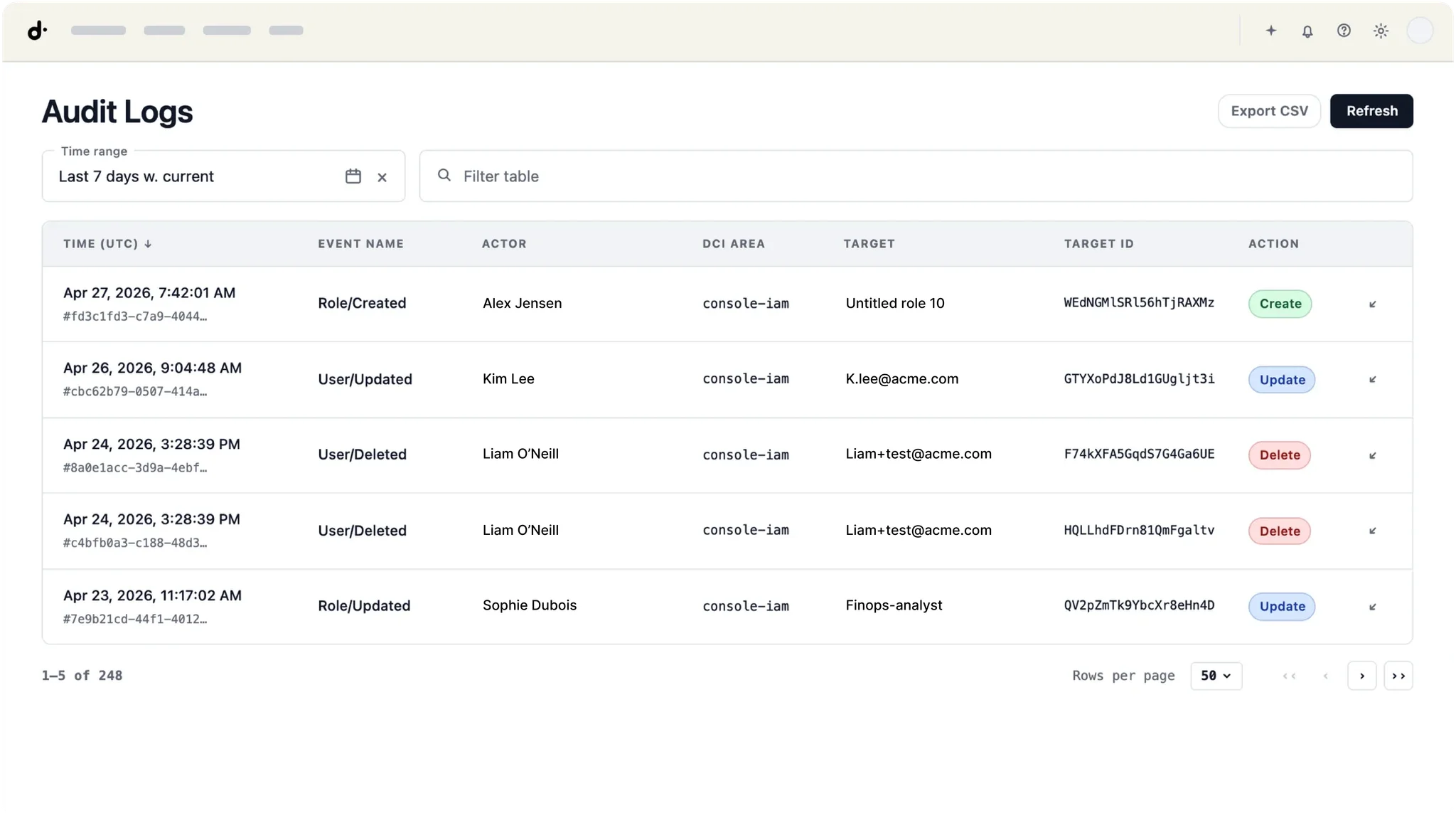
Each event records six fields: timestamp, event description, actor, Cloud Intelligence™ area (budgets, allocations, reports, anomalies, and so on), target object, and action type (create, update, delete). Read actions and exports are not logged in this release.
How to investigate
Filter by any field. All filters support regex, so you can scope to a team domain (.*@acme\.com), a class of objects, or a time window. Click any value in the table to filter by it. Default view is the last 7 days, newest first. Timestamps are UTC.
Access and retention
Audit logs are available to users with the Admin role under settings > Audit Logs. Events are retained indefinitely.
Learn more
Full audit logs documentation in the Help Center
Related documentation
