

AWS FinOps tools help engineering, finance, and operations teams manage cloud spend with shared accountability. The five tools worth evaluating in 2026 are DoiT Cloud Intelligence, AWS Cost Explorer, CloudHealth by VMware, Cloudability by Apptio, and Spot by NetApp. Each addresses a different set of tradeoffs between depth of optimization, automation, multi-cloud support, and implementation complexity.
AWS cloud costs follow a predictable pattern: they start manageable, grow faster than expected, and become genuinely hard to explain to anyone outside the team running the infrastructure. Engineering can see what's deployed. Finance sees the bill. Neither can quickly answer why costs changed last month or where the most leverage is.
That's the problem AWS FinOps tools exist to solve. Not just visibility, but the connection between what's visible and what actually changes.
The market for these tools has grown crowded. This comparison covers the five most frequently evaluated options in 2026, with honest assessments of where each one performs well and where it falls short.

What are AWS FinOps tools, and why are they essential for cloud cost management?
AWS FinOps tools are platforms that bring financial accountability to AWS cloud spending. They combine cost visibility, governance, and optimization into workflows that engineering, finance, and operations teams can actually use together.
The FinOps Foundation defines the practice across three phases: Inform (understand what you're spending), Optimize (reduce waste and improve efficiency), and Operate (build the processes that sustain gains over time). Most organizations are strong at Inform and weak at Operate. That's where the real cost of not having the right tooling shows up.
According to the Flexera 2025 State of the Cloud Report, 84% of organizations say managing cloud spend is their top challenge, and cloud budgets are exceeding targets by 17% on average. The gap isn't awareness. It's execution.
The tools in this comparison get evaluated on their ability to close that gap: not just surface what's happening, but help teams do something about it.
The 5 best AWS FinOps tools for 2026
These five tools represent the most commonly evaluated options for AWS-heavy environments in 2026. The comparison is structured around the decisions real buyers face: native vs. third-party, breadth vs. depth, automation vs. analyst workflow.
1. DoiT Cloud Intelligence
DoiT Cloud Intelligence is an intent-aware FinOps platform, meaning it evaluates cloud spend in the context of what each workload is actually supposed to be doing, not just whether the number went up. It combines automated cost analytics, governance, and optimization with access to a team of cloud architects, built for AWS-heavy and multi-cloud environments where native tooling provides visibility but not the operational loop that turns visibility into action.
DoiT's AWS credentials matter in context: the company holds AWS Premier Tier Services Partner status, more than 500 AWS certifications, six AWS competencies, and the AWS Managed Services Provider (MSP) designation, placing it in the top tier of AWS partners worldwide. In 2023, DoiT signed a five-year Strategic Collaboration Agreement with AWS targeting $5 billion in business. That depth of partnership translates directly to access to AWS pricing, commitment flexibility, and escalation paths that standalone FinOps platforms can't offer.
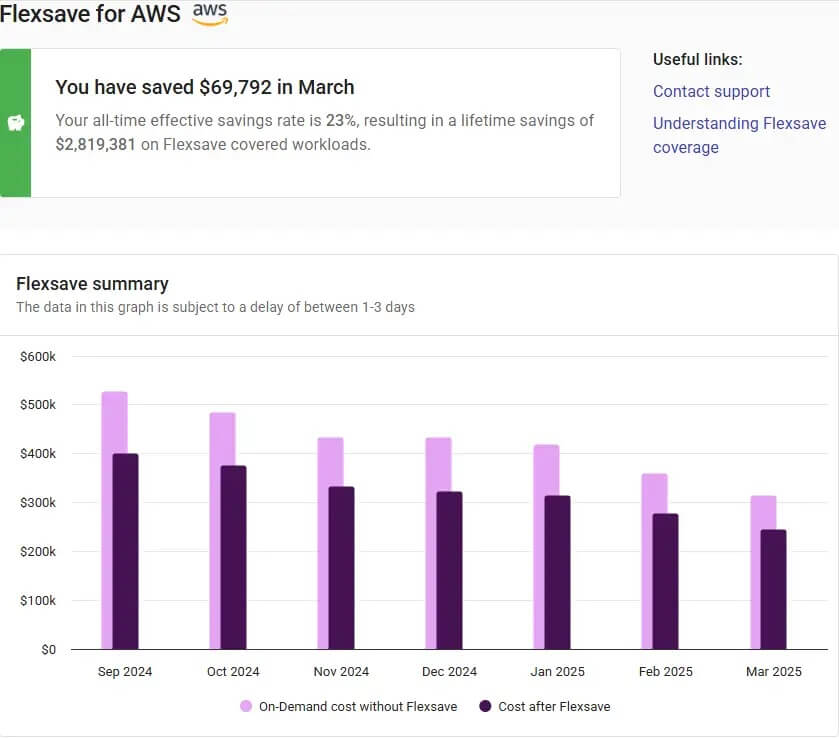
On the platform itself, the key differentiator is Flexsave for Compute, which automates AWS commitment management without requiring teams to forecast usage or lock into specific instance types. Unlike Reserved Instances or Savings Plans that require upfront decisions, Flexsave applies discounts automatically and adjusts as usage changes.
Key features
- Real-time cost anomaly detection across AWS services with automated alerts routed to responsible teams
- Flexsave for Compute: automated AWS commitment management without forecasting requirements or upfront lock-in
- CloudFlow: automated FinOps workflows for rightsizing, tag enforcement, and cost attribution
- DoiT Insights: AI-assisted recommendations with human review from cloud architects
- Cross-provider visibility covering AWS, GCP, and Azure in a unified view
- FinOps Foundation certified platform — the highest certification offered by the organization
Pros
- Flexsave delivers automated AWS savings without requiring commitment forecasting — reviewers on Gartner Peer Insights cite it as a primary adoption driver
- AWS Premier Tier Services Partner with MSP designation: access to AWS expertise, pricing, and escalation paths built into the platform relationship, not just the software
- FinOps Foundation certified — independently validated against the FinOps Framework
- Human expertise included: access to cloud architects for implementation and ongoing optimization, not just software licenses
Limitations
- Platform depth means more to configure upfront — teams that want a dashboard without integration work will find the initial setup requires more investment
- Pricing is usage-based and scales with cloud spend managed, which can make cost estimation less predictable for rapidly growing environments
Best fit: AWS-heavy organizations and multi-cloud environments that want optimization automation alongside expert advisory access, not just cost dashboards. Also a strong fit for teams using Flexsave to manage AWS commitments without dedicated FinOps headcount.
Learn more: DoiT Cloud Intelligence | DoiT FinOps | DoiT AWS Partner page
2. AWS Cost Explorer
AWS Cost Explorer is the native AWS cost management tool. It provides interactive dashboards for analyzing spending patterns, reviewing Reserved Instance and Savings Plan coverage, forecasting future costs, and generating rightsizing recommendations for EC2, RDS, and other services.
For teams that are primarily or exclusively on AWS and don't need cross-provider visibility, Cost Explorer is the logical starting point. It's included with every AWS account, integrates directly with AWS billing data, and covers the basics of cost attribution, trend analysis, and commitment coverage tracking.
Key features
- Cost and usage dashboards with up to 13 months of historical data
- Reserved Instance and Savings Plan coverage and utilization reports
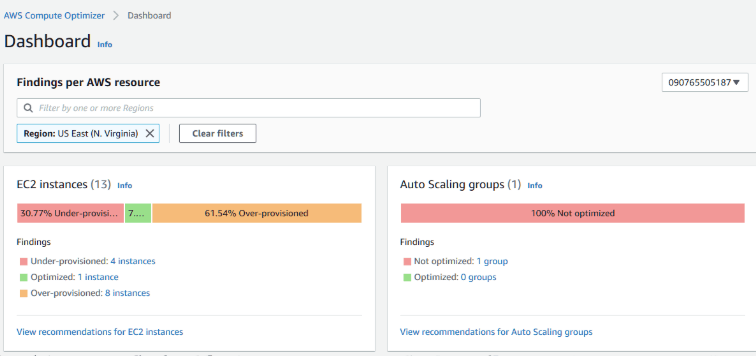
- Rightsizing recommendations for EC2 instances based on CloudWatch utilization data
- Cost forecasting with confidence intervals based on historical patterns
- AWS Budgets integration for threshold alerts and automated actions
Pros
- Free to use — no additional cost beyond standard AWS API request charges
- Native integration with all AWS services — no data connectors or export configuration required
- Familiar to AWS teams — built into the console workflow most engineers already use
Limitations
- AWS-only: no visibility into GCP, Azure, or SaaS spend alongside AWS costs
- Limited automation: recommendations surface in the console but don't execute automatically without additional configuration
- Attribution requires consistent tagging — teams without mature tagging practices get limited allocation data
- No human advisory layer: insights require interpretation by someone who understands AWS pricing and architecture
Best fit: AWS-only environments in the early stages of FinOps maturity that need to understand spending before investing in third-party tooling.
Learn more: AWS Cost Explorer
3. CloudHealth by VMware
CloudHealth by VMware (now part of Broadcom following the VMware acquisition) is one of the established enterprise cloud management platforms. The CloudHealth product page positions it around multi-cloud visibility across AWS, GCP, and Azure with a strong policy engine for governance and compliance.
CloudHealth built its reputation as a category leader for enterprise cloud financial management, particularly in large organizations with complex multi-account AWS environments and dedicated FinOps or cloud operations teams. The Broadcom acquisition introduced uncertainty around product direction and pricing that buyers should factor into any evaluation.
Key features
- Multi-cloud cost management across AWS, GCP, and Azure
- Policy-based governance and automated remediation
- Chargeback and showback reporting for internal cost attribution
- Reserved Instance lifecycle management and purchase recommendations
- Custom reporting and executive dashboards
Pros
- Established enterprise platform with deep AWS integration and a large customer base
- Strong policy engine for organizations with complex governance requirements
- Multi-cloud breadth covers AWS, GCP, and Azure in a single platform
Limitations
- Broadcom acquisition has introduced pricing changes and product direction uncertainty — PeerSpot data shows CloudHealth's mindshare in the cloud management category fell from 2.4% to 1.7% in 2025, a sign of where enterprise attention is shifting
- Platform complexity can require dedicated resources to configure and maintain effectively
- Less automation-forward than newer platforms — more analyst workflow than automated optimization
Best fit: Large enterprises with established FinOps teams, complex governance requirements, and existing VMware/Broadcom relationships.
DoiT comparison: DoiT vs. CloudHealth
4. Cloudability by Apptio
Cloudability is Apptio's cloud financial management platform, now part of IBM. The Cloudability product page focuses on connecting cloud costs to business context, unit economics, cost allocation by business unit, and financial forecasting for multi-cloud environments.
Cloudability targets finance and IT finance teams as much as engineering, with strong reporting and allocation features that map cloud spend to business outcomes. G2 scores Cloudability's Cloud Cost Analytics at 8.9, slightly ahead of some competitors on that dimension.
Key features
- Business context mapping: allocate cloud costs to products, teams, or customers
- Cloud cost forecasting and budgeting with scenario modeling
- Reserved Instance and Savings Plan management with coverage recommendations
- Chargeback and showback reporting with finance-ready outputs
- Multi-cloud support across AWS, GCP, and Azure
Pros
- Strong financial reporting and business context features — well suited for finance team workflows
- Unit economics and cost allocation capabilities are among the most developed in the category
- IBM backing provides enterprise support and integration with broader IT financial management tooling
Limitations
- IBM acquisition has introduced similar concerns to the Broadcom/CloudHealth situation — product roadmap transparency and pricing predictability are open questions for some buyers
- Less focused on automation and optimization than platforms built specifically for engineering-led FinOps
- Implementation complexity is a recurring theme on G2 and Gartner Peer Insights, particularly for teams without a dedicated FinOps analyst to manage onboarding
Best fit: Enterprise organizations where the finance team leads cloud cost management and needs detailed allocation, forecasting, and business unit reporting.
DoiT comparison: DoiT vs. Cloudability
5. Spot by NetApp
Spot by NetApp focuses on compute cost optimization, specifically the automation of spot instance usage and commitment management for AWS, GCP, and Azure. Its core differentiation is predictive algorithms that maintain application availability on lower-cost spot and preemptible instances.
For organizations with workloads that can tolerate interruption — batch processing, dev/test environments, stateless applications — Spot's automation delivers significant compute savings with managed reliability risk. The platform covers a narrower scope than the others on this list, with less breadth in cost attribution and governance.
Key features
- Automated spot instance management with predictive rebalancing to prevent interruption
- Savings Plans and Reserved Instance management and optimization
- Elastigroup: workload management layer for spot instance orchestration
- Ocean: Kubernetes cost optimization and cluster right-sizing
- Multi-cloud support for AWS, GCP, and Azure compute
Pros
- Deep automation for spot instance workloads — a category where it has more specialization than broader FinOps platforms
- Ocean provides Kubernetes cost optimization that pairs well with engineering-led CloudOps practices
- Can deliver significant savings on compute-heavy workloads without requiring forecasting or commitment decisions
Limitations
- Narrower scope: strong on compute optimization, weaker on broader cost attribution, governance, and multi-service visibility
- Spot instance workloads require architecture review — not all applications are candidates for interruption tolerance
- Less coverage of the financial reporting and attribution workflows that enterprise FinOps teams need
Best fit: Engineering-led teams with significant compute spend on batch, stateless, or Kubernetes workloads where spot instance optimization would have immediate impact.
AWS FinOps tools at a glance
This table summarizes the key differentiators across the five tools for buyers evaluating options in 2026.
| Tool | Multi-cloud | Automation | Attribution | Advisory layer | Best fit |
|---|---|---|---|---|---|
| DoiT Cloud Intelligence | Yes | High | Strong | Yes | AWS-heavy and multi-cloud teams wanting automation + advisory |
| AWS Cost Explorer | AWS only | Low | Basic | No | AWS-only early-stage FinOps |
| CloudHealth by VMware | Yes | Medium | Strong | No | Large enterprise with existing Broadcom relationship |
| Cloudability by Apptio | Yes | Low | Very strong | No | Finance-led FinOps with complex allocation needs |
| Spot by NetApp | Yes | High (compute) | Limited | No | Compute-heavy workloads on spot instances or Kubernetes |
Read across the table: DoiT and CloudHealth are the only two tools with both multi-cloud visibility and strong attribution capabilities. Cloudability leads on attribution but trails on automation. Cost Explorer is the only free option, but it's AWS-only with limited automation. Spot by NetApp has the deepest compute optimization automation but the narrowest scope. Teams evaluating these tools are typically choosing between breadth of coverage and depth of optimization in specific areas.
What are the top features to look for in AWS FinOps tools?
The feature marketing for FinOps tools can sound similar across the category. The practical differences show up in execution: which tools actually close the loop between visibility and action, and at what operational cost to your team.
These four capabilities separate tools that reduce waste from tools that just report on it.
Real-time cost anomaly detection and automated response
Cost anomaly detection ships with most tools. Automated response to anomalies does not.
The distinction matters because the window between a cost spike starting and someone acting on it is where money gets lost. A Lambda function invoked at unexpected scale, a BigQuery job without row limits, a dev environment left running over a long weekend — these generate real charges within hours. A weekly cost review doesn't catch them. Neither does an email alert that lands in a shared inbox.
What to look for: alerts that route to whoever owns the spend, with enough context to start investigating without opening three other tools. Auto-shutdown for idle resources and spending threshold enforcement are table stakes at this point. The real differentiator is whether the tool can take automated action on known waste patterns, or whether it just tells you the waste exists.
Automated rightsizing and commitment management
Rightsizing recommendations exist in almost every tool. Automated rightsizing, where the tool makes the change rather than the suggestion, appears far less often and marks one of the more meaningful capability gaps across platforms.
On the commitment side, the same gap exists. AWS Savings Plans and Reserved Instances can reduce compute costs by 30% to 72% compared to on-demand rates, but purchasing commitments requires forecasting usage patterns that most teams don't have the bandwidth to do well. Tools that automate commitment management, like Flexsave for AWS, remove the forecasting requirement and adjust coverage as usage changes.
What to look for: rightsizing that can execute changes, not just recommend them. Kubernetes is where this gap is most acute: pod-level resource requests and limits are the most common source of container waste, and no major cloud provider's native tooling addresses it automatically. Commitment management that doesn't require upfront forecasting or lock-in.
Cross-functional cost attribution and chargeback
You can't optimize what you can't attribute. And attribution in multi-team AWS environments requires consistent tagging, enforced at provisioning time, mapped to organizational context that finance and engineering agree on.
The consequence of not having this: cost reports that show total spend but can't answer who's responsible for which portion of it. That makes optimization conversations adversarial rather than collaborative, and makes finance reviews reactive rather than predictive.
What to look for: tag enforcement that prevents untagged resources from being deployed, not just flagged after the fact. Showback and chargeback reporting that works at the team, product, and business unit level. The FinOps Foundation's guidance on cost allocation is worth reading before any evaluation. It maps FinOps cost allocation maturity across five levels, which makes it easier to assess whether a tool supports where you are now and where you're heading.
Multi-cloud visibility and unified governance
AWS-only visibility was sufficient when most organizations ran on a single cloud. That's increasingly not the case. According to the Flexera 2025 State of the Cloud Report, the average organization uses 2.4 public cloud providers.
Tools that only surface AWS costs create a partial picture that can lead to bad decisions: optimizing AWS spend while GCP or Azure costs grow unchecked, or missing cross-provider egress costs that only become visible when you see both sides of the data transfer.
What to look for: a single pane that covers AWS, GCP, and Azure without requiring separate analyst workflows per cloud. Anomaly detection that applies the same logic across providers, not just within AWS. Governance policies that don't need to be reconfigured every time you add a workload on a second cloud.
How to implement AWS FinOps tools for maximum ROI
The technical setup for most AWS FinOps tools takes days, not months. The organizational work takes longer. The sequencing matters: quick wins from cleanup and rightsizing generate political capital for the harder governance and commitment work that follows. Teams that skip to the complex parts first tend to stall.
One signal worth noting from the State of FinOps 2026 report: pre-deployment architecture costing ranked as the second most-wanted tool capability that practitioners say doesn't yet exist. That's an AWS-relevant finding. Most shift-left FinOps work happens in Terraform and CloudFormation environments where infrastructure decisions get made before a dollar is spent. Teams that build cost estimation into that workflow, rather than reviewing spend after the fact, consistently outperform teams that don't.
Typical timeline: most teams see early cost reductions within two to four weeks from cleanup and rightsizing. Larger structural savings from commitment management and governance usually materialize within 60 to 90 days of sustained implementation.
Step 1: Establish ownership
Assign a FinOps lead who can bridge engineering and finance. At many organizations, a platform engineer or cloud architect fills this role alongside their existing responsibilities, owning the relationship with finance on cloud costs without a dedicated headcount.
Define KPIs before configuring anything: what does success look like in 30, 60, and 90 days? Typical targets include waste reduction as a percentage of total spend, commitment coverage percentage for stable workloads, and anomaly-to-resolution time. Starting with measurable outcomes prevents the program from becoming a dashboarding exercise.
Step 2: Define cost allocation
Implement tagging standards across all AWS accounts before optimizing anything. Tagging underpins everything that follows. A well-tagged environment generates cost attribution data that finance, engineering, and product teams can all work from. An untagged environment generates a bill that nobody can explain.
Minimum tags for most environments: team, environment (prod/staging/dev), application, and cost center. Enforce them at provisioning time using AWS Tag Policies or a third-party governance layer. Tags that are optional in practice are effectively absent.
Step 3: Automate cost reporting
Configure dashboards before the first review cycle, not after. The mistake most teams make is building one view for everyone, which means it works well for nobody.
Executives want trend lines and forecast vs. actual. Finance needs allocation broken out by team or business unit with chargeback-ready data. Engineers don't want a dashboard at all — they want anomaly alerts routed directly to them with enough context to investigate without switching tools.
Distribute reports on a defined cadence — weekly for engineering, monthly for finance, quarterly executive review — so that cost conversations happen on schedule rather than in reaction to a spike. The goal is to make the budget conversation predictable.
Step 4: Optimize reservations
Analyze at least 30 to 90 days of actual usage data before purchasing any commitments. Target 60% to 80% coverage for stable, predictable workloads while keeping on-demand capacity for variable or unpredictable usage patterns.
For teams that don't want to manage the forecasting and purchase cycle manually, automated commitment tools like Flexsave eliminate that overhead by applying discounts without requiring upfront decisions. The practical outcome is similar coverage levels with significantly less analyst time.
Step 5: Monitor and iterate
Implement continuous anomaly detection with alerts routed to whoever owns the spend, not to a central ops inbox. Run quarterly FinOps reviews to assess what's been optimized, what still represents an opportunity, and whether the KPIs set in Step 1 have been met.
The pattern that sustains optimization gains over time: treating this as an ongoing operational practice, not a project. Teams that build FinOps reviews into sprint planning and architecture reviews maintain gains. Teams that treat it as a project find themselves starting over.
Transform your AWS cost management strategy with the right tools
The right AWS FinOps tool depends on where your team sits in its optimization journey, how it's structured, and what's generating the most cost pressure.
If you're early stage and AWS-only, Cost Explorer is the starting point. Once you're spending enough that the limitations of native tooling become the constraint, third-party platforms close the gap. And if the immediate priority is Savings Plans and Reserved Instance coverage without the forecasting overhead, that's exactly what Flexsave for AWS is built for.
The metric that matters most isn't which tool has the most features. It's which one closes the loop between what you can see and what your team actually changes.
If you're evaluating AWS FinOps tools and want to know where the most immediate opportunities are in your specific environment, before committing to anything, DoiT works with more than 4,000 customers worldwide as an AWS Premier Tier Services Partner with MSP designation. Talk to our team and we'll walk through your current AWS setup together.
Frequently asked questions
What is AWS FinOps?
AWS FinOps is the practice of bringing financial accountability to AWS cloud spending through shared ownership across engineering, finance, and operations teams. It combines cost visibility (tagging and allocation), governance (budgets and guardrails), and optimization (rightsizing, commitments, and anomaly detection) to make AWS spending predictable and actionable. The FinOps Foundation defines the practice across three phases: Inform, Optimize, and Operate.
What's the difference between AWS native FinOps tools and third-party tools?
AWS native tools like Cost Explorer, Budgets, and Compute Optimizer are free, deeply integrated with AWS billing data, and sufficient for single-cloud environments with basic FinOps needs. Third-party tools like DoiT Cloud Intelligence add cross-provider visibility, deeper automation, advisory access, and governance capabilities that AWS native tooling doesn't provide. Teams typically start with native tools and add third-party tooling as their cloud spend scales and their optimization needs grow more complex.
How do AWS Reserved Instances and Savings Plans fit into FinOps?
Reserved Instances and Savings Plans are AWS commitment-based pricing models that reduce compute costs by 30% to 72% compared to on-demand rates in exchange for committing to a defined level of usage over one or three years. FinOps tools help manage these commitments by analyzing usage data to identify coverage gaps, recommending purchases, and tracking utilization. Some platforms, like DoiT's Flexsave for Compute, automate this process without requiring upfront forecasting or lock-in decisions.
What should I look for in an AWS FinOps tool?
The four capabilities that separate effective FinOps tools from dashboarding tools: real-time anomaly detection with automated response (not just alerts), automated rightsizing and commitment management that executes changes, not just recommends them, cross-functional cost attribution and chargeback that maps spend to teams and business units, and multi-cloud visibility if your infrastructure spans more than AWS. Tools that close the loop between visibility and action deliver more value than tools that only improve reporting.
How long does AWS FinOps implementation take?
Most teams see early cost reductions within two to four weeks from basic cleanup and rightsizing efforts. Larger structural savings from commitment optimization and governance typically materialize within 60 to 90 days of sustained implementation. The technical setup for most tools is fast — days, not months. The organizational work of establishing tagging standards, defining ownership, and building cross-team accountability takes longer and is where most programs stall.
Is DoiT Cloud Intelligence only for AWS?
No. DoiT Cloud Intelligence supports AWS, Google Cloud Platform, and Microsoft Azure in a unified platform. However, DoiT has particularly deep AWS capabilities given its status as an AWS Premier Tier Services Partner, MSP designation holder, and signatory to a five-year Strategic Collaboration Agreement with AWS. Flexsave for Compute is specifically designed for AWS commitment management.
See how DoiT Cloud Intelligence compares for your AWS environment
Most AWS cost problems surface quickly. The harder part is building the operational loop that keeps them from coming back. DoiT CloudFlow automates the optimization workflows that most teams currently handle manually — tagging enforcement, rightsizing, commitment management, anomaly response. As an AWS Premier Tier Services Partner with MSP designation and FinOps Foundation certification, DoiT combines platform automation with the cloud expertise to put it to work. Talk to our team to see what's possible for your environment.
Related reading