

What is cost allocation
The move from data center to cloud has shifted IT spend from a capital expense to an operational expense, which has created new cloud cost governance problems. Instead of having to explicitly request money to purchase servers or equipment, developers (or automated systems) can easily spin up instances, often leading to overspending and unattributed spend.
One of the first steps to introducing more governance to your cloud spend is to organize and group your costs among internally defined categories (e.g., business units) within your organization. Known as Cost Allocation, this process helps you see what costs are shared among groups so you can split them accordingly. It also helps you find missing costs and non-governed spend. Don’t worry, cost allocation is a skill you will develop as an organization over time — you don’t have to allocate everything perfectly from the beginning.
Once costs are allocated, it is easier to report on them and create more accurate budgets and forecasts. However, there’s no single way to allocate your cost and usage data, and no shortage of tools that help you do so.
Let’s talk about allocating your cloud costs by environment and how to do so using Google Cloud, AWS and DoiT’s proprietary cloud analytics technology.
Why allocate costs by environment
Understanding cost per environment helps you answer questions like “How much does it cost to serve our customers vs. build, test, or experiment?” In certain countries, you can avail of financial incentives by capitalizing R&D costs and depreciating them over time to free up cash. It also enables the kind of internal conversations that prompt engineers to take action that can save you money down the road.
For instance, you may want to focus on production costs – not only because of the level of spending there, but also because you can use your findings to figure out customer margins, which can be useful for sales conversations when determining how much of a discount you can give. Additionally, it’ll help you understand seasonality better if your industry experiences cyclic customer usage.
Paying attention to spending trends in your dev environment will help you identify stability or scaling issues early and minimize problems when a feature gets shipped.
Finally, a better understanding of environment costs and their trends enables you and your engineers to develop accurate forecasts and budgets. It’s your answer to the “How much spending is too much?” question.
How to allocate costs by environment
How you track cost per environment starts depends on how you define an environment. This is usually done through user-defined tags or labels, with “environment” key values representing prod, dev, staging and more.
Defining environments in this way enables you to create more granular breakdowns, like measuring production costs by account or project.
Additionally, we’ve seen other customers define environments using Projects (Google Cloud) or Accounts (AWS), and even with IAM Folders in Google Cloud.
Calculating cost per environment in Google Cloud
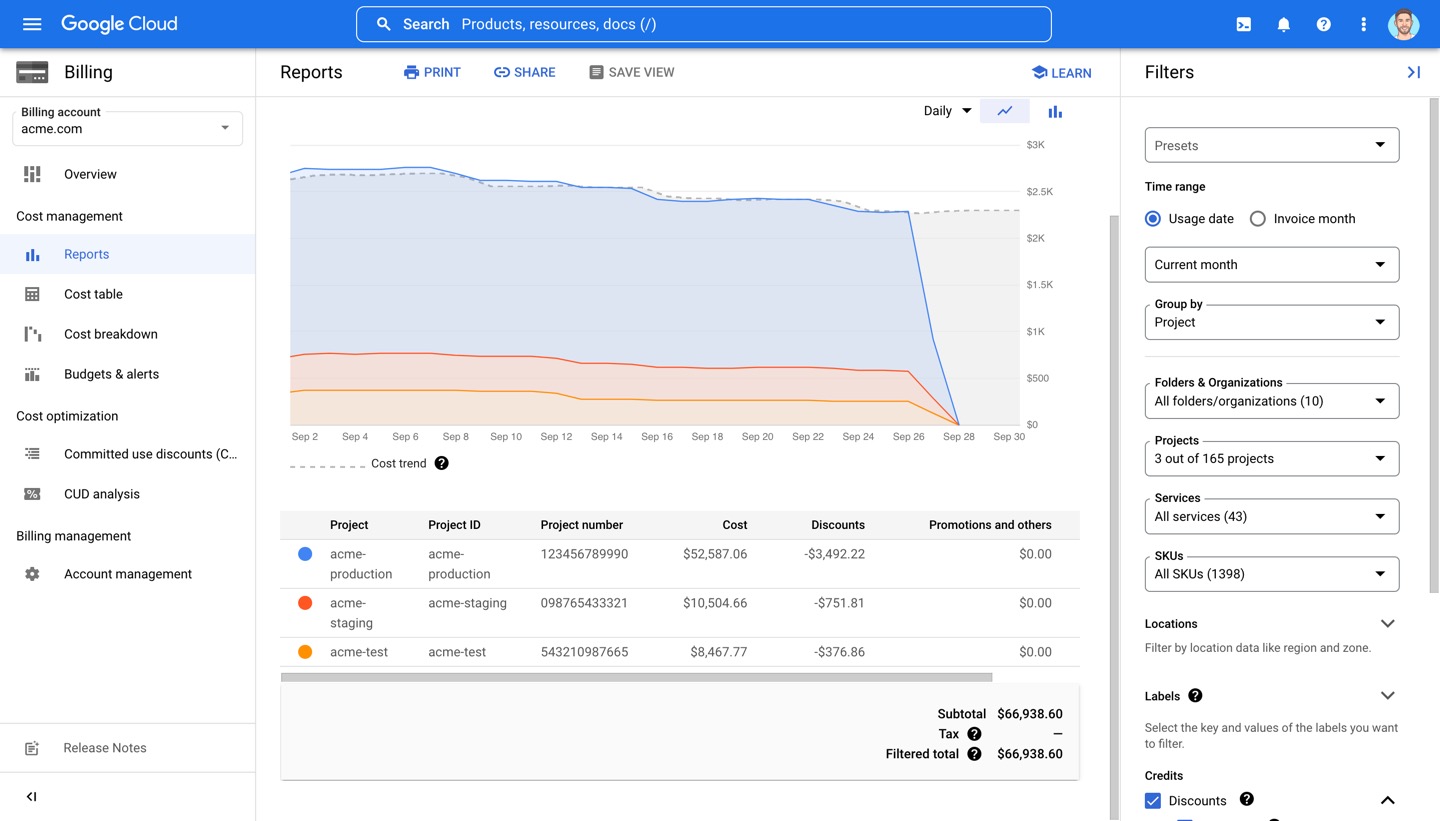
Below is an example of how you might visualize environment costs in Google Cloud’s Billing Reports. In this case, I filtered for three projects, each representing a different environment.
Calculating cost per environment in AWS
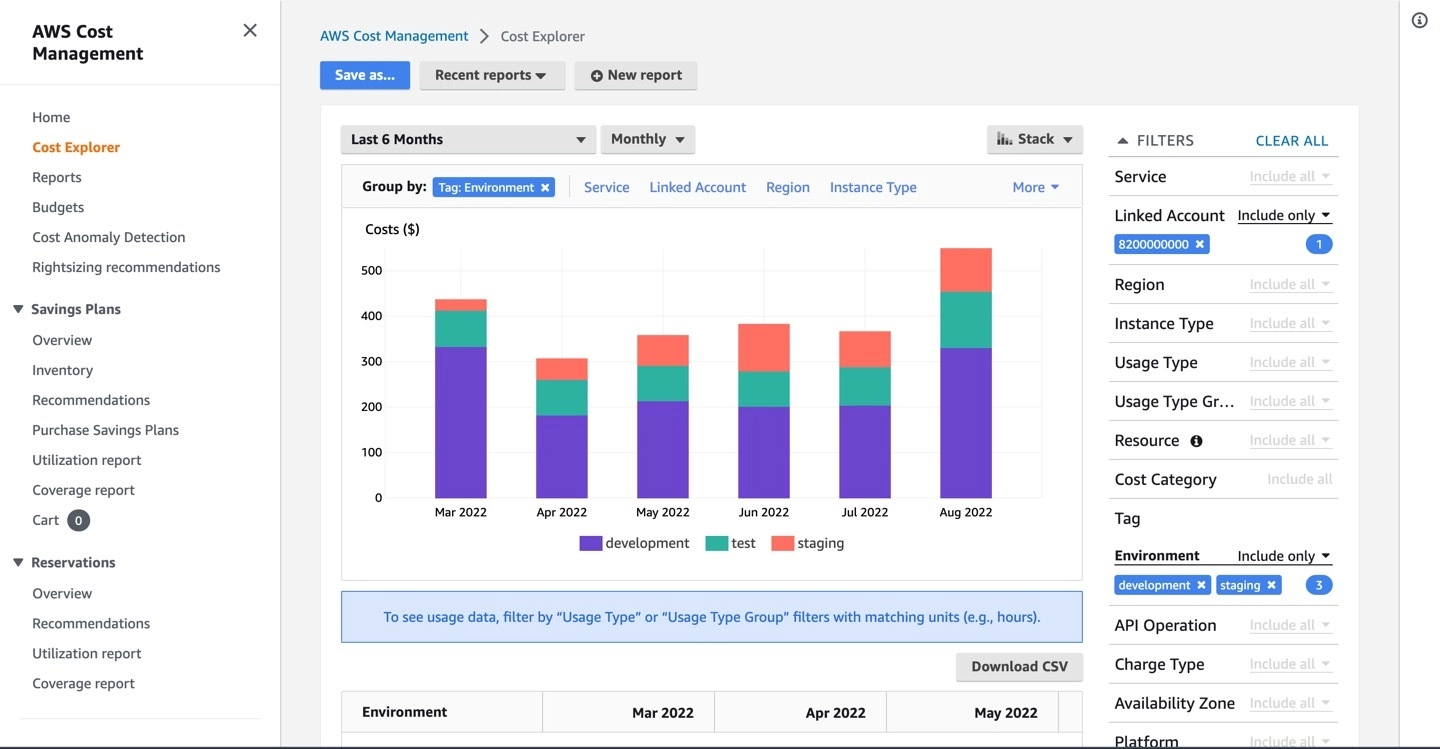
Below is an example of how you might visualize environment costs in AWS Cost Explorer. We’ve filtered for specific “Environment” tag values and grouped by the same “Environment” tag to break down our costs per environment.
To set up this tag and tag values in the first place, you’ll need to create User-Defined Cost Allocation Tags — ideally with the AWS Tag Editor. Once created, you’ll just need to activate the tags for cost allocation before being able to use them in Cost Explorer. Note that it might take tags 24-48 hours to appear in Cost Explorer after creating them. The earlier you do this the better, as tags can’t be retroactively applied to resources. Any analysis on tags will show data from the day the resource was tagged.
Calculating cost per environment with DoiT Cloud Analytics technology
DoiT customers get access to proprietary technology that helps them make sense of their cloud bill, namely through Cloud Analytics Reports and Attributions.
Attributions help you define company-specific entities like an environment by allowing you to group together cloud resources (projects/accounts, labels/tags, etc.). Once Attributions are created, you can use them to build Reports that help you understand your cloud costs in the context of your business.
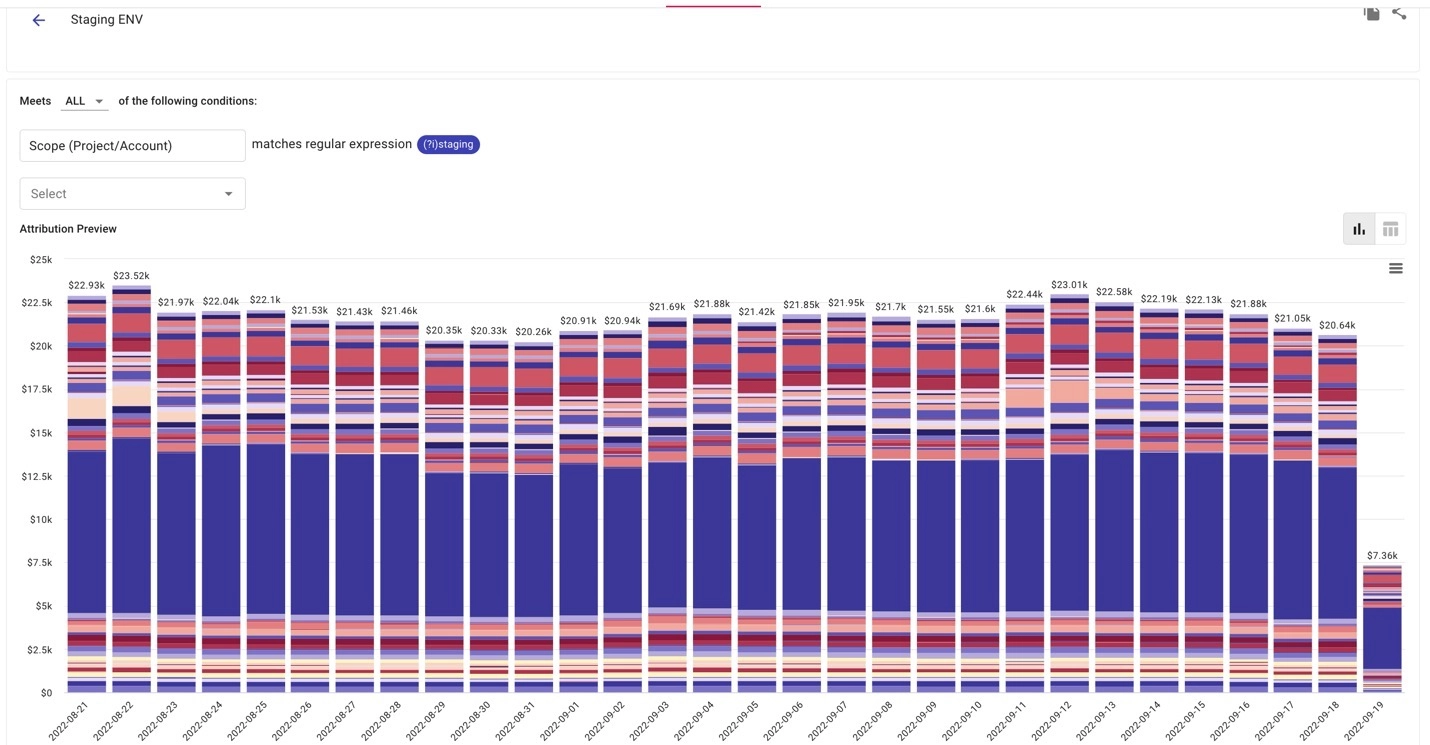
Below I’ve created a “Staging Environment'' Attribution that groups all Google Cloud Projects containing the word “staging.” In this case, that’s MY company’s definition of a staging environment.
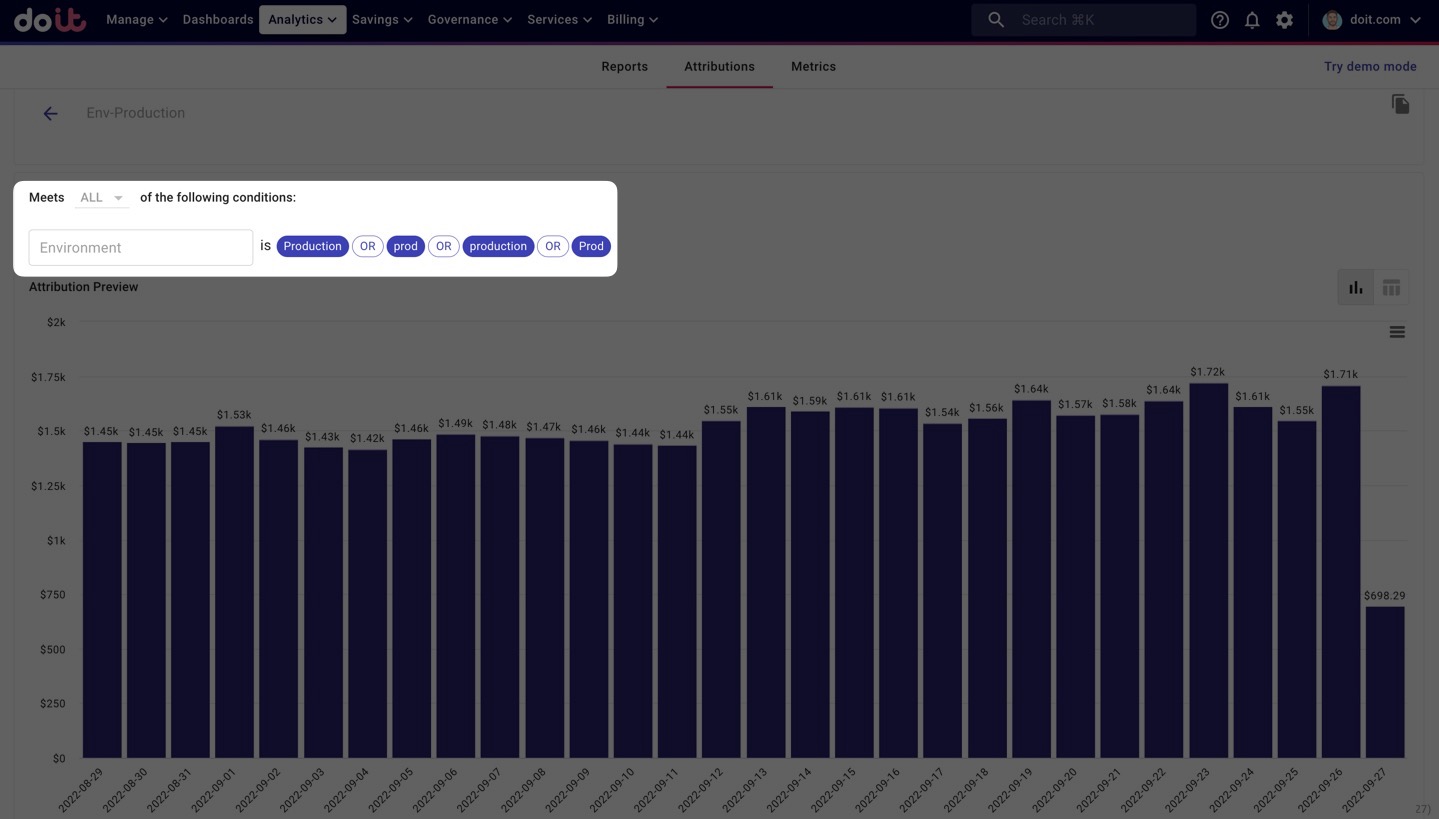
Alternatively, you might prefer to use tags/labels to capture your various environments. For example, you might have two (or more) tags/labels representing the same environment, like “Prod”, “prod”, “Production” and “production” as we see in the screenshot below. A common problem is that this reporting is done by a FinOps or central group, but they cannot easily enforce consistency in the metadata, so the analytics tool must do this instead. By grouping these tags/labels together using Attributions, you can do just that.
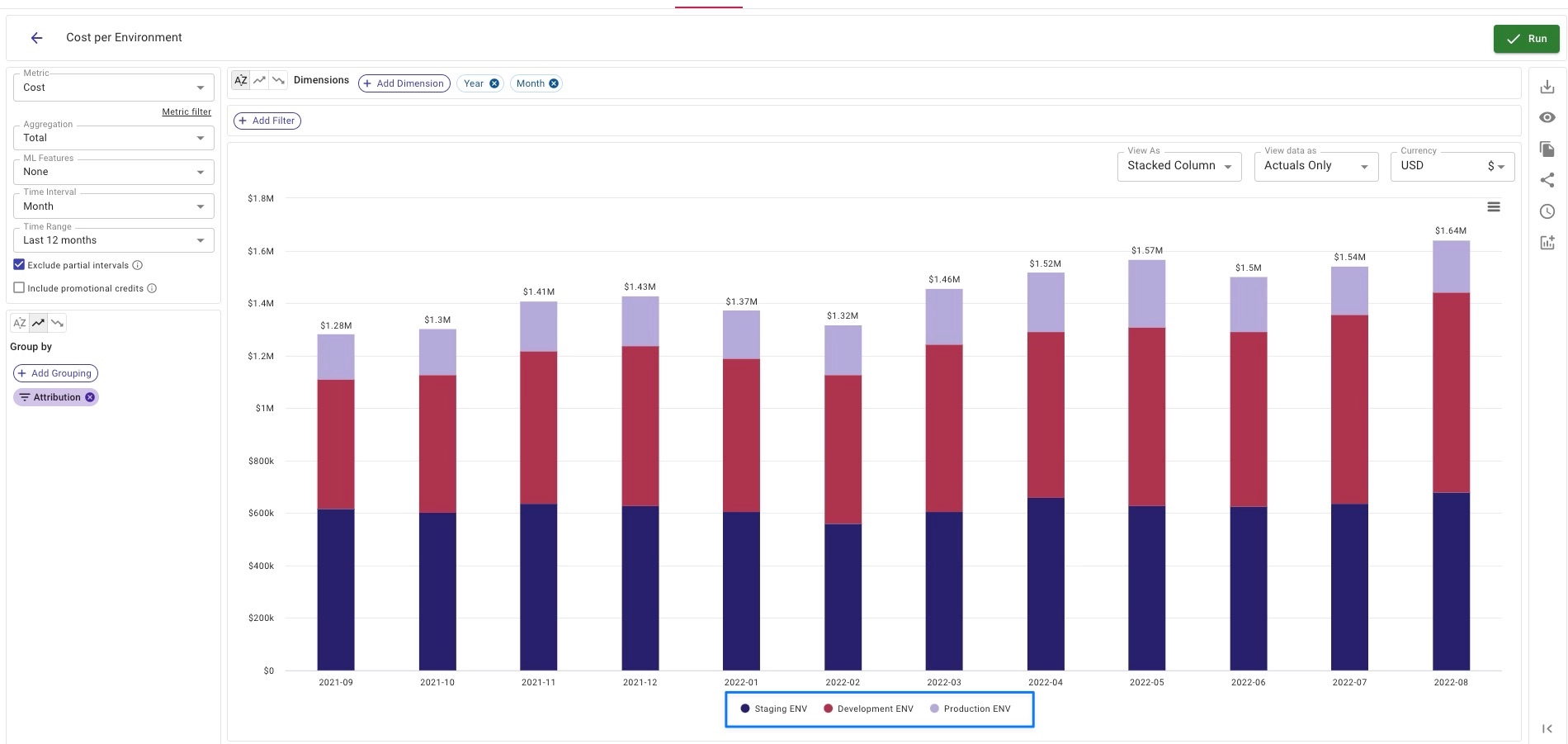
I went ahead and created Attributions for Prod and Dev environments as well. Once Attributions are created, you can visualize their costs together in Cloud Analytics Reports, as I’ve done below.
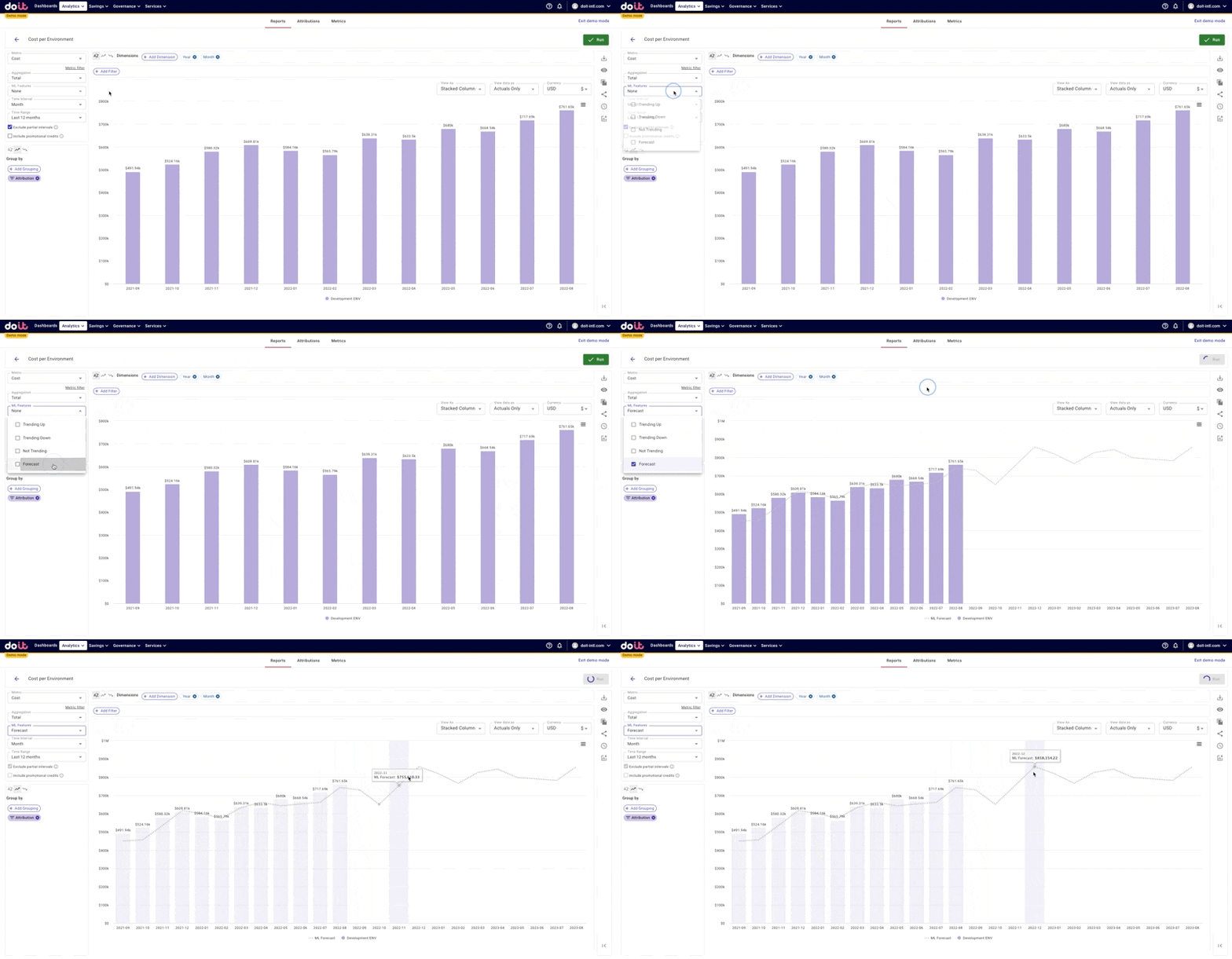
From there, you can create one-click forecasts of the costs of a particular environment as I’ve done below with Dev.
Or if you want to dive deeper into the costs of an environment, you can break down an environment’s costs by service. As you can see below, you can then surface the services that had the largest percentage increases in spend, month over month.
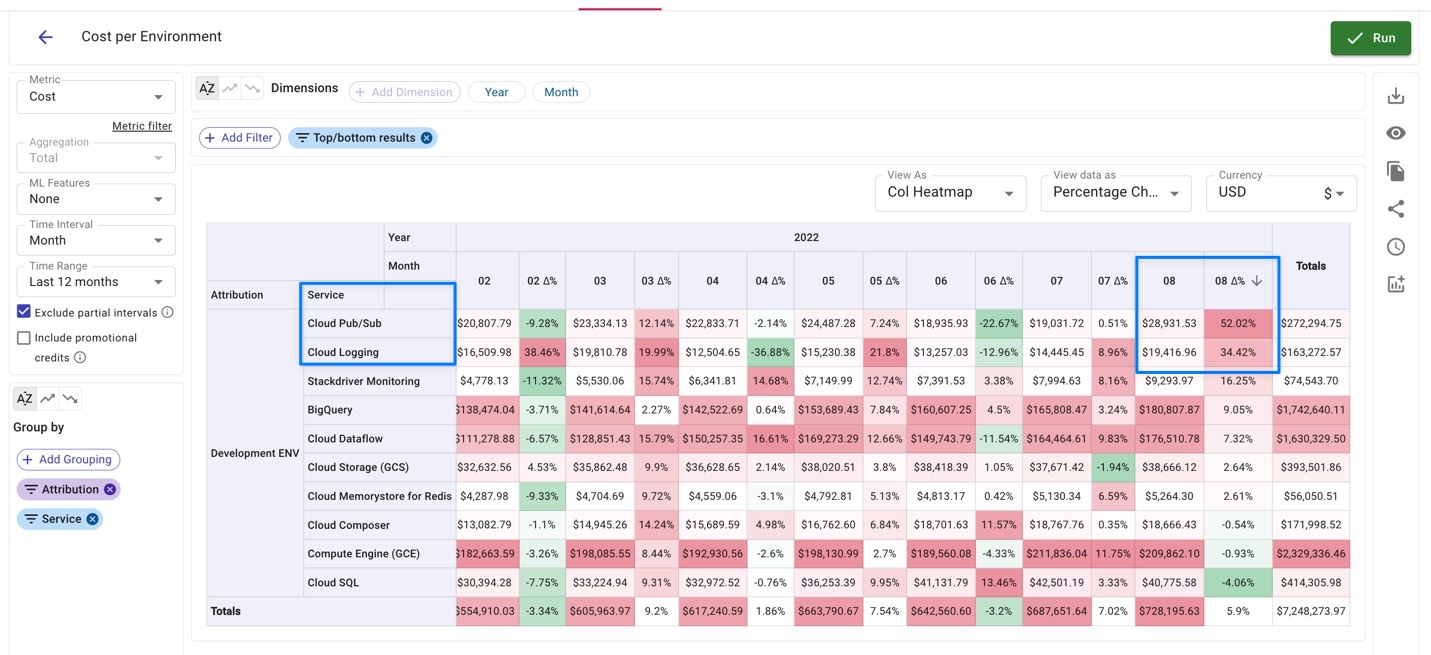
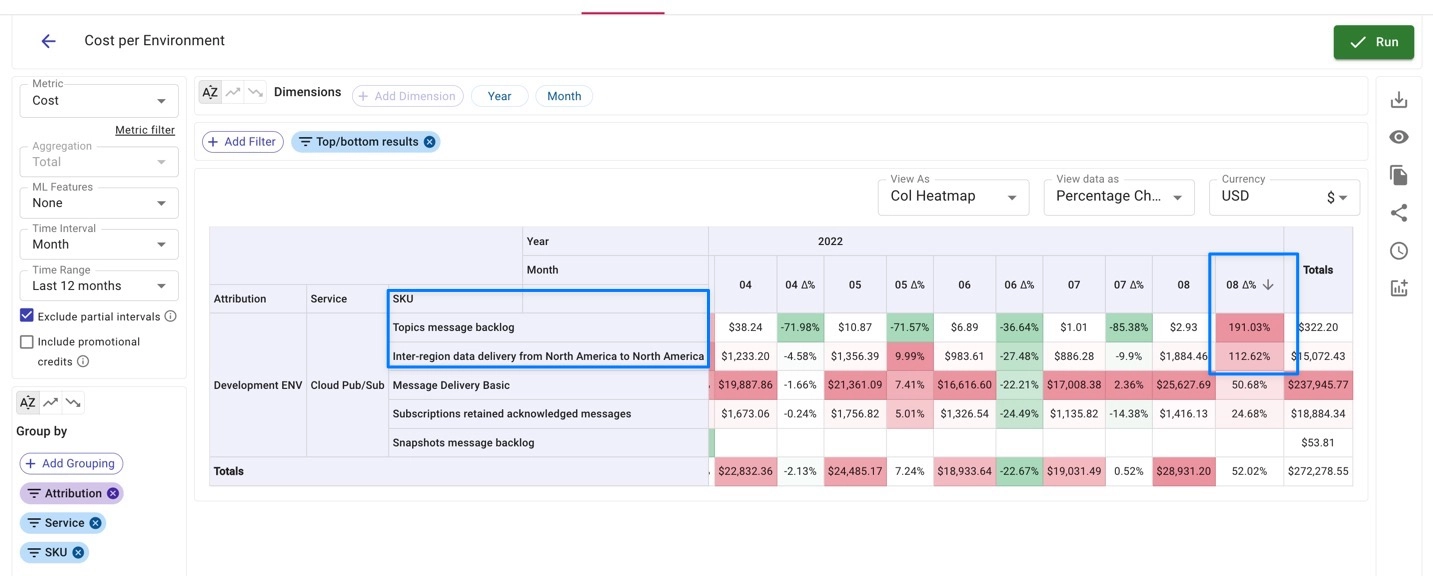
Once you’ve identified the service(s) that increased the most — in our case Google Cloud Pub/Sub — you can go a level deeper to identify the SKUs that caused this price increase.
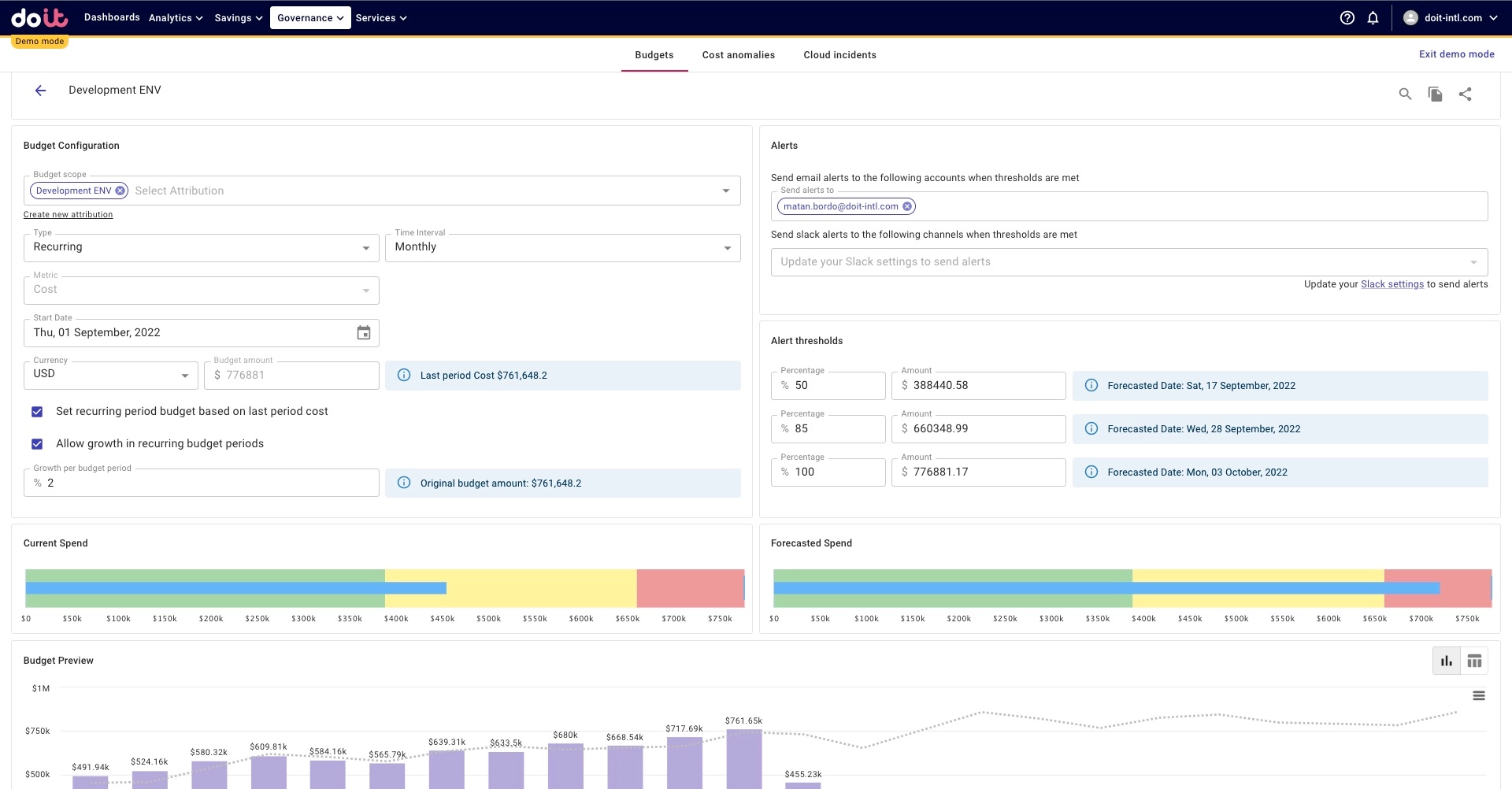
Finally, you can use Attributions to create environment-specific budgets to minimize surprises, as we’ve done below for our Development Environment. We’ve set thresholds that, once exceeded, alert us via email and/or Slack in case we might need to take action (for example, consuming 50% of our monthly budget in the first seven days of the month). We can also see current spend vs. budget and forecasted spend versus budget.
Being able to drill down into your environment costs like this — or any similar cost category that may not be as straightforward to calculate out-of-the-box — informs conversations with your team that you may not otherwise have. This ultimately brings more accountability and awareness of cloud spend across the organization. As a result, your organization will minimize surprises and create faster feedback loops that result in more efficient behavior moving forward. You’ll also see increased autonomy for owners of each allocated bucket.
Once done at a tier-1 level, you can delegate management down the stack (to the team level for an engineering manager, or a product level for a product manager, for instance). Remember, cost allocation is a discipline where you’re constantly improving!
Understanding cloud costs is just the beginning
In future posts, we’ll cover additional cost allocation use cases you should consider, so stay tuned!
DoiT Cloud Analytics helps you make sense of your cloud bill, but that’s just one piece of the cloud management puzzle. As a Premier Partner of AWS and Google Cloud, we’ve helped thousands of companies manage and optimize their cloud deployments.
That’s why DoiT customers also gain access to proprietary products that help ensure you’re paying the best prices and eliminate time-wasting administrative tasks through automation. And for tasks that are better handled by humans — like shifting to a containerized architecture or building a data pipeline — you have unlimited access to senior cloud architects around the world. Think of it as “on-demand brain capacity” or a personal StackOverflow.
To learn more about working with DoiT, get in touch with an expert today or check out our recent ebook, The Cost Conscious Cloud.