


One of our customers recently tried to enable S3 Transfer Acceleration, a service designed to expedite data transfers to and from Amazon Simple Storage Service (S3) on an S3 bucket and encountered an unexpected error(Access Denied).
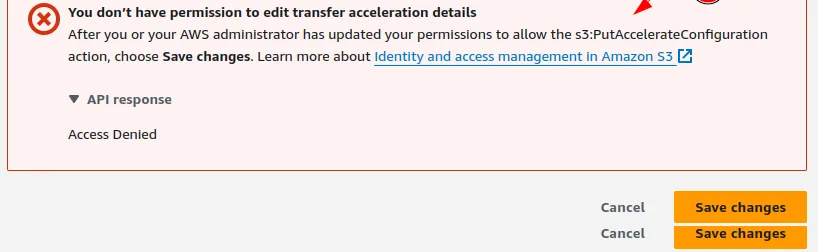
We initially thought it was an IAM permissions issue, a Service Control Policy Issue, or an S3 bucket policy, so we looked into those aspects.
We started our investigation and found that:
- No deny-SCP was associated with the account except for the Full AWS access SCP, which allows Access.
- No bucket policy was associated with the S3 bucket. Therefore, there is no explicit deny statement on the bucket level.
- The naming convention of the bucket complied with what is expected for S3 transfer acceleration.
- The user had IAM admin privileges. We also tried using the AWS account root user. However, the root user was denied with the same error message.
- Amazon S3 Transfer acceleration was supported in the S3 bucket's regions.
A quick Google search suggested that the same error had been reported in multiple forums, but no solution had been posted.
Unable to set bucket accelerate configuration - Administrator Access
Luckily, we could replicate this in some of our personal AWS Accounts, so we dug deeper but still couldn't find what was causing this error. What we did find was:
- This error was more prominent in accounts created using AWS organizations.
- There wasn't any specific correlation with the age of the accounts.
- There was nothing in AWS CloudTrail that suggested what caused this error.
- We also tried to leave the AWS Organization and make our account stand-alone, but we need more.
Digging deeper into AWS Documents, we found that Amazon S3 Transfer Acceleration takes advantage of the globally distributed edge locations in Amazon CloudFront.
So we tried creating a new CloudFront distribution, but it failed with the below error.

At this point, we almost gave up and thought our only option was to upgrade our AWS Support Plan, but in the era of cost optimization, we were trying to avoid any additional costs.
But then we had this idea that this might be related to the Security Score on your AWS Account(Some benefits of working at AWS before ;), so we decided to try it out.
We launched a couple of EC2 instances in the N.Virginia (us-east-1) Region (t2.micro is fine) and left them running for 2–3 hours until we received an email like the one below.
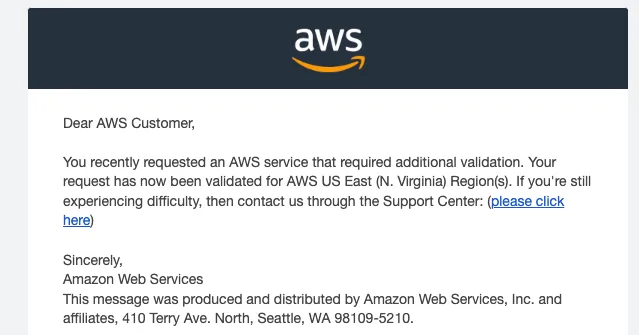
Once we got this email from the screenshot above, we tried to enable Transfer Acceleration again, and it worked!
So, the conclusion is that the account must be explicitly verified in the N. Virginia(us-east-1) Region before you can use Amazon S3 Transfer Acceleration. It doesn't matter if it was verified in another region.
AWS can improve its documentation and the error message so it becomes more transparent to users about why this is occurring, and they don't have to pay for AWS Support unnecessarily.
This blog has been co-authored with my colleague and security guru