
Cloud Intelligence™
Kubernetes and Secrets Management in Cloud: Part 2
This page is also available in Deutsch, Español, Français, Italiano, 日本語, and Português.


About Alexei Ledenev
Long ago, in a perfectly ordinary corner of the software universe, I started persuading computers, clouds, containers, and Kubernetes clusters to behave in ways that were useful, reliable, and occasionally intentional.
Since then, I’ve led architecture and engineering teams, built cloud platforms, designed distributed systems, and created open-source tools such as pumba, KubeIP, kube-secrets-init, and ccgram - because apparently production systems were not failing in enough interesting ways on their own.
My work lives somewhere between Software Architecture, Kubernetes, Cloud, chaos engineering, and AI infrastructure: the sort of place where dashboards glow green, alarms remain suspiciously quiet, and everyone hopes DNS has read the plan.
I enjoy building practical tools for complicated systems, automating the boring parts, understanding the dangerous parts, and reminding infrastructure - gently, but firmly - that uptime is not just a lifestyle choice. 🪐
My personal page
Store API keys, passwords, certificates, and other sensitive data in cloud-native secret management services and access them from K8s clusters.
Introduction
Secrets are essential for the operation of many production systems. Unintended secrets exposure is one of the top risks that should be properly addressed. Developers should do their best to protect application secrets.
The problem becomes even harder, once a company moves to a microservice architecture and multiple services require access to different secrets in order to properly work. This leads to new challenges: how to distribute, manage, monitor, and rotate application secrets while avoiding unintended exposure?
In the previous post ( Part I), I showed a way of integrating AWS and Google Cloud secrets management services ( AWS Secrets Manager, AWS SSM Parameter Store, and Google Cloud Secret Manager) with Kubernetes, using doitintl/secrets-init initContainer manually added into a target Pod.
In this post, I’m going to present a Kubernetes-native approach to integrating cloud secrets management services mentioned above.
Automatic Cloud Secret Injection
While it is possible to manually modify Kubernetes Deployment YAML files to use secret-init as a container init system, the better option would be if someone could do it for you and do it only for Kubernetes Pods that are referencing cloud secrets. Fortunately for us, Kubernetes allows us to inspect and modify any Pod before the container is created with a mechanism known as a mutating admission webhook.
The doitintl/kube-secrets-init is an open-source project from DoiT International that implements a Kubernetes mutating admission webhook for cloud secrets injection, supporting both AWS and Google Cloud managed secrets.
The kube-secrets-init monitors Kubernetes clusters for newly created or updated Pods, adding an initContainer with doitintl/secrets-init utility to the Pods that are referencing cloud secrets directly (through environment variables) and/or indirectly (through Kubernetes Secret and ConfigMap).
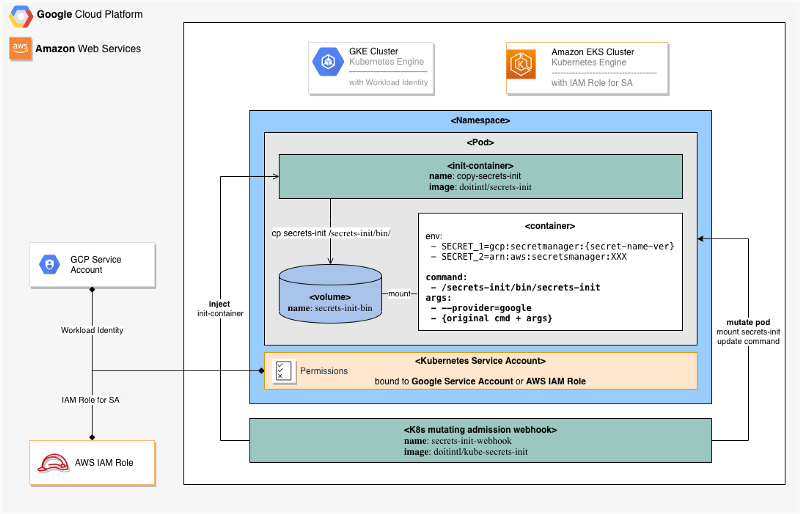
Integration with AWS Secrets Manager
Users can put an AWS secrets ARN reference as an environment variable value. The secrets-init will resolve an environment value, using the specified ARN, to a referenced secret value.
https://gist.github.com/930c9ea733557f9715f976df042bf361
Integration with AWS Systems Manager Parameter Store
It is possible to use the AWS Systems Manager Parameter Store to store application parameters and secrets.
Users can put an AWS Parameter Store ARN reference as an environment variable. The secrets-init will resolve an environment value, using the specified ARN, to a referenced parameter store value.
https://gist.github.com/f7d9a81d5e239cdd734989a689d46f82
Integration with Google Secret Manager
Users can put a Google Secret name (prefixed with gcp:secretmanager:) as environment variable value. The secrets-init will resolve an environment value, using the specified name, to a referenced secret value. The secret name can include a secret version, to reference a specific version of the secret.
Requirements
AWS
In order to resolve AWS secrets from AWS Secrets Manager and Parameter Store, the secrets-init application should run under AWS IAM Role with one of the following IAM policies attached.
For AWS Secrets Manager:
https://gist.github.com/7348301b4882a564cbd9644d6697c3eb
For AWS Systems Manager Parameter Store:
https://gist.github.com/3f3dd3d015a4c000341491c18ac2c4b7
When running in the EKS cluster, it’s recommended to use AWS IAM Roles for Service Account. It’s also possible to assign an IAM Role to an EC2 instance, where the container is running. This option is considered to be less secure.
Google Cloud
In order to resolve Google secrets from Google Secret Manager, the secrets-init application should run under an IAM role with sufficient permissions to access desired secrets. For example, you can assign the following two predefined Google IAM roles to a Google Service Account: Secret Manager Viewer and Secret Manager Secret Accessor role.
In the GKE cluster, it is possible to assign IAM Role to a Kubernetes Pod with Workload Identity. It’s also possible to assign an IAM Role to a GCE instance, where the container is running. This option is considered to be less secure.
Uncomment --provider=google flag in the deployment.yaml file.
The Webhook Deployment
- To deploy the
kube-secrets-initwebhook server, we need to create a webhook service and a deployment in our Kubernetes cluster. It’s pretty straightforward, except for one thing; the server’s TLS configuration. If you’d care to examine the deployment.yaml file, you’ll find that the certificate and corresponding private key files are read from command line arguments and that the path to these files comes from a volume mount that points to a Kubernetes secret:
https://gist.github.com/b861984a2be2f2f63596f089f417cefc
The most important thing to remember is to set the corresponding CA certificate later in the webhook configuration, so the apiserver will know that it should be accepted. For now, we’ll reuse the script originally written by the Istio team to generate a certificate signing request. Then we’ll send the request to the Kubernetes API, fetch the certificate, and create the required secret from the result.
First, run webhook-create-signed-cert.sh script and check if the secret holding the certificate and key has been created:
https://gist.github.com/43135c6af29328bcd74a37b0df5188f8
Once the secret is created, we can create deployment and service. These are standard Kubernetes deployment and service resources. Up until this point we’ve produced nothing but an HTTP server that’s accepting requests through service on port 443:
https://gist.github.com/3971cf1f46f5a57d11d922ed84b0543f
Configure Mutating Admission Webhook
Now that our webhook server is running, it can accept requests from the apiserver. However, we should create some configuration resources in Kubernetes first. Let’s start with our validating webhook, then we’ll configure the mutating webhook later. If you take a look at the webhook configuration, you’ll notice that it contains a placeholder for CA_BUNDLE:
https://gist.github.com/fcafa7ed3b3c3b951b7fad3c0d5fbdb6
There is a small script that substitutes the CA_BUNDLE placeholder in the configuration with this CA. Run this command before creating the validating webhook configuration:
https://gist.github.com/6d5bb7724cef04e9e6a2af12da917a21
Create a mutating webhook configuration:
https://gist.github.com/f946d6046cc1a76a21526c346ca403c1
Configure RBAC for secrets-init-webhook
Create a Kubernetes Service Account to be used with secrets-init-webhook:
https://gist.github.com/0cda887b586609cbdbb700f7412e70ad
Define RBAC permissions for webhook service account:
https://gist.github.com/1205f1a5d2f449cc3340a404ea474b77
Summary
I hope you find this post useful. I look forward to your comments and any questions you have.
You are also invited to contribute (Issues, Features, PRs) to the doitintl/kube-secrets-init GitHub Project.
Want more stories from Alexei? Check our blog, or follow Alexei on Twitter.
Cloud bill shouldn't be a mystery
One platform for AI and Cloud optimization.


